Day 13 of Becoming an AI Developer: Vector Databases Explained (Pinecone, Chroma & Weaviate)
Why Traditional Databases Fail for AI Search — and How Vector Databases Make RAG Possible
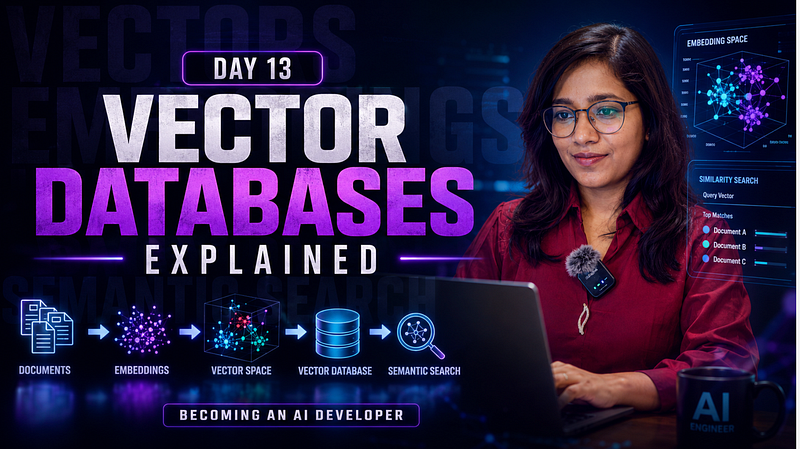
A surprising fact: your SQL database can store millions of records, but it still struggles with a question like:
“Find articles similar to this one, even if they don’t use the same words.”
Traditional databases are great at exact matches.
AI applications need something completely different: meaning-based search.
This is exactly why vector databases became one of the most important building blocks of modern AI systems.
If you’ve been learning about embeddings, RAG, AI search, or chat-with-PDF applications, you’ve already encountered the problem that vector databases solve.
In this article, we’ll break down:
- What vector databases are
- Why embeddings need them
- How Pinecone, Chroma, and Weaviate work
- When to use each one
- Common mistakes developers make
Let’s dive in.
Quick Recap: What We’ve Covered So Far
In the last 11 days, we explored:
- Day 2: How LLMs actually work
- Day 3: How ChatGPT generates responses
- Day 4: Prompt engineering
- Day 9 & 10: RAG, embeddings, vector databases, and Chat with PDF architecture
- Day 11: Context windows in AI
If you’d like to follow the complete journey and learn AI with me in 30 days, check out the full series below. Save the series to receive notifications whenever a new article is published.
Zero to AI Expert in 30 Days
The Problem: Embeddings Need a Home
In the previous article, we learned that embeddings convert text into numerical vectors.
For example:
"I love programming" -> [0.12, -0.45, 0.87, ...]These vectors capture semantic meaning.
But after generating thousands or millions of embeddings, a new challenge appears:
Where do we store them?
And more importantly:
How do we quickly find the most similar vectors?
Imagine storing 10 million vectors and comparing every query against all of them.
That would be painfully slow.
This is where vector databases come in.
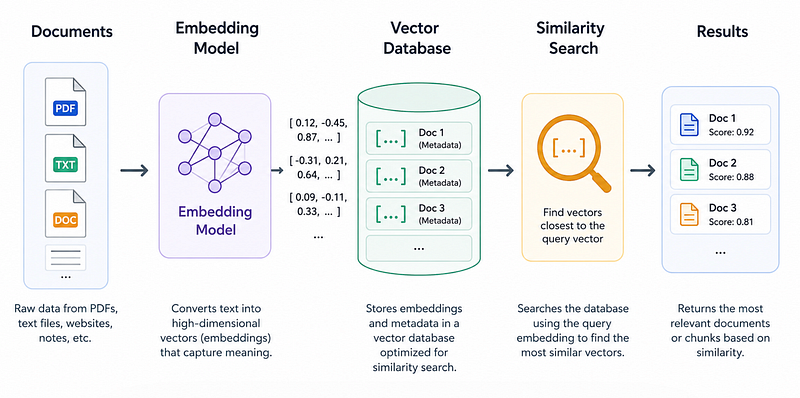
What Is a Vector Database?
A vector database is a specialised database designed to store, index, and search vector embeddings efficiently.
Instead of searching by keywords:
SELECT * FROM articles
WHERE title LIKE '%React%'
A vector database searches by similarity:
Find vectors closest to: [0.12, -0.45, 0.87, ...]This allows AI applications to find information based on meaning rather than exact words.
For example:
Query:
“How do I deploy a React application?”
The database may return:
- React deployment guide
- Vercel hosting tutorial
- CI/CD setup article
Even if none contain the exact phrase.
That’s semantic search.
How Vector Search Works
At a high level:
Step 1: Convert Content to Embeddings
const embedding = await openai.embeddings.create({
 model: "text-embedding-3-small",
 input: document
});
Step 2: Store Vectors
vectorDB.insert({
 id: "doc-123",
 vector: embedding.data[0].embedding,
 metadata: {
 source: "blog-post"
 }
});
Step 3: Embed User Query
const queryEmbedding =
 await generateEmbedding(userQuery);
Step 4: Similarity Search
const results = await vectorDB.search({
 vector: queryEmbedding,
 topK: 5
});
The closest vectors are returned.
Simple concept.
Massive impact.
Why RAG Depends on Vector Databases
Retrieval-Augmented Generation (RAG) relies heavily on vector databases.
Without them:
- LLMs only know training data
- Cannot access your PDFs
- Cannot access company documents
- Cannot access private knowledge
With vector databases:
- Store document embeddings
- Search relevant chunks
- Send retrieved context to the LLM
- Generate accurate answers
This is exactly how:
- Chat with PDF apps
- Internal company assistants
- AI search engines
- Knowledge-base chatbots
typically work.
Pinecone
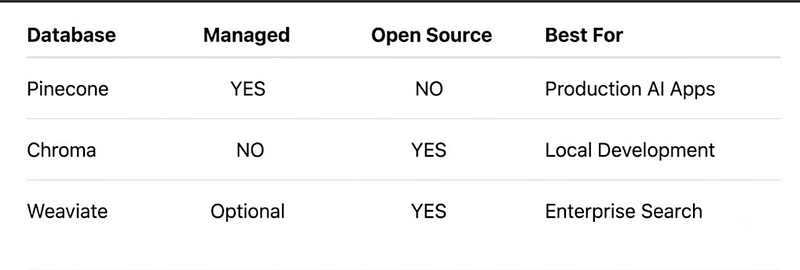
One of the most popular managed vector databases.
Why Developers Like It
- Fully managed
- Highly scalable
- Fast similarity search
- Production-ready infrastructure
- No server management
Example:
import { Pinecone } from "@pinecone-database/pinecone";
const pinecone = new Pinecone({
 apiKey: process.env.PINECONE_API_KEY
});
const index = pinecone.index("knowledge-base");
await index.upsert([
 {
 id: "doc1",
 values: embedding
 }
]);
Best For
- Production AI applications
- SaaS products
- Large-scale RAG systems
Tradeoff
Convenient but not entirely free at scale.
Chroma
Chroma has become extremely popular among developers building local AI applications.
Why Developers Like It
- Open source
- Easy setup
- Works locally
- Great for prototypes
Python example:
import chromadb
client = chromadb.Client()
collection = client.create_collection(
 name="documents"
)
collection.add(
 ids=["1"],
 documents=["Vector databases are awesome."]
)
Best For
- Learning RAG
- Local AI projects
- Personal assistants
- Hackathons
Tradeoff
Not ideal for massive enterprise workloads.
Weaviate
Weaviate combines vector search with powerful metadata filtering.
Example:
const response = await client.graphql
 .get()
 .withClassName("Article")
 .withNearText({
 concepts: ["React deployment"]
 })
 .do();
Why Developers Like It
- Open source
- Hybrid search
- Metadata filtering
- GraphQL support
Best For
- Enterprise knowledge systems
- Complex search applications
- Structured + semantic search
Tradeoff
Slightly steeper learning curve.
Quick Comparison
Common Developer Mistakes
1. Storing Entire Documents
Bad:
One PDF = One VectorBetter:
One PDF
↓
Split into chunks
↓
Generate vectors
Smaller chunks produce much better retrieval quality.
2. Ignoring Metadata
Bad:
{
 vector: embedding
}
Better:
{
 vector: embedding,
 metadata: {
 source: "resume.pdf",
 page: 12
 }
}
Metadata improves filtering and debugging.
3. Retrieving Too Many Results
Many beginners retrieve 50 chunks.
The model gets overwhelmed.
A smaller set of highly relevant chunks often performs better.
The Surprising Payoff
Most developers think:
Better AI models create better AI applications.
In practice, retrieval quality often matters more.
A smaller model with excellent retrieval can outperform a larger model with poor retrieval.
That’s why companies spend enormous effort optimising:
- chunking
- embeddings
- vector search
- reranking
rather than only upgrading models.
The real secret behind many successful AI products isn’t just the LLM.
It’s the retrieval system feeding the LLM the right information.
Key Takeaways
Vector databases are the backbone of modern AI retrieval systems.
Remember:
✅ Embeddings convert meaning into vectors
✅ Vector databases store and search those vectors
✅ RAG relies on vector search
✅ Pinecone excels in production
✅ Chroma is perfect for local projects
✅ Weaviate shines in enterprise environments
Most importantly:
A great AI application is often less about having the biggest model and more about retrieving the right information at the right time.
Missed the previous articles?
- Read here: Build a Resume Analyser Using AI
- Read here: Architecture of Chat PDF App with AI
Upcoming
- RAG Explained for Developers
🚀 Transitioning into AI as a developer?
I’m building a practical 30-day roadmap to help developers move into AI — step by step, without random tutorials or confusion.
👉 Save this series so you don’t miss the next day
Zero to AI Expert in 30 Days.
👉 To support my writings, you can buy me a coffee ☕️ 🤗
👉 What’s the biggest thing confusing you about AI right now? Drop it in the comments — I may cover it next.