Day 4 of Becoming an AI Developer: Prompt Engineering for Developers
Stop blaming AI for bad answers. Most of the time, the prompt is the problem.
You open ChatGPT.
You type:
“Build a login system.”
AI gives you random code. You try again.
“Create authentication.”
Still messy. Then you think, but here’s the uncomfortable truth:
Most developers are not bad at AI. They’re bad at prompting.
And no, prompt engineering is not just writing longer prompts.
It’s about giving AI the right context, role, constraints, and output expectations.
The difference between a mediocre prompt and a great prompt can literally feel like working with a confused intern vs a senior engineer.
In Day 4 of this AI series, let’s learn the skill that makes AI genuinely useful for developers:
By the end of this series, you’ll understand how modern AI systems work, build real projects, work with LLMs, prompts, RAG, agents, embeddings, fine-tuning concepts, and become confident enough to transition into AI-focused roles.
Prompt Engineering for Developers
By the end of this article, you’ll know:
✅ Why AI gives bad answers
✅ Good vs bad prompts
✅ Role prompting
✅ Reusable prompt templates
✅ A mini project using prompt engineering
✅ Common mistakes developers make
Why Most Developers Fail With AI
Here’s what usually happens.
A developer asks:
Create a React dashboardAI replies with generic code.
Then frustration begins.
But think about this:
Would you ask a junior developer only one sentence and expect production-ready work?
Probably not.
You’d provide:
- Tech stack
- Requirements
- Constraints
- Expected output
- Edge cases
AI works the same way.
The formula is simple:
Bad Input → Bad Output
Better Context → Better Results
Why AI Gives Poor Responses
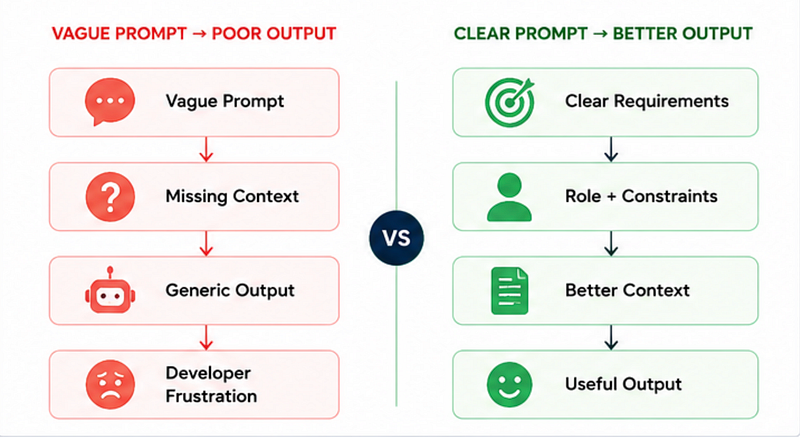
Bad Prompt vs Good Prompt
Let’s look at a real example.
❌ Bad Prompt
Build a Node.js APIWhat’s missing?
Everything.
- Which framework?
- Authentication?
- Database?
- Folder structure?
- Error handling?
AI has to guess.
And guessing produces mediocre output.
Better Prompt
Act as a senior Node.js backend engineer.
Create a production-ready REST API using Express.js and MongoDB for user authentication.
Requirements:
- JWT authentication
- Folder structure
- Validation
- Error handling
- Rate limiting
- Environment variables
- Best security practices
Provide explanation for each major decision.
See the difference?
Now AI has:
- a role
- context
- constraints
- expectations
The result becomes dramatically better.
Developer Insight
The quality jump is often 10x better when you clearly define expectations.
This is the first big unlock in prompt engineering.
The Secret Weapon: Role Prompting
One of the biggest mistakes developers make?
They forget to tell AI who it should act as.
This is called Role Prompting.
Instead of:
Explain DockerTry:
Act as a DevOps engineer.
Explain Docker to a MERN stack developer with 2 years of experience.
Include:
- simple explanation
- real-world use case
- beginner mistakes
- commands with examples
Notice what happened?
The answer becomes:
- more personalized
- technically aligned
- easier to understand
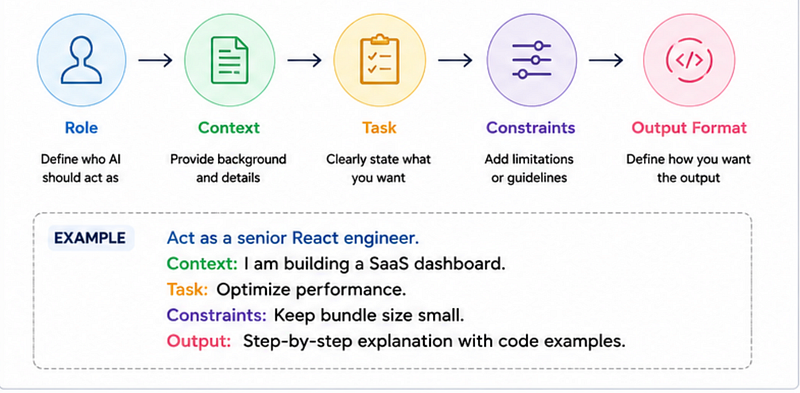
This structure works surprisingly well.
A Prompt Template Every Developer Should Save
Here’s a reusable template.
Copy this.
Seriously.
You’ll use it every day.
Act as a [ROLE].
Context:
[PROJECT CONTEXT]
Task:
[WHAT YOU WANT]
Requirements:
- [Requirement 1]
- [Requirement 2]
- [Requirement 3]
Constraints:
- [Limitations]
Output Format:
[Code / Explanation / Steps / Table]
Example: Debugging a React Issue
Instead of saying:
Fix my React bugTry this:
Act as a senior React engineer.
Context:
I am using React with Next.js.
Problem:
My component re-renders infinitely.
Code:
[paste code]
Requirements:
- identify root cause
- explain why it happens
- fix it
- suggest optimization
Output format:
Step-by-step explanation.
This dramatically improves debugging quality.
Mini Project: Build an AI Code Reviewer
Let’s make this practical.
Here’s a simple mini project.
Goal
Use prompt engineering to create an AI-powered code reviewer.
Step 1: Bad Version
const prompt = `
Review this code:
${code}
`;
Problem?
Too generic.
AI will give shallow feedback.
Step 2: Better Version
const prompt = `
Act as a senior software engineer.
Review the following code.
Focus on:
- performance issues
- security problems
- scalability
- code readability
- edge cases
Provide:
1. Problems found
2. Suggested fixes
3. Improved code version
Code:
${code}
`;
Now the feedback becomes much more useful.
Why this works
You’re reducing ambiguity.
AI performs better when the task is specific and constrained.
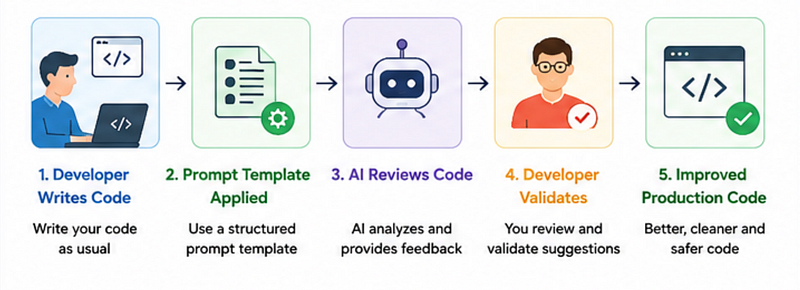
Workflow: AI-Assisted Code Review
Common Prompt Engineering Mistakes
Here are mistakes developers repeatedly make.
1. Being Too Vague
// Vague prompt
Optimize my app
// More accurate prompt
Optimize my React app for faster initial load time.
Focus on bundle size and unnecessary re-renders.2. Expecting Production Code Instantly
AI is an assistant.
Not magic.
Always:
- review output
- validate logic
- test edge cases
- check security
3. Ignoring Constraints
Without constraints, AI over-engineers.
Example:
Keep solution beginner-friendly.
Avoid external libraries.
This often improves responses massively.
Comparison Table: Bad vs Good Prompting
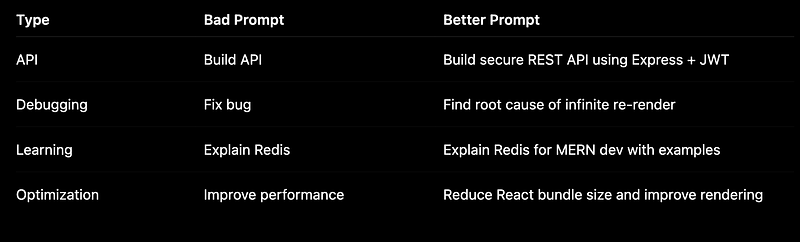
Chart: Productivity Improvement with Better Prompts

The Surprising Payoff Nobody Talks About
Here’s the unexpected lesson.
Prompt engineering is actually software engineering thinking.
Good developers naturally think in:
- requirements
- constraints
- edge cases
- expected outputs
That’s exactly what great prompting is.
The best prompt engineers are often just good engineers communicating clearly.
So if you feel AI is inconsistent…
It might not be the tool.
It might just be the instructions.
And once this clicks?
AI suddenly becomes much more useful.
Key Takeaways
If you remember only 5 things from this article, remember these:
- Vague prompts create vague answers
- Role prompting massively improves results
- Use templates instead of rewriting prompts
- Add constraints to avoid messy output
- Always validate AI-generated code
A simple workflow to follow:
- Define the role
- Add context
- Explain the task
- Add requirements
- Add constraints
- Define output format
That alone can improve your AI results dramatically.
So here’s a question for you:
What’s the worst prompt you’ve ever written to AI that gave a hilariously bad answer?
Missed the previous articles?
Read here: Zero to AI expert in 30 Days
Upcoming
Day 4: Your First AI App in Node.js
🚀 Transitioning into AI as a developer?
I’m building a practical 30-day roadmap to help developers move into AI — step by step, without random tutorials or confusion.
👉 Follow this series so you don’t miss the next day.
👉 Bookmark this article — you’ll want to revisit it.
👉 What’s the biggest thing confusing you about AI right now? Drop it in the comments — I may cover it next.