Day 3 of Becoming an AI Developer: How ChatGPT Actually Generates Responses
Prediction, Hallucinations, Temperature & a Fun API Experiment for Developers
You ask ChatGPT a question.
It replies in seconds.
Sometimes the answer feels scarily smart.
And sometimes…
It confidently tells you something completely wrong.
That raises an important question:
What is actually happening behind the scenes?
Is ChatGPT thinking?
Does it understand your question?
Or is something much simpler happening?
Here’s the surprising truth:
ChatGPT is basically playing an insanely advanced prediction game.
And once you understand this, AI suddenly starts making a lot more sense.
Let’s break it down like developers.
The Biggest Misconception About ChatGPT
Many developers imagine ChatGPT works like Google search.
You ask a question → it searches the internet → gives the answer.
That’s not how it works.
In most cases, ChatGPT is not browsing the web.
Instead, it predicts what word should come next based on patterns learned during training.
Think about this sentence:
“React is a JavaScript ____”
You instantly predict:
framework
That prediction ability is exactly what large language models do.
But at a massive scale.
Instead of predicting one word, ChatGPT predicts:
- the next word,
- then the next,
- then the next,
- thousands of times per response.
ChatGPT Predicts Tokens, Not Sentences
Here’s a hidden detail most beginners don’t know:
ChatGPT does not predict full sentences.
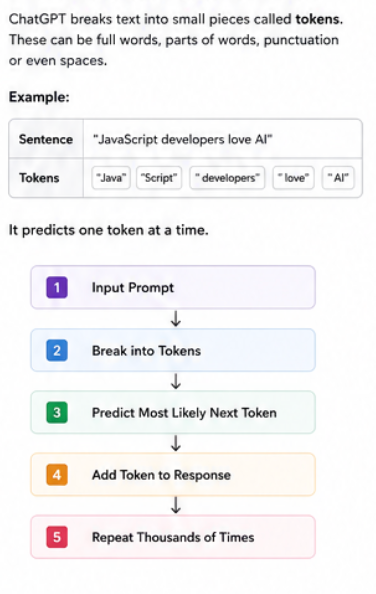
It predicts tokens.
A token is usually:
- part of a word,
- a whole word,
- punctuation,
- or even spaces.
Example:
The sentence:
"JavaScript developers love AI"May become tokens like:
["Java", "Script", " developers", " love", " AI"]ChatGPT predicts one token at a time.
Simplified workflow:
Input Prompt
 ↓
Break into Tokens
 ↓
Predict Most Likely Next Token
 ↓
Add Token to Response
 ↓
Repeat Thousands of Times
Why this matters
This explains why:
- AI sometimes feels smart
- sometimes becomes repetitive
- sometimes confidently invents nonsense
Because it’s predicting probabilities, not “thinking.”
A Simple Prediction Example
Imagine the prompt:
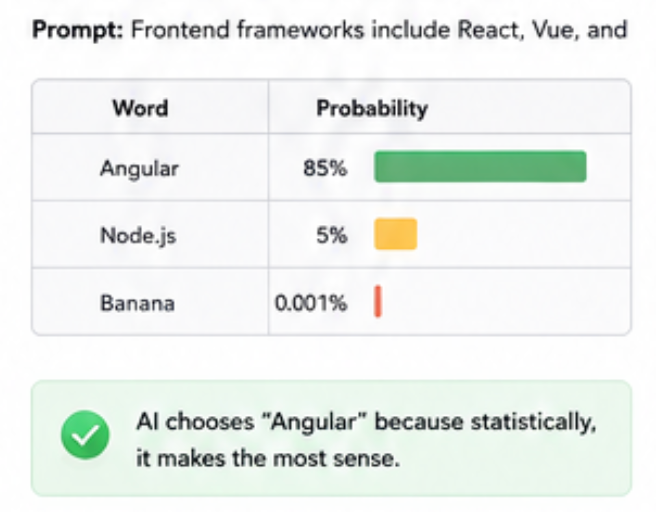
Frontend frameworks include React, Vue, andPossible predictions:
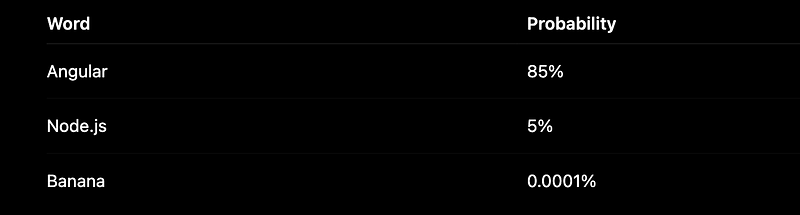
Naturally, AI chooses:
Angular
Because statistically, it makes the most sense.
Now imagine this process repeated thousands of times per answer.
That’s ChatGPT.
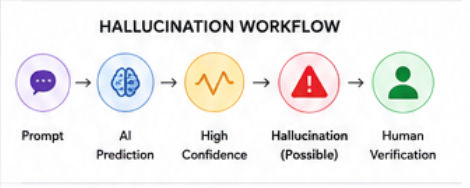
So, Why Does ChatGPT Hallucinate?
This is where things get interesting.
A hallucination happens when AI generates information that sounds believable but is incorrect.
Example:
You ask:
“Who invented React in 2018?”
ChatGPT may confidently respond with something wrong.
Why?
Because AI is optimised for:
generating likely text
Not:
guaranteeing truth
That distinction matters.
Think Like a Developer
Imagine autocomplete in VS Code.
Sometimes it gives:
✅ exactly what you wanted
Sometimes:
❌ weird suggestions
LLMs are essentially super-powered autocomplete systems.
Just dramatically more advanced.
Common Reasons Hallucinations Happen
1. Missing context
Bad prompt:
Explain authenticationBetter prompt:
Explain JWT authentication for a MERN app beginner.Specific prompts reduce hallucinations.
2. Weak factual grounding
If the model isn’t certain, it may still generate something convincing.
This is why developers should:
- Verify critical information
- cross-check APIs
- test generated code
Never blindly trust AI in production.
What Is Temperature in ChatGPT?
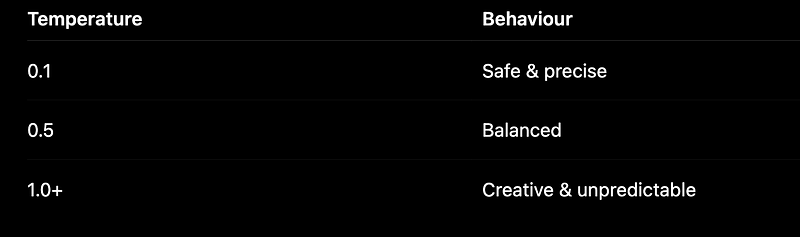
Temperature controls:
How creative or random the AI becomes
Lower temperature:
- predictable
- consistent
- focused
Higher temperature:
- creative
- surprising
- less reliable
Think of it like this:
Example: Same Prompt, Different Temperature
Prompt:
Suggest a startup idea for developersTemperature = 0.1
An AI debugging assistant for frontend developers.Safe. Logical.
Temperature = 1.0
A virtual AI teammate that joins standups and predicts sprint blockers.More creative.
Potentially more interesting.
Also, more unpredictable.
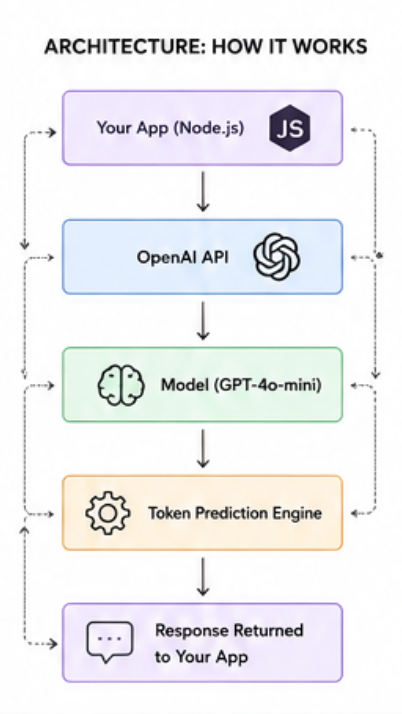
Let’s Try an API Experiment
Instead of just theory, let’s build something.
We’ll create a tiny app to test the temperature ourselves.
Step 1: Install OpenAI SDK
npm install openai dotenvStep 2: Create a Simple Experiment
import ollama from "ollama";

const MODEL = "llama3";
const PROMPT = "Explain AI like I am a MERN developer in 3 short sentences.";

async function chat(temperature) {
 const response = await ollama.chat({
 model: MODEL,
 messages: [{ role: "user", content: PROMPT }],
 options: { temperature },
 });
 return response.message.content;
}

async function run(temperature) {
 try {
 const content = await chat(temperature);
 console.log(`content at ${temperature}, `, content)
 } catch (err) {
 if (err?.code === "ECONNREFUSED") {
 console.error(
 "Cannot reach Ollama. Install the app from https://ollama.com and run: ollama pull llama3"
 );
 } else {
 console.error(err.message ?? err);
 }
 process.exit(1);
 }
}

async function main() {
 await run(0.1);
 await run(1.0);
}

main();
What this code does
This experiment:
- Sends the same prompt twice
- Changes only the temperature
- Compares response creativity
Why this matters
You’ll finally see how AI behaviour changes.
And honestly?
This is when AI suddenly becomes less magical and more understandable.
Mini Project: Build an “AI Creativity Tester”
Try this:
Create a small app where users:
- Enter a prompt
- Adjust temperature using a slider
- Compare results side by side
Example UI:
Prompt:
"Generate a React project idea"
Temperature: 0.2
Response: Dashboard Builder
Temperature: 1.0
Response: AI-powered coding companion
You’ll quickly notice:
Same prompt ≠ same result
Small parameter changes can dramatically affect output.
The Surprising Truth Most Developers Realize Late
Here’s the counterintuitive insight:
The best AI users aren’t people who trust AI the most.
They’re the people who understand:
when NOT to trust it.
Senior developers often get better results because they:
- write better prompts,
- validate outputs,
- understand edge cases,
- spot hallucinations quickly.
AI doesn’t replace developer thinking.
It amplifies it.
Key Takeaways
✅ ChatGPT works through prediction, not thinking
✅ It generates responses token by token
✅ Hallucinations happen because AI predicts likely text, not truth
✅ Temperature controls creativity vs consistency
✅ API experiments help you understand AI behavior faster
✅ The best developers verify AI output instead of blindly trusting it
Final Thought
Once you stop seeing ChatGPT as “magic” and start seeing it as a probability engine, your prompts improve, your debugging improves, and your expectations become realistic.
And that’s when AI becomes genuinely useful.
What surprised you most about how ChatGPT works — prediction, hallucinations, or temperature?
🚀 Transitioning into AI as a developer?
I’m building a practical 30-day roadmap to help developers move into AI — step by step, without random tutorials or confusion.
👉 Follow this series so you don’t miss the next day.
👉 Bookmark this article — you’ll want to revisit it.
👉 What’s the biggest thing confusing you about AI right now? Drop it in the comments — I may cover it next.