Day 11: 4 AWS Compute Services You Might Be Ignoring (But Shouldn’t)
I just need to deploy my app. Why is setting up servers this complicated?
If you’ve ever spent hours configuring EC2 instances, setting up load balancers, and worrying about scaling before even pushing your first line of code.
AWS is amazing, but it can feel overwhelming when all you want is a simple way to run your app.
Here’s the good news: AWS has purpose-built services that do the heavy lifting for you.
Whether you’re building a small blog, processing huge data batches, or running hybrid-cloud workloads, these services will save you time and headaches.
Let’s dive into four underused (but powerful) AWS compute services every developer should know.
- Elastic Beanstalk — Deploy web apps without worrying about servers.
- AWS Batch — Run massive batch jobs automatically.
- Lightsail — Easiest way to host websites on AWS.
- Outposts — Run AWS in your data centre.
1. AWS Elastic Beanstalk — “Heroku, but on AWS”
The Problem It Solves
You want to deploy your Node.js or Python app, but you don’t want to manually:
- Set up EC2 instances
- Configure load balancers
- Write auto-scaling rules
- Monitor health checks
You just want to upload your code and let AWS handle the boring stuff.
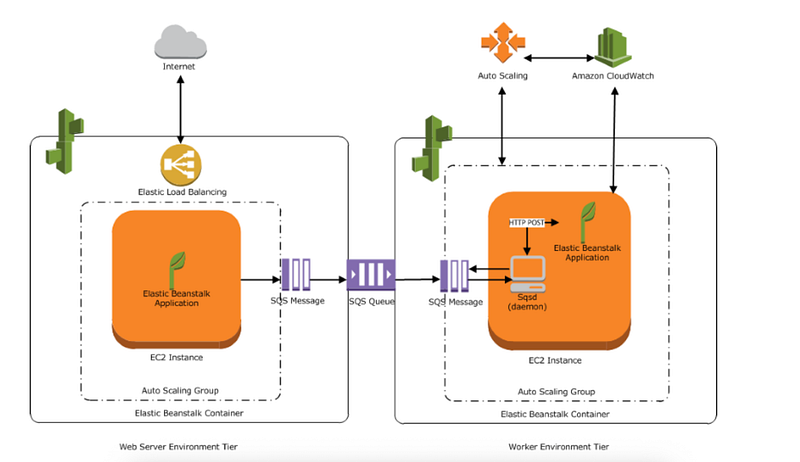
How It Works
With Elastic Beanstalk:
✅ You give it your app code
✅ You choose basic configs (instance type, scaling rules, environment type)
✅ AWS automatically provisions the infrastructure
And yes, it supports multiple languages: Java, .NET, Node.js, Python, PHP, Ruby, Go, Docker.
Code Example — Deploying a Simple Node.js App
Assume you have a server.js:
const express = require("express");
const app = express();
app.get("/", (req, res) => {
 res.send("Hello from AWS Elastic Beanstalk!");
});
app.listen(3000, () => console.log("Server running on port 3000"));
Now, create a zip of your app and deploy:
eb init my-node-app --platform node.js --region us-east-1
eb create my-node-env
eb deploy
✔ Auto-scaling? Done.
✔ Monitoring? Done.
✔ Rollback? Just redeploy a previous version.
Real-World Use Case
A startup building a SaaS app can launch its MVP in days without hiring a DevOps engineer. As traffic grows, Elastic Beanstalk automatically adds more instances.
When Should You Use It?
✅ Web applications (REST APIs, SaaS platforms)
✅ Mobile backends
✅ Microservices
Quick Pro Tips
- For beginners: Start with the default configurations. AWS does most of the optimisation for you.
- For mid-level devs: You can still SSH into EC2 instances if you need custom tweaks.
2. AWS Batch — Processing Data Like a Boss
The Problem It Solves
Need to run millions of data-processing tasks, Genomics research or financial risk calculations? Spinning up and shutting down servers manually for batch jobs is painful.
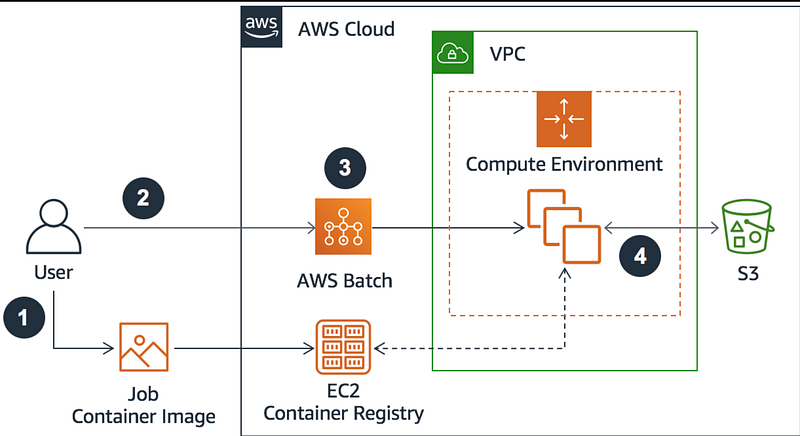
How It Works
AWS Batch:
- Automatically provisions the right compute resources.
- Distributes jobs across multiple EC2 instances.
- Scales down when jobs are done (saving cost).
Think of it as a “serverless batch processor.”
Quick Example — Running a Batch Job
- Package your processing script (e.g., Python).
# process_data.py
import time
print("Starting data processing...")
time.sleep(3)
print("Done processing batch job!")
2. Submit it as a job:
aws batch submit-job \
 --job-name data-processing-job \
 --job-queue my-queue \
 --job-definition my-job:1
AWS handles the rest — provisioning EC2 or Spot Instances, running the job, and shutting down unused resources.
Real-World Use Case
- Financial firms run thousands of risk calculations overnight.
- Machine learning teams are training models in parallel.
- Video processing companies are transcoding hundreds of files at once.
When Should You Use It?
✅ Scientific computing
✅ Genomics research
✅ Big data processing
Quick Pro Tips
- Use Spot Instances with Batch to cut costs up to 70%.
- For mid-level devs: Combine AWS Batch with S3 triggers to start jobs automatically when new data is uploaded.
3. Amazon Lightsail — The “AWS for Beginners”
The Problem It Solves
AWS EC2 is powerful but can feel like too much for small projects. What if you just want to host a WordPress blog or a portfolio site?
How It Works
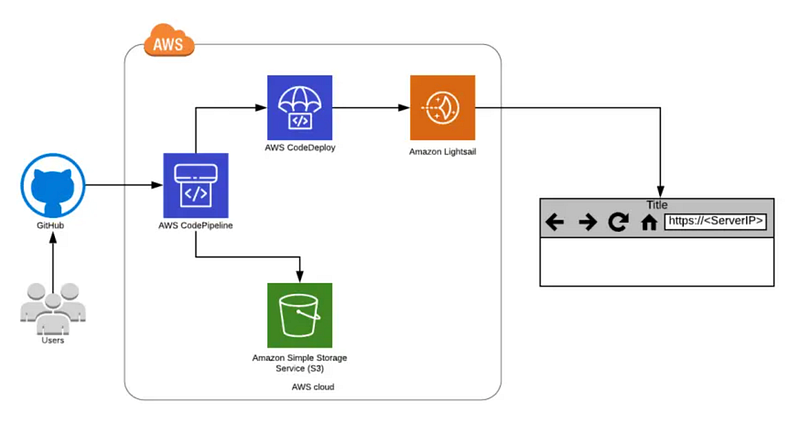
Lightsail gives you:
✅ Preconfigured virtual private servers (VPSs)
✅ Fixed monthly pricing (starts at $5/month)
✅ One-click app templates (WordPress, LAMP, Django, etc.)
You don’t need to touch security groups, IAM roles, or VPCs.
Quick Example — Launching a WordPress Site
- Log into Lightsail.
- Click “Create Instance.”
- Choose “WordPress Blueprint.”
- Click “Launch.”
Your WordPress site is live in minutes.
Real-World Use Case
- Personal blogs
- Startup landing pages
- Small business websites
When Should You Use It?
✅ Small, low-traffic apps
✅ Dev/test environments
✅ Learning AWS basics
Quick Pro Tips
- For beginners: Great way to learn cloud hosting without being overwhelmed.
- For mid-level devs: Move to EC2/ECS later when you need auto-scaling and more customisation.
4. AWS Outposts — AWS in Your Own Data Centre
The Problem It Solves
Some companies can’t move everything to the cloud due to:
- Regulatory compliance (financial/healthcare industries)
- Low-latency requirements (gaming, stock trading)
- Data residency laws
But they still want AWS services.
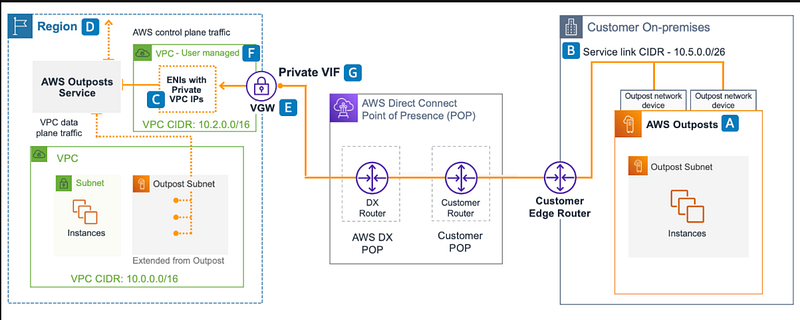
How It Works
AWS ships you physical racks that run AWS services in your data centre.
✅ Run EC2, ECS, EKS, and S3 locally.
✅ Same AWS APIs and tools you use in the cloud.
✅ Syncs with your AWS account for hybrid-cloud setups.
Real-World Use Case
- A bank keeps sensitive financial data on-premises but runs analytics using AWS services.
- A video streaming company processes videos locally for low latency while storing backups in S3.
When Should You Use It?
✅ Hybrid-cloud environments
✅ Edge computing
✅ Compliance-heavy industries
Quick Pro Tips
- Outposts is not for hobby projects — it’s expensive and built for enterprises.
- Great for teams already invested in AWS but need on-prem control.
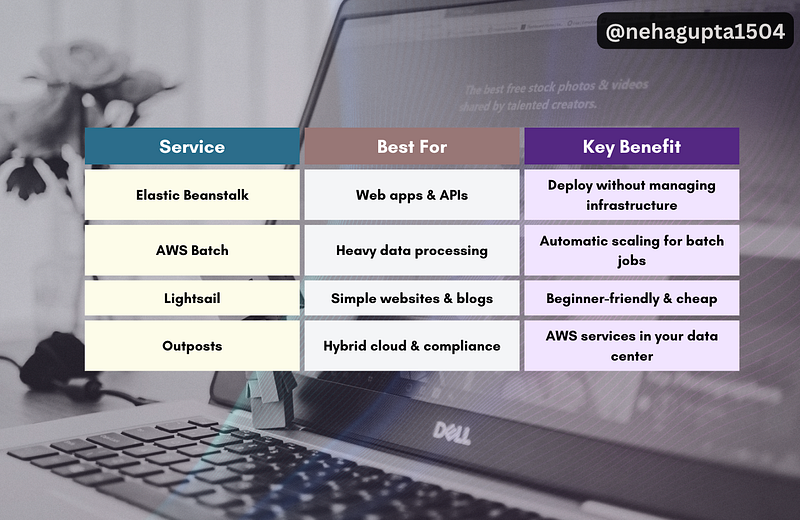
Comparison Table — Which One Should You Choose?
Conclusion — Which One Should You Try First?
If you’re a full-stack dev:
- Launching a web app? → Start with Elastic Beanstalk.
- Processing large datasets? → Try AWS Batch.
- Hosting a blog or portfolio? → Lightsail is your friend.
- Building for enterprise with compliance needs? → Outposts.
The beauty of AWS is you don’t always need to manage servers manually. Pick the right service for your use case, and you can focus on writing code — not on babysitting infrastructure.
Your Turn
Which AWS service are you going to try next?
If this blog helped you, let me know in the comments…
Your words might seem small, but they’re the reason I keep writing more🤗
At Dev Simplified, We Value Your Feedback 📊
👉 Follow us to not miss any updates.
👉 Have any suggestions? Let us know in the comments!