Day 8 of Becoming an AI Developer: Build a Resume Analyser Using AI
Learn how to build a smart AI-powered resume reviewer using React, Node.js, Ollama, and llama3 — without spending money on APIs.
On Day 5, we built our first AI backend using Ollama + Express. In Day 6, we created an AI chatbot using React + Node.js.
Today, we’ll combine those skills and build something practical:
An AI Resume Analyzer.
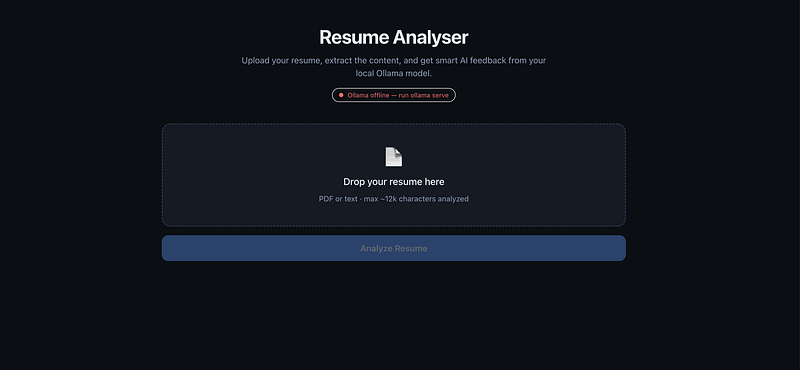
What Are We Building?
We’ll create a simple app where users can:
✅ Upload a resume (PDF/text)
✅ Extract resume content
✅ Send it to a local LLM
✅ Get smart AI feedback
The AI will analyze:
- Skills identified
- Missing technologies
- Resume summary
- Improvement suggestions
- ATS optimization tips
How the Resume Analyser Works
Here’s the complete flow:
Architecture overview:
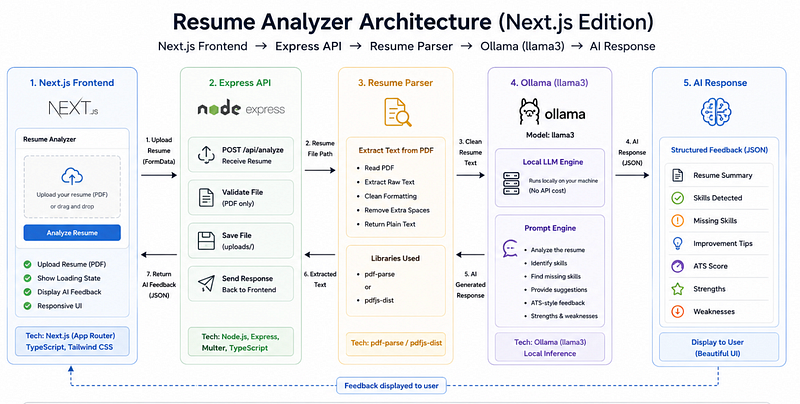
The idea is surprisingly simple:
- User uploads resume
- Backend extracts text
- Prompt is generated
- llama3 analyzes resume
- Feedback is displayed
The magic is mostly in the prompt.
Yes — prompt engineering matters here too.
Step 1: Upload Resume in Next.js
Let’s start with a simple upload input.
The home page (app/page.tsx) stores the selected file in state, then sends it to POST /api/analyze as multipart/form-data under the field name resume.
"use client";

import { useCallback, useEffect, useState } from "react";
import { AnalysisResults } from "@/components/AnalysisResults";
import { UploadZone } from "@/components/UploadZone";
import type { ResumeAnalysis } from "@/types/analysis";

type Status = "idle" | "loading" | "success" | "error";

export default function Home() {
 const [file, setFile] = useState<File | null>(null);
 // ...
 const analyze = useCallback(async () => {
 // ...
 const formData = new FormData();
 formData.append("resume", file);

 const res = await fetch("/api/analyze", {
 method: "POST",
 body: formData,
 });
 // ...
 }, [file]);
This lets users upload resumes.
A common mistake beginners make?
Trying to send raw PDFs directly to the AI.
LLMs don’t understand PDF files.
You first need to extract text.
Step 2: Server API: extract text + ask Ollama
The analysis endpoint (app/api/analyze/route.ts) receives the uploaded file, extracts text, then runs the Ollama analysis.
route.ts
import { NextRequest, NextResponse } from "next/server";
import { extractTextFromFile } from "@/lib/extract-text";
import { analyzeWithOllama } from "@/lib/ollama";

export const runtime = "nodejs";

export async function POST(request: NextRequest) {
 try {
 const formData = await request.formData();
 const file = formData.get("resume");

 if (!file || !(file instanceof File)) {
 return NextResponse.json(
 { error: "Please upload a resume file." },
 { status: 400 }
 );
 }

 const { text, fileName } = await extractTextFromFile(file);
 const analysis = await analyzeWithOllama(text);

 return NextResponse.json({
 fileName,
 characterCount: text.length,
 analysis,
 });
 } catch (error) {
 const message =
 error instanceof Error ? error.message : "Analysis failed.";
 const status = message.includes("Ollama") ? 503 : 400;
 return NextResponse.json({ error: message }, { status });
 }
}
Step 3: Text extraction (PDF or text)
Extraction is handled in lib/extract-text.ts:
- If PDF: uses
pdf-parse - Else if text-like: reads UTF-8
- Normalises whitespace and truncates to
MAX_CHARS(12k) before sending to the model.
import pdf from "pdf-parse";

const MAX_CHARS = 12_000;

export async function extractTextFromFile(
 file: File
): Promise<{ text: string; fileName: string }> {
 const buffer = Buffer.from(await file.arrayBuffer());
 const name = file.name.toLowerCase();

 let text: string;

 if (name.endsWith(".pdf")) {
 const parsed = await pdf(buffer);
 text = parsed.text;
 } else if (
 name.endsWith(".txt") ||
 name.endsWith(".md") ||
 file.type.startsWith("text/")
 ) {
 text = buffer.toString("utf-8");
 } else {
 throw new Error("Unsupported file type. Upload a PDF or text file.");
 }

 const trimmed = text.replace(/\s+/g, " ").trim();
 // ...
 return { text: trimmed.slice(0, MAX_CHARS), fileName: file.name };
}
Now the AI can actually read the resume.
Without parsing?
Your model will hallucinate or return poor results.
This is one of those tiny implementation details that makes a huge difference.
Step 4: Ollama call + strict JSON output
Now comes the fun part.
We’ll ask llama3 to act like a recruiter.
lib/ollama.ts sends a system prompt that forces a specific JSON schema (summary, skills found, missing skills, suggestions, ATS score/feedback). It calls POST /api/chat and parses the response.
const SYSTEM_PROMPT = `You are an expert resume reviewer and ATS specialist.
Analyze the resume text and respond with ONLY valid JSON (no markdown, no code fences).
Use this exact schema:
{
 "summary": "2-4 sentence overview of the candidate profile",
 "skillsFound": ["skill1", "skill2"],
 "missingSkills": ["skills recruiters might expect but are absent"],
 "improvementSuggestions": ["actionable suggestions for wording, formatting, measurable achievements"],
 "atsScore": 0-100 integer for keyword/ATS optimization,
 "atsFeedback": "short paragraph on ATS keyword optimization"
}
Be specific and practical. Infer role level from the resume when suggesting missing skills.`;

export async function analyzeWithOllama(resumeText: string): Promise<ResumeAnalysis> {
 const response = await fetch(`${OLLAMA_URL}/api/chat`, {
 method: "POST",
 headers: { "Content-Type": "application/json" },
 body: JSON.stringify({
 model: OLLAMA_MODEL,
 stream: false,
 format: "json",
 messages: [
 { role: "system", content: SYSTEM_PROMPT },
 { role: "user", content: `Analyze this resume:\n\n${resumeText}` },
 ],
 }),
 });
 // ...
 return parseAnalysis(content);
}
Why structured prompts matter?
Because vague prompts create vague outputs.
Bad prompt: Check my resume
Better prompt:
Analyze this resume for ATS optimization,
technical skills, weak points,
and missing industry keywords.
The quality difference is massive.
Final Output: Here is our Resume Analyser up and running
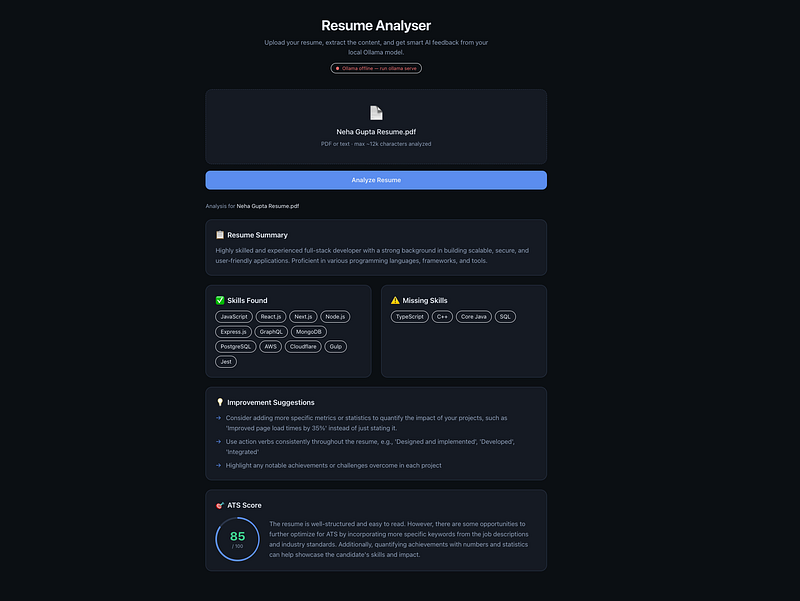
You can see the complete code here in this repository- Resume-Analyser
What the UI Can Show
Instead of dumping one giant response, structure feedback nicely:
Resume Summary
Short overview of candidate profile.
Skills Found
React, Node.js, AWS, MongoDB, etc.
Missing Skills
Things recruiters might expect.
Improvement Suggestions
Better wording, formatting, measurable achievements.
ATS Score
Keyword optimization feedback.
A Surprising Payoff Most Developers Don’t Expect
Here’s something interesting.
Once you build a resume analyzer…
you’ve accidentally learned the foundation of document AI systems.
The same architecture powers:
- Contract analyzers
- Legal document review tools
- AI invoice scanners
- Medical report assistants
- ATS screening platforms
The app feels small.
But the pattern is industry-level.
That’s the real win.
Common Mistakes to Avoid
❌ Sending PDFs directly to LLMs
❌ Using weak prompts
❌ Returning unstructured AI output
❌ Forgetting loading states in UI
❌ Ignoring hallucinations
Always validate AI feedback before trusting it.
AI should assist decisions — not replace human judgment.
🚀 Transitioning into AI as a developer?
I’m building a practical 30-day roadmap to help developers move into AI — step by step, without random tutorials or confusion.
👉 Follow this series so you don’t miss the next day.
👉 Bookmark this article — you’ll want to revisit it.
👉 What’s the biggest thing confusing you about AI right now? Drop it in the comments — I may cover it next.