Day 9 of Becoming an AI Developer: Architecture of Chat PDF App with AI
Before building a Chat PDF app in Next.js, understand how PDFs, embeddings, retrieval, vector stores, and RAG actually work under the hood.
In the previous articles of this series, we started by understanding how to run local AI models using Ollama and built our first AI-powered app using Node.js and llama3. We learned how an LLM processes prompts and generates responses.
But building a Chat PDF app is a completely different challenge. Before jumping into implementation, we first need to understand what actually happens behind the scenes when a user uploads a document and asks AI questions about it.
This article is for providing a better understanding of the architecture, and in the next article, we’ll be implementing it.
If you have missed our previous articles, you can read them here
What we are going to learn today
Imagine This…
You upload a PDF and ask:
“Summarize this document.”
Or:
“What skills are mentioned in this resume?”
Or even:
“Explain section 4 in simple words.”
And somehow…
The AI answers based only on the uploaded PDF.
Pretty cool, right?
But here’s the interesting part:
The AI never actually “reads” the PDF file.
Yes — even advanced models like llama3 cannot directly understand PDFs.
So what actually happens after upload?
How does AI know where to search?
Why do developers talk about embeddings, vector databases, and RAG all the time?
Before writing a single line of code, let’s understand the architecture of a Chat PDF system from beginner to advanced.
By the end of this article, you’ll understand the full pipeline and finally stop treating AI apps like a black box.
What Are We Actually Building?
At a high level, we’re building an app where users can:
- Upload a PDF
- Ask questions about it
- Get answers grounded in the document
But internally?
A lot is happening.
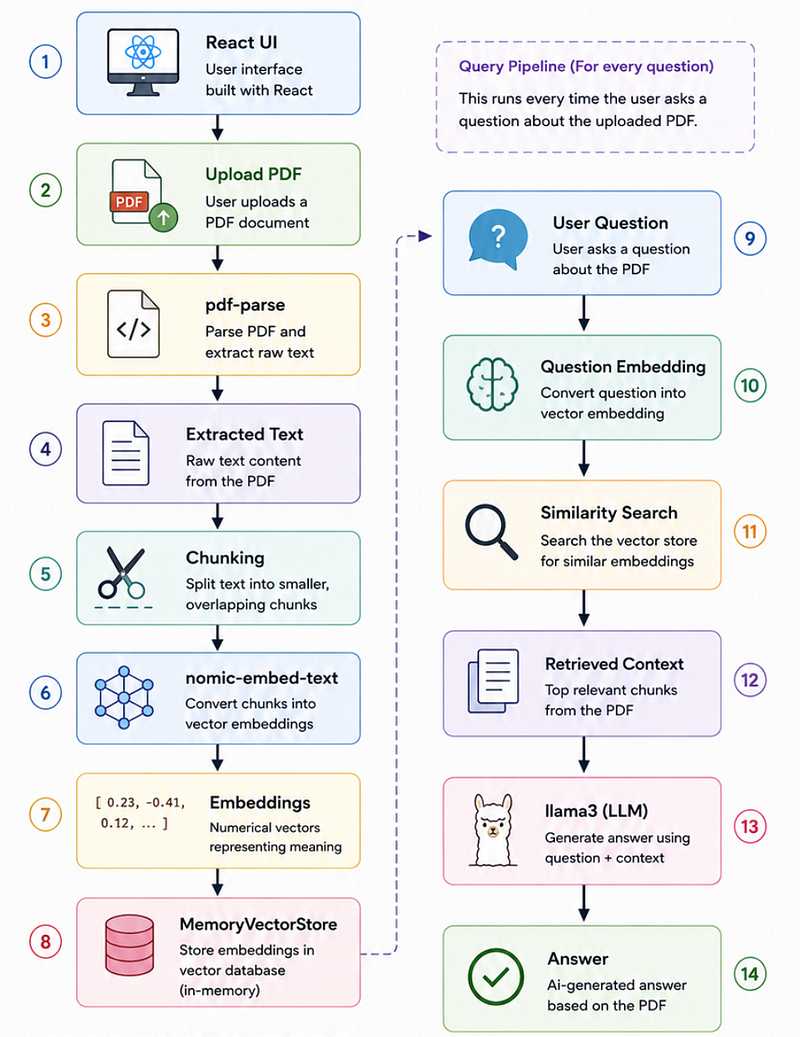
Here’s the complete flow:
User Uploads PDF
 ↓
PDF Parsing
 ↓
Text Extraction
 ↓
Chunking
 ↓
Embeddings Generation
 ↓
Vector Store
 ↓
User Question
 ↓
Question Embedding
 ↓
Similarity Search
 ↓
Relevant Context Retrieval
 ↓
LLM (llama3)
 ↓
Answer Generation
At first glance, this looks overwhelming.
But once we break it into pieces, it becomes surprisingly manageable.
Let’s understand every block.
Can an LLM Read a PDF Directly?
Short answer? No.
This is one of the biggest misconceptions developers have.
An LLM doesn’t understand files.
A PDF contains things like:
- Fonts
- Layout
- Metadata
- Styling
- Tables
- Positioning information
But LLMs understand:
Text tokens
Which means:
PDF → Extract Text → ProcessWe first need to convert the PDF into readable text.
Why We Need pdf-parse
This is where pdf-parse comes in.
It extracts raw text from uploaded PDFs.
For example:
Inside the PDF
John Doe
Software Engineer
5 Years Experience
After Extraction
"John Doe Software Engineer 5 Years Experience"Simple.
The PDF becomes machine-readable text.
Example
import pdf from "pdf-parse";
import fs from "fs";

const dataBuffer = fs.readFileSync("resume.pdf");
const data = await pdf(dataBuffer);
console.log(data.text);
What this code does
- Reads the uploaded PDF
- Extracts text
- Makes it ready for AI processing
Common mistakes developers make
Many beginners try:
LLM → Entire PDFInstead of:
PDF → Extract Text → Process → LLMThat usually breaks quickly for larger files.
📌 What You Learned So Far
- LLMs cannot read PDFs directly
- PDFs must be converted into text
pdf-parsehelps extract readable content
Once Text Is Extracted, What’s Next?
Now comes another beginner mistake.
You might think:
“Why not send the entire PDF text to the LLM?”
Sounds reasonable.
But this creates problems:
- Token limits
- Slow performance
- High cost
- Poor answer quality
- Harder retrieval
This introduces one of the most important concepts: Chunking
What Is Chunking?
Chunking means:
Splitting large text into smaller pieces.
Example:
Chunk 1 → Introduction
Chunk 2 → Experience
Chunk 3 → Skills
Chunk 4 → Projects
Instead of sending one giant document, we work with meaningful, smaller sections.
Why Not One Huge Chunk?
Large context often hurts performance.
The model struggles to identify relevant information.
Think about it:
Searching a paragraph is easier than searching an entire book.
What Is Chunk Overlap?
Here’s something many tutorials skip.
Without overlap:
Chunk 1:
React is a frontend
Chunk 2:
framework used with Next.jsNotice the problem?
We broke context.
Now with overlap:
Chunk 1:
React is a frontend framework
Chunk 2:
frontend framework used with Next.jsMuch better.
This preserves meaning.
That’s why tools like RecursiveCharacterTextSplitter are popular.
Example
const splitter =
new RecursiveCharacterTextSplitter({
 chunkSize: 500,
 chunkOverlap: 100,
});
Why this matters
Good chunking improves:
- Retrieval quality
- Accuracy
- Context understanding
Bad chunking = worse answers.
What Are Embeddings? (The Most Important Concept)
This is where most developers get confused.
Let’s simplify it.
Computers don’t understand meaning.
They understand:
Numbers
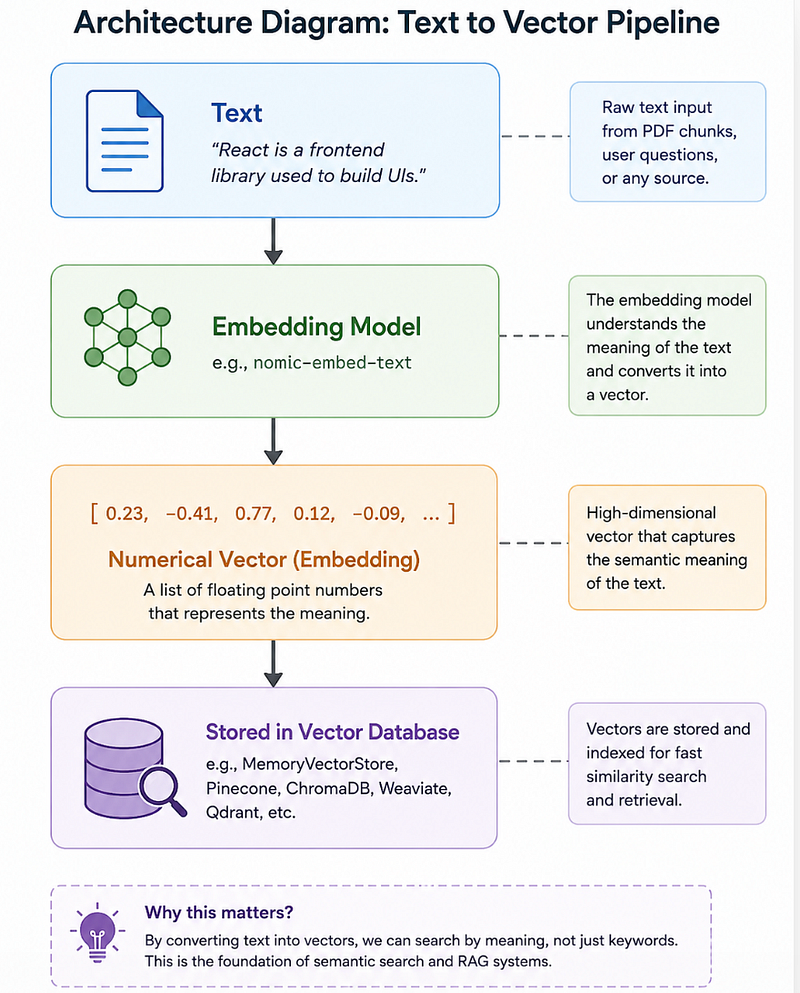
So text gets converted into vectors.
Example:
"React is a frontend library"Becomes:
[0.23, 0.77, -0.41, 0.12...]These are called: Embeddings
But here’s the cool part:
Embeddings capture meaning, not exact words.
Example:
User asks:
“Which frontend framework is used?”
PDF says:
“React powers the UI.”
Different words.
Same meaning.
Still matches.
That’s semantic understanding.
Embedding Model vs LLM (Common Confusion)
Many developers mix these up.
They are completely different.
Embedding Model
Job:
Text → VectorExample:
nomic-embed-text
Used for:
- Similarity search
- Retrieval
- Semantic matching
LLM
Job:
Question + Context → AnswerExample:
llama3
Used for:
- Reasoning
- Answer generation
- Explanation
Here’s the important insight:
Embedding models do not answer questions.
LLMs do not perform semantic search.
They work together.
What Is a Vector Store?
Now the question becomes:
Where do embeddings go?
Inside something called a:
Vector Store
Example:
Chunk A → [0.23, 0.51, 0.71]
Chunk B → [0.88, 0.21, 0.43]
Chunk C → [0.16, 0.97, 0.12]
A vector database helps us search through meaning.
For beginners:
MemoryVectorStore
Why it’s great:
- No setup
- Easy to learn
- In-memory storage
- Perfect for prototypes
Production alternatives:
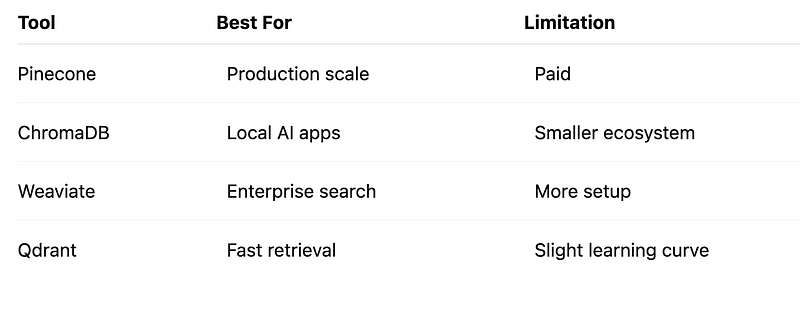
What Is Retrieval?
Let’s say the user asks:
“What are the candidate’s skills?”
Do we send the whole PDF?
No.
Instead:
The system finds only relevant chunks.
Example:
Chunk 1 → Summary
Chunk 2 → Education
Chunk 3 → Skills
Retrieve:
Chunk 3This is called: Similarity Search
We search based on meaning, not exact keywords.
What Is RAG?
Here’s the term everyone keeps mentioning.
Retrieval-Augmented Generation
Sounds scary.
It’s actually simple.
Question
 +
Relevant PDF Chunks
 ↓
LLM
 ↓
Answer
Breakdown:
Retrieval
Find relevant document information.
Generation
Generate the answer.
Without RAG:
The model guesses.
With RAG:
The model answers using the actual document context.
And this reduces hallucination massively.
Why Hallucination Happens
A surprising truth:
LLMs don’t “know” facts.
They predict probable words.
Without context:
AI may invent answers.
Example:
User asks:
“Who is the CEO?”
PDF doesn’t mention it.
Bad response:
“The CEO is John Smith.”
Good response:
“I couldn’t find this information in the uploaded PDF.”
That single behaviour change makes AI apps feel dramatically smarter.
Counterintuitive, right?
Sometimes better AI means saying “I don’t know.”
End-to-End Example: What Happens Internally?
User uploads:
resume.pdf
Internal flow:
1. PDF uploaded
2. pdf-parse extracts text
3. Text split into chunks
4. Chunks converted into embeddings
5. Stored in MemoryVectorStore
6. User asks a question
7. Question converted into embedding
8. Similar chunks retrieved
9. Context sent to llama3
10. Answer generated
What We’ll Build in the Next Article
Now that the architecture finally makes sense, the next step is implementation.
We’ll build this complete Chat PDF app using:
- Next.js
- LangChain
- Ollama
- llama3
- nomic-embed-text
- MemoryVectorStore
From scratch.
No black boxes.
Just practical implementation.
What part of Chat PDF architecture confused you the most before reading this — chunking, embeddings, or RAG?
Missed the previous articles?
Read here: Build a Resume Analyser Using AI
Upcoming
Implementation: Build a Chat With PDF App
🚀 Transitioning into AI as a developer?
I’m building a practical 30-day roadmap to help developers move into AI — step by step, without random tutorials or confusion.
👉 Follow this series so you don’t miss the next day.
👉 Bookmark this article — you’ll want to revisit it.
👉 What’s the biggest thing confusing you about AI right now? Drop it in the comments — I may cover it next.