Day 19 of Becoming an AI Developer: Function Calling vs Tool Calling
How weather apps, APIs, and real tools help LLMs move from “I think” to “I checked.”
Most beginners assume an AI model can answer anything because it “knows” everything.
That assumption breaks the first time you ask:
“What’s the weather in Bangalore right now?”
The model may sound confident. It may even give a nicely formatted answer.
But unless it has access to live weather data, it is guessing.
That is exactly why function calling and tool calling matter.
Why You Should Learn This
If you are building AI apps, chatbots, RAG systems, coding assistants, or automation agents, text generation is only half the story.
Real applications need the model to:
- fetch live data
- call APIs
- search databases
- trigger workflows
- read files
- perform safe actions
Without tools, the model is just generating probable text.
With tools, your application can connect the model to the real world.
Architecture Diagram
┌──────┐
│ User │
└──┬───┘
 │
 ▼
┌──────────┐
│ AI App │
└──┬───────┘
 │
 ▼
┌──────────┐
│ Model │
└──┬───────┘
 │ Tool Request
 ▼
┌──────────┐
│ Tool Call│
└──┬───────┘
 │
 ▼
┌──────────────┐
│ External API │
└──┬───────────┘
 │ Result
 ▼
┌──────────┐
│ Model │
└──┬───────┘
 │
 ▼
┌──────────────┐
│Final Response│
└──────────────┘
The Problem: The Model Does Not Execute Your Code
At first, I thought function calling meant the model directly runs my function.
That is not what happens.
The model only decides:
- Which function should be used
- What arguments should be passed
- When the tool result is enough to answer the user
Your application still executes the function.
That small detail matters a lot.
async function getWeather(location) {
 // Your app calls a real weather API here
 return {
 location,
 temperature: "27°C",
 condition: "Cloudy"
 };
}
The model does not magically run getWeather().
It produces something like:
{
 "name": "getWeather",
 "arguments": {
 "location": "Bangalore"
 }
}
Then your backend runs the function and sends the result back to the model.
Function Calling vs Tool Calling
In practice, both terms are often used together.
But mentally, this distinction helps:
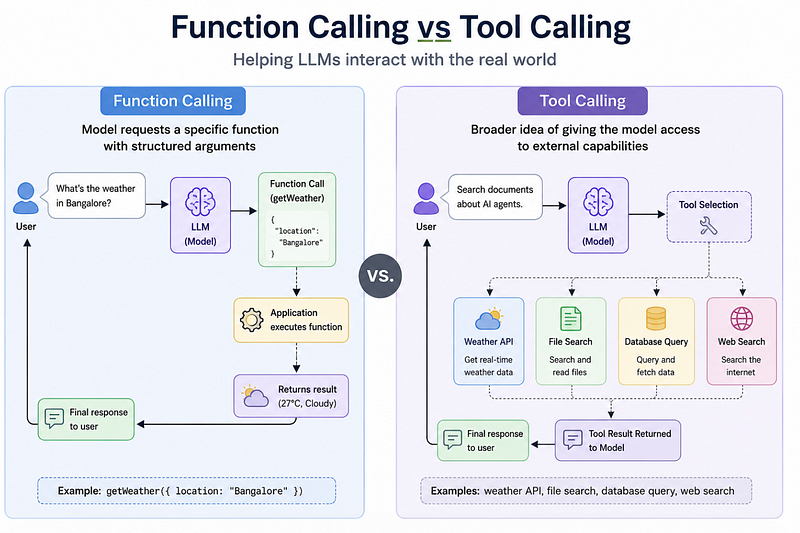
So function calling is one kind of tool calling.
Tool calling is the bigger umbrella.
Weather Example: The Classic Use Case
Let’s say the user asks:
“What’s the weather in Mumbai?”
Without a tool, the model may hallucinate.
With a tool, your app defines what the model can call:
const tools = [
 {
 type: "function",
 name: "getWeather",
 description: "Get current weather for a city",
 parameters: {
 type: "object",
 properties: {
 location: {
 type: "string",
 description: "City name, for example Mumbai"
 }
 },
 required: ["location"]
 }
 }
];
This schema tells the model:
- the tool name
- what it does
- what input it needs
- what format the arguments should follow
This is where many beginners make mistakes.
They write vague descriptions like:
description: "Gets data"That is not helpful.
Better:
description: "Get the current weather for a given city using live weather data"The model performs better when your tool descriptions are boringly clear.
The Actual Flow
The flow usually looks like this:
- User asks a question
- Model decides a tool is needed
- Model returns tool name and arguments
- Your app executes the function
- Your app sends the result back
- Model creates the final user-friendly response
Example tool result:
{
 "location": "Mumbai",
 "temperature": "30°C",
 "condition": "Humid",
 "wind": "12 km/h"
}
Final response:
The current weather in Mumbai is 30°C and humid, with wind around 12 km/h.Notice the difference?
The model is not pretending anymore.
It is answering based on data your system provided.
A Better Backend Pattern
In real projects, never directly execute any random function name returned by the model.
Use a safe registry.
const toolRegistry = {
 getWeather: async ({ location }) => {
 return await getWeather(location);
 }
};
async function executeTool(toolCall) {
 const tool = toolRegistry[toolCall.name];
 if (!tool) {
 throw new Error(`Unknown tool: ${toolCall.name}`);
 }
 return await tool(toolCall.arguments);
}
Why this matters:
- prevents unsafe execution
- keeps tools predictable
- makes debugging easier
- helps with logging and monitoring
This is a small production habit that saves pain later.
Common Mistakes Developers Make
1. Giving the model too many tools
More tools do not always mean better results.
If you give 40 tools with similar descriptions, the model may pick the wrong one.
Start small.
2. Poor argument validation
The model may send incomplete or slightly wrong arguments.
Validate everything.
if (!location || typeof location !== "string") {
 throw new Error("Location is required");
}
3. Assuming tool calls are always correct
Tool calling improves reliability, but it does not remove the need for checks.
Your backend still owns correctness.
4. Mixing business logic into prompts
Prompts are not a replacement for backend rules.
Use code for rules. Use the model for reasoning and language.
When Not to Use Tool Calling
Tool calling is not needed for every AI feature.
Avoid it when:
- the answer does not require live data
- the task is simple text generation
- the tool adds more latency than value
- the same result can be computed safely inside your app
For example, summarizing a paragraph does not need a weather API, database, or external action.
The catch is knowing when the model needs help.
The Surprising Payoff
The biggest benefit is not just accuracy.
It is control.
Once I understood tool calling, AI apps started feeling less mysterious.
Instead of hoping the model gives the right answer, I could design the system:
- what the model can access
- what it cannot access
- what arguments are allowed
- what happens when something fails
That changes how you build.
You stop treating the model like a magic box.
You start treating it like a reasoning layer inside a normal software system.
Reflection
After building a few AI workflows, I realised the hard part is not calling an API.
We already know how to do that.
The harder part is designing the boundary between the model and the application.
The model should decide intent.
The application should control execution.
That separation makes AI apps safer, easier to debug, and much closer to production-ready systems.
Final Takeaways
Function calling and tool calling are the bridge between language models and real software.
Remember this:
- the model does not execute functions directly
- your app runs the tool
- schemas guide the model
- validation still matters
- fewer, clearer tools usually work better
- tool calling is useful when the model needs external data or actions
For Day 19, the key lesson is simple:
A good AI app does not just ask the model to answer.
It gives the model the right tools, at the right time, with the right guardrails.
And that is where AI development starts becoming real engineering.
If you would like to learn AI with us, make sure to save this series. It’s free and available to everyone on Medium
Zero to AI Expert in 30 Days
Missed the previous articles?
Read here: Build a Resume Analyser Using AI
Read here: Build an MCP Server in Node.js
From Dev Simplified
- 👏 Enjoyed the article? Don’t forget to leave a clap.
- 💬 Have thoughts or questions? Share them in the comments.
- ✍️ Want to write for Dev Simplified? Drop a personal note on any Dev Simplified story with your draft link.