Day 20 of Becoming an AI Developer: Multi-Agent Systems Explained For Beginners
Planner vs Executor, explained through the way real AI apps actually break
One of the first mistakes I made while building AI apps was assuming one smart agent could do everything.
- Give it a user request.
- Add tools.
- Connect APIs.
- Maybe attach a database.
Done.
At least, that was the idea.
But the moment the task became slightly bigger
— “analyse this PDF, extract action items, create a summary, check missing data, and draft an email”
— the agent started behaving like a tired developer after too many context switches.
It would plan halfway.
Then execute too early.
Then forget one requirement.
Then confidently return something that looked useful but missed the actual goal.
That is when multi-agent systems started making sense.
Not because “more agents” sounds advanced.
Because real work is rarely one job.
Why Should You Learn Multi-Agent Systems?
If you are building AI features beyond simple chat, you will hit this problem quickly.
A single-agent setup works fine for:
- answering simple questions
- calling one API
- summarizing short text
- generating small code snippets
But it starts struggling when the task needs:
- planning
- multiple steps
- tool usage
- validation
- retries
- role-specific reasoning
- different outputs from different sources
Think about a “Chat with PDF” app.
At first glance, it looks simple.
User uploads a PDF.
AI answers questions.
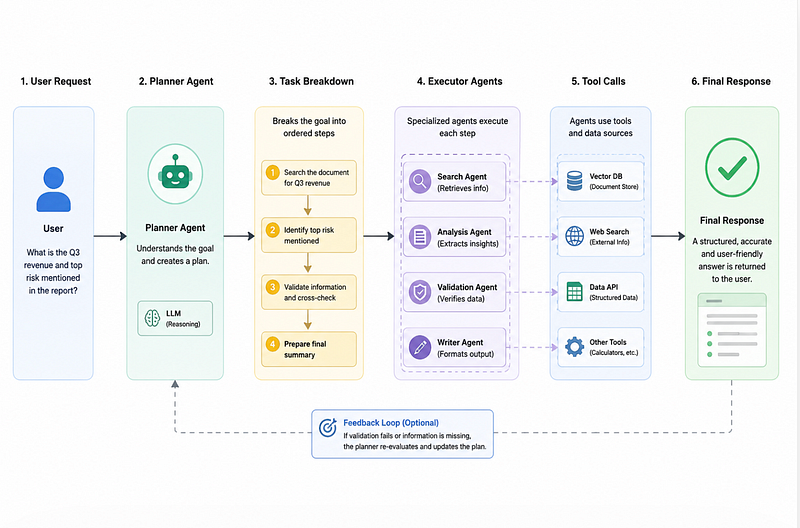
But in practice, the system may need to:
- understand the user’s question
- retrieve relevant chunks
- check whether the answer exists
- summarize only grounded information
- avoid hallucination
- format the final response clearly
That is already more than one responsibility.
The Problem With One Big Agent
A common beginner approach looks like this:
const agent = new Agent({
 name: "SuperAgent",
 instructions: `
 You can answer questions, search documents, call APIs,
 summarize results, validate output, and format responses.
 `,
 tools: [searchPDF, callAPI, sendEmail, createReport]
});
This looks convenient.
But there is a hidden cost.
The agent now has too many decisions to make:
- Which tool should I use?
- Should I plan first?
- Should I answer directly?
- Should I verify?
- Should I ask a follow-up?
- Should I call another tool?
The more responsibilities you add, the harder it becomes to debug.
When something goes wrong, you do not know whether the issue came from planning, retrieval, execution, formatting, or bad instructions.
This is where multi-agent systems help.
What Is a Multi-Agent System?
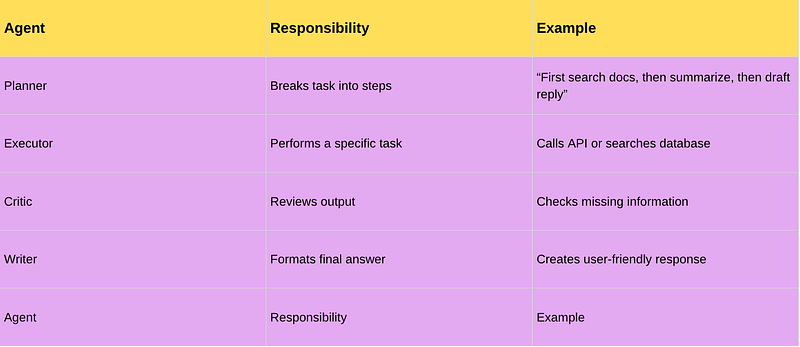
A multi-agent system is a setup where different agents handle different responsibilities.
Instead of one agent doing everything, you split the workflow.
For example:
The important part is this:
Multi-agent systems are not about adding more AI for fun. They are about separating responsibilities.
That one line changed how I started designing AI apps.
Planner vs Executor
This is the most useful pattern to understand first.
The Planner Agent
The planner does not directly execute everything.
Its job is to decide:
- What needs to be done?
- In what order?
- Which agent should handle each step?
- What information is missing?
- When should the workflow stop?
Example planner output:
{
 "goal": "Create a project summary from uploaded documents",
 "steps": [
 {
 "agent": "document_search_agent",
 "task": "Find sections related to project timeline"
 },
 {
 "agent": "summary_agent",
 "task": "Summarize timeline risks"
 },
 {
 "agent": "writer_agent",
 "task": "Format final response for the user"
 }
 ]
}
This matters because the plan becomes visible.
And visible plans are easier to debug.
The Executor Agent
The executor does the actual work.
It should usually have a narrow role.
const documentSearchAgent = {
 name: "Document Search Agent",
 instructions: `
 Search uploaded documents and return only relevant chunks.
 Do not generate final answers.
 Do not make assumptions.
 `,
 tools: [searchDocuments]
};
Notice the restriction.
The executor is not allowed to do everything.
That is intentional.
A focused agent is easier to test, easier to replace, and less likely to go off-track.
A Simple Planner-Executor Example
Here is a basic JavaScript-style example.
async function runMultiAgentWorkflow(userQuery) {
 const plan = await plannerAgent.run({
 input: userQuery
 });
 const results = [];
 for (const step of plan.steps) {
 const agent = getAgentByName(step.agent);
 const result = await agent.run({
 task: step.task,
 context: results
 });
 results.push({
 step: step.task,
 output: result
 });
 }
 return finalWriterAgent.run({
 input: userQuery,
 executionResults: results
 });
}
What this does:
- The planner creates the steps.
- Each executor handles one step.
- Previous results are passed as context.
- A final writer prepares the response.
The common mistake here is passing too much context to every agent.
Do not dump everything everywhere.
Give each agent only what it needs.
Bad vs Better Agent Design
Bad
const executorAgent = {
 instructions: `
 Search the database, analyze the result, decide next steps,
 write the final response, and check correctness.
 `
};
This is too broad.
The executor is quietly becoming another “super agent.”
Better
const executorAgent = {
 instructions: `
 Execute only the assigned task.
 Return structured output.
 Do not decide the next step.
 Do not write the final answer.
 `
};
This small boundary makes a huge difference.
The cleaner the responsibility, the easier the system becomes to control.
The Surprising Payoff
What surprised me was this:
Multi-agent systems are not always smarter.
- Sometimes they are slower.
- Sometimes they cost more.
- Sometimes a simple single-agent flow is better.
The real payoff is not “better intelligence.”
The payoff is better control.
- You can inspect the plan.
- You can retry only one failed step.
- You can replace one agent without touching the whole system.
- You can add validation before the final answer reaches the user.
That is useful in production.
Common Mistakes Developers Make
1. Creating too many agents too early
If your task has only one or two steps, do not force a multi-agent setup.
Start simple.
Split only when responsibilities become hard to manage.
2. Letting every agent talk to every tool
This creates confusion.
A planner does not need email access.
A writer does not need database write access.
A search agent does not need payment API access.
Tool access should match responsibility.
3. No structured output
This makes workflows fragile.
Prefer this:
{
 "status": "success",
 "summary": "Found 3 relevant sections",
 "sources": ["doc_1", "doc_3"],
 "missing_info": []
}
Over this:
I found some useful information and here is what I think...Structured output makes the next agent’s job easier.
When Not to Use Multi-Agent Systems
Use a single agent when:
- the task is simple
- latency matters a lot
- cost needs to stay low
- the workflow does not need strict control
- one tool call is enough
Use multi-agent systems when:
- tasks have multiple stages
- different skills are needed
- outputs need validation
- debugging matters
- production reliability matters
In short: do not use multi-agent systems because they sound advanced. Use them when the workflow actually needs separation.
Reflection: What Changed After Understanding This
After understanding planner vs executor, I stopped thinking of AI agents as “one smart brain.”
I started thinking of them like backend services.
One service should not handle auth, payments, emails, analytics, and reporting all in one file.
AI agents are similar.
- The planner decides the workflow.
- The executor performs the task.
- The reviewer checks quality.
- The writer shapes the final answer.
That separation makes the system less magical and more buildable.
And honestly, that is the part that matters for developers.
Final Takeaways
Multi-agent systems help when a single agent becomes hard to control.
The planner-executor pattern is the easiest way to start:
- Planner decides what should happen.
- Executor performs focused tasks.
- Reviewer or critic can validate results.
- Writer prepares the final response.
Start with one agent.
When the workflow becomes messy, split responsibilities.
That is usually the right time to move from a single-agent app to a multi-agent system.
The best question to ask is not:
“Can I use multiple agents here?”
It is:
“Which responsibility is making my current agent unreliable?”
If you would like to learn AI with us, make sure to save this series. It’s free and available to everyone on Medium
Zero to AI Expert in 30 Days
Missed the previous articles?
Read here: Build a Resume Analyser Using AI
Read here: Build an MCP Server in Node.js
From Dev Simplified
- 👏 Enjoyed the article? Don’t forget to leave a clap.
- 💬 Have thoughts or questions? Share them in the comments.
- ✍️ Want to write for Dev Simplified? Drop a personal note on any Dev Simplified story with your draft link.