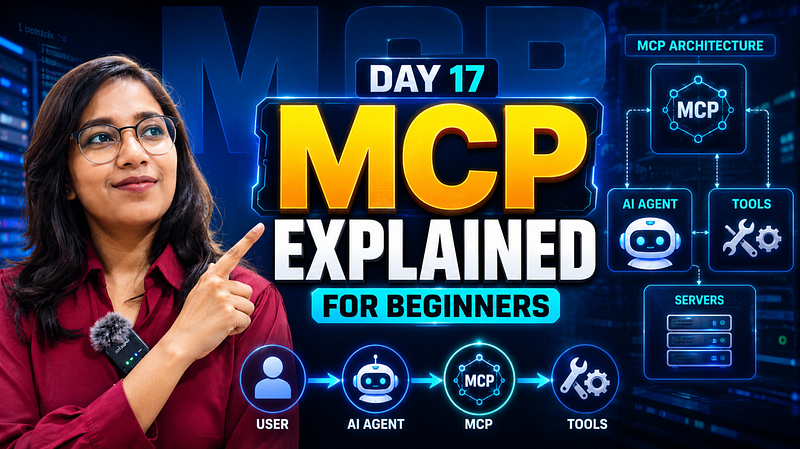
Day 17 of Becoming an AI Developer: MCP Explained For Beginners
Why Everyone Is Talking About MCP (And Why It Matters More Than Prompt Engineering)
I thought tool calling had already solved the biggest problem in AI applications.
Does the model need weather data?
- Call a weather API.
Need to send an email?
- Call an email function.
Need database access?
- Create another tool.
Simple.
But after building a few AI projects, I kept running into the same problem.
- Every new application required writing custom integrations.
- Every new tool required new code.
- Every AI app had its own way of connecting to external systems.
And that’s when I discovered MCP.
What surprised me was that MCP isn’t trying to make models smarter.
It’s trying to make integrations simpler.
And that small difference changes everything.
If you would like to learn AI with us, make sure to save this series. It’s free and available to everyone on Medium
Zero to AI Expert in 30 Days
The Problem Most AI Developers Eventually Hit
Imagine you’re building an AI assistant.
Today it needs:
- Gmail access
- Slack access
- PostgreSQL access
- GitHub access
Tomorrow it needs:
- Jira
- Notion
- Google Drive
- Stripe
Without a standard approach, every integration becomes a custom project.
You end up writing code like this:
const github = new GitHubClient(token);
const slack = new SlackClient(token);
const notion = new NotionClient(token);
const gmail = new GmailClient(token);
Each service has:
- Different APIs
- Different authentication methods
- Different data formats
- Different SDKs
The AI isn’t the difficult part anymore.
The integrations are.
So What Exactly Is MCP?
MCP stands for Model Context Protocol.
Think of it as a common language between AI models and external tools.
Instead of every AI application creating custom integrations, tools expose themselves through a standard protocol.
The AI can then discover and use them consistently.
At first glance, it sounds like another API standard.
But there’s a key difference.
Traditional APIs are designed for developers.
MCP is designed for AI systems.
Why Developers Care
Because MCP reduces integration complexity.
Instead of building one-off connectors for every AI application:
AI App 1 → GitHub Integration
AI App 2 → GitHub Integration
AI App 3 → GitHub Integration
You build the connector once.
GitHub MCP Server
 ↑
 |
AI App 1
AI App 2
AI App 3
Now every AI application can reuse the same integration.
Visualizing MCP
Example:
User
 ↓
AI Assistant
 ↓
MCP Client
 ↓
GitHub MCP Server
 ↓
GitHub API
The AI doesn’t directly communicate with GitHub.
It communicates through MCP.
How MCP Works
The workflow is surprisingly simple.
Step 1: Tool Registration
An MCP server exposes available tools.
Example:
{
 "name": "createIssue",
 "description": "Create a GitHub issue"
}
Step 2: AI Discovers Tools
The model learns:
- What tools exist
- What inputs they require
- What outputs they return
Step 3: Model Decides
User says:
Create a GitHub issue for the login bug.
The model determines:
I need createIssue()Step 4: Tool Execution
The MCP server executes the action.
Step 5: Response Returned
Result:
{
 "issueNumber": 123,
 "status": "created"
}
The model converts this into a human-friendly response.
Flowchart
User Request
 │
 ▼
Model Reasoning
 │
 ▼
Tool Discovery
 │
 ▼
MCP Server
 │
 ▼
Tool Execution
 │
 ▼
Result
 │
 ▼
Final Response
A Mini Project: GitHub Issue Creator
Let’s build a simplified MCP-style workflow.
Tool Definition
const tools = [
 {
 name: "createIssue",
 description: "Create a GitHub issue",
 parameters: {
 title: "string",
 body: "string"
 }
 }
];
This tells the model what capability exists.
Tool Implementation
async function createIssue(title, body) {
 return {
 issueNumber: 101,
 title,
 status: "created"
 };
}
Simple for now.
In production, this would call GitHub’s API.
Model Decision
Suppose the user says:
Create a bug report for login failure.The model generates:
{
 "tool": "createIssue",
 "arguments": {
 "title": "Login Failure",
 "body": "Users cannot login."
 }
}
Tool Execution
const result = await createIssue(
 "Login Failure",
 "Users cannot login."
);
console.log(result);
Output:
{
 "issueNumber": 101,
 "status": "created"
}
This is the core idea behind MCP.
The protocol standardises how tools are exposed and consumed.
The Biggest Misconception About MCP
When I first learned MCP, I assumed:
MCP gives AI new abilities.
Not exactly.
The AI’s capabilities come from the tools.
MCP only standardises communication.
Think of USB.
USB doesn’t make a keyboard smarter.
It just makes devices communicate using a common standard.
MCP does something similar for AI systems.
This distinction clears up a lot of confusion.
Where MCP Becomes Powerful
Small demos don’t show the real value.
Large systems do.
Imagine an AI engineering assistant with access to:
- GitHub
- Jira
- Slack
- PostgreSQL
- Documentation
Without MCP:
5 integrations
5 authentication systems
5 SDKs
5 maintenance burdens
With MCP:
1 protocol
Multiple servers
Reusable integrations
That’s a huge operational win.
Common Mistakes Developers Make
Mistake #1: Thinking MCP Replaces APIs
It doesn’t.
MCP usually sits on top of APIs.
The API still exists.
MCP simply standardises access.
Mistake #2: Exposing Too Many Tools
More tools ≠ better AI.
Too many tools can confuse decision-making.
Expose only what the model genuinely needs.
Mistake #3: Ignoring Permissions
An AI capable of:
- Reading emails
- Deleting records
- Sending messages
Needs strict access controls.
MCP doesn’t remove security concerns.
If anything, it makes them more important.
Tradeoffs You Should Know
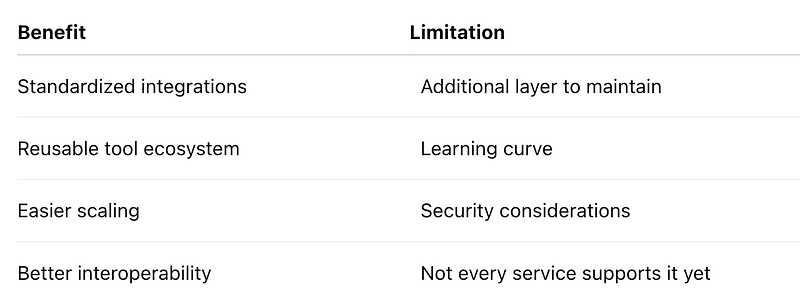
MCP is powerful.
But it’s not automatically the right choice for every project.
For a simple chatbot with one API integration, it may be unnecessary.
For complex AI systems with dozens of tools, it becomes much more attractive.
Reflection
What changed for me after understanding MCP was realising that AI development isn’t only about models anymore.
Most beginners spend months learning prompting.
Most experienced teams spend months solving integration problems.
That’s a very different challenge.
The unexpected realization was this:
As AI models become increasingly capable, the bottleneck often shifts from intelligence to connectivity.
The question stops being:
How smart is the model?
And becomes:
What can the model access safely and reliably?
MCP is one of the strongest answers emerging for that problem.
Key Takeaways
- MCP stands for Model Context Protocol.
- It standardizes communication between AI systems and tools.
- MCP does not replace APIs.
- MCP does not make models smarter.
- MCP makes integrations reusable and easier to scale.
- The biggest benefit appears in multi-tool AI applications.
- Security and permissions remain critical.
Final Thoughts
Most developers initially focus on prompts, embeddings, and model selection.
Those are important.
But after building real AI applications, another challenge quickly emerges: connecting AI to the systems your business already uses.
MCP is interesting because it tackles that problem directly.
And if the future of AI involves agents working across dozens of tools, protocols like MCP may end up being just as important as the models themselves.
Have you built an AI application that needed multiple tool integrations? What was harder — the AI logic or the integrations themselves?
Missed the previous articles?
Read here: Build a Resume Analyser Using AI
Read here: Vector Databases Explained
Upcoming
🚀 Transitioning into AI as a developer?
I’m building a practical 30-day roadmap to help developers move into AI — step by step, without random tutorials or confusion.
👉 Follow this series so you don’t miss the next day.
👉 Bookmark this article — you’ll want to revisit it.
👉 What’s the biggest thing confusing you about AI right now? Drop it in the comments — I may cover it next.