Day 16 of Becoming an AI Developer: Build Your First AI Agent
A hands-on guide to building a small AI agent that can call real JavaScript functions instead of only generating text
The first time I built an AI agent, I made a very beginner's mistake.
I assumed the LLM would “do” the task.
- Calculate the cost? The LLM will do it.
- Create a task? The LLM will create it.
- Fetch data? The LLM will somehow access it.
Then I realised something important:
An LLM does not automatically take action. It only decides what should happen next.
Your application still has to do the real work.
That is where tool calling comes in.
If you would like to learn AI with us, make sure to save this series. It’s free and available to everyone on Medium
Zero to AI Expert in 30 Days
Architecture
┌─────────────┐
│ USER │
│ │
│ "Create a │
│ high-prio │
│ task" │
└──────┬──────┘
 │
 ▼
┌───────────────────┐
│ AI AGENT │
│ (LLM Reasoning) │
│ │
│ Understands user │
│ intent and decides│
│ whether a tool is │
│ needed │
└──────┬────────────┘
 │
 ▼
┌───────────────────┐
│ TOOL DECISION │
│ │
│ create_task( │
│ title, │
│ priority │
│ ) │
└──────┬────────────┘
 │
 ▼
┌───────────────────┐
│ JAVASCRIPT TOOL │
│ FUNCTION │
│ │
│ executeTool() │
│ │
│ Database/API/ │
│ Business Logic │
└──────┬────────────┘
 │
 ▼
┌───────────────────┐
│ TOOL RESULT │
│ │
│ { │
│ success: true, │
│ taskId: 123 │
│ } │
└──────┬────────────┘
 │
 ▼
┌───────────────────┐
│ FINAL RESPONSE │
│ │
│ "Task created │
│ successfully with │
│ high priority." │
└───────────────────┘
The Problem With Normal Chatbots
A normal chatbot can answer questions like:
“Explain what an API is.”
But what if the user asks:
“Calculate the cost of 3 hours of work at ₹1200 per hour.”
The model might answer correctly.
But here is the catch: for real applications, you should not depend on the model to perform business logic.
Why?
Because your app may need to:
- apply exact pricing rules
- access databases
- call APIs
- create tasks
- send emails
- check permissions
- log actions
The model should not directly control these things.
Instead, it should say:
“I need to call this tool with these inputs.”
Your backend runs the tool.
That is the basic idea behind an AI agent.
What Is Tool Calling?
Tool calling means giving the model a list of functions it is allowed to request.
The model does not execute the function itself.
It only returns something like:
{
 "tool": "calculate_project_cost",
 "arguments": {
 "hours": 3,
 "hourlyRate": 1200,
 "currency": "INR"
 }
}
Then your Node.js application runs the actual function.
That small separation is very important.
The AI decides.
Your code executes.
Your app stays in control.
Step 1: Define the Tools
In this starter project, we will create three tools:
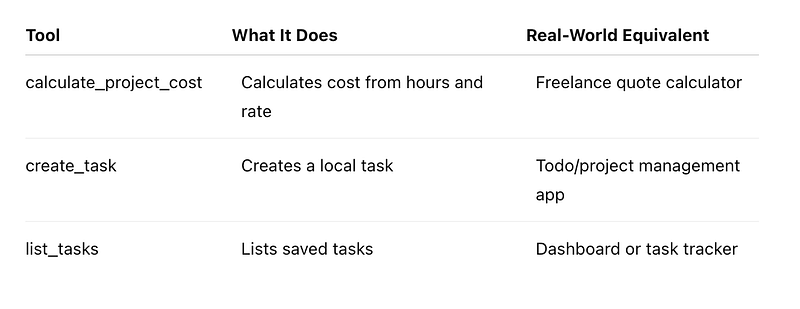
Here is the tool definition:
export const tools = [
 {
 type: "function",
 name: "calculate_project_cost",
 description: "Calculate project cost using hours and hourly rate.",
 parameters: {
 type: "object",
 additionalProperties: false,
 properties: {
 hours: {
 type: "number",
 description: "Number of hours required for the work."
 },
 hourlyRate: {
 type: "number",
 description: "Hourly rate for the work."
 },
 currency: {
 type: "string",
 description: "Currency code or label, for example INR or USD."
 }
 },
 required: ["hours", "hourlyRate", "currency"]
 }
 }
];
This schema tells the model:
- what the tool is called
- when it should be used
- what inputs are required
- what data types are expected
A common mistake is writing vague descriptions.
Bad:
description: "Does calculation"Better:
description: "Calculate project cost using hours and hourly rate."The model performs better when tools are described clearly.
Step 2: Write the Real Function
The tool definition is only the contract.
Now we need the actual implementation:
export async function executeTool(name, args) {
 switch (name) {
 case "calculate_project_cost": {
 const total = args.hours * args.hourlyRate;
return {
 hours: args.hours,
 hourlyRate: args.hourlyRate,
 currency: args.currency,
 total,
 message: `Estimated cost is ${total} ${args.currency}.`
 };
 }
 default:
 throw new Error(`Unknown tool: ${name}`);
 }
}
This is the part beginners often miss.
The model does not calculate using your business logic unless your application gives it a tool and runs that tool.
In production, this function could call:
- PostgreSQL
- Stripe
- Notion
- Slack
- Gmail
- internal APIs
- a vector database
The pattern remains the same.
Step 3: Send Tools to the Model
Now we create the agent request:
let response = await client.responses.create({
 model,
 input: [
 {
 role: "system",
 content: systemMessage
 },
 {
 role: "user",
 content: userInput
 }
 ],
 tools
});
The model now knows which tools exist.
But it still has to decide whether a tool is needed.
For example:
Explain what an AI agent is.No tool needed.
But:
How much would 3 hours of work cost at 1200 INR per hour?Now the model should request the calculator tool.
Step 4: Execute Tool Calls
Here is where the agent loop begins:
const toolCalls = response.output.filter(
 (item) => item.type === "function_call"
);
If the model requested a tool, we parse the arguments:
const args = JSON.parse(toolCall.arguments || "{}");
const result = await executeTool(toolCall.name, args);
Then we send the result back:
toolOutputs.push({
 type: "function_call_output",
 call_id: toolCall.call_id,
 output: JSON.stringify(result)
});
This is the moment where the AI becomes useful beyond text generation.
It can now interact with your application through controlled doors.
Github Code
Here is my GitHub repo for you to access. Please go through the README.md for a better understanding
The Mistake I Made First
At first, I thought:
“If the model can call tools, maybe I can give it access to everything.”
Bad idea.
You should not casually expose risky tools.
For example, this is dangerous:
{
 name: "delete_user_account",
 description: "Deletes a user account"
}
If you build tools that perform destructive actions, add confirmation.
Better pattern:
{
 name: "prepare_account_deletion",
 description: "Prepares account deletion request but does not delete anything."
}
Then ask the user to confirm before taking action.
AI agents should be helpful, not uncontrolled.
Tool Calling Is Not Magic
Here is the surprising part:
Most beginner AI agents are just loops.
- Not magic.
- Not consciousness.
- Not independent intelligence.
Just a loop:
while (true) {
 const toolCalls = response.output.filter(
 (item) => item.type === "function_call"
 );
 if (toolCalls.length === 0) {
 return response.output_text;
 }
 // run tools
 // send outputs back
}
That is the core agent pattern.
The model reasons.
Your app checks the output.
Your tools execute.
The model continues.
Once I understood this, AI agents felt much less mysterious.
When Should You Use Tool Calling?
Use a tool called when the AI needs to interact with real systems.
Good use cases:
- AI task manager
- chat with database
- invoice generator
- RAG app with retrieval tools
- support chatbot with order lookup
- coding assistant with file search
- internal admin assistant
Avoid tool calling when:
- the user only needs explanation
- there is no external action
- the task is simple text generation
- the tool would add unnecessary latency
The best agents are not the ones with the most tools.
They are the ones with the right tools.
Reflection: What Changed After I Understood This
Before tool calling, I treated LLMs like smart text boxes.
After building a few agent workflows, my thinking changed.
Now I see the LLM as the reasoning layer, not the whole application.
The real value comes from combining:
- model reasoning
- strict tool schemas
- backend validation
- safe execution
- useful final responses
That is also why full-stack developers are in a strong position here.
If you already understand APIs, databases, auth, and backend logic, tool calling will feel very natural.
You are basically giving the model a controlled API surface.
Key Takeaways
Tool calling is the foundation of practical AI agents.
Remember these points:
- The model does not execute tools directly.
- Your application owns the real function execution.
- Tool descriptions should be specific.
- Tool inputs should be validated.
- Risky actions need confirmation.
- Start with small tools before building complex agents.
The best way to learn this is to build a tiny version first.
Try creating an agent that can calculate project cost, create a task, and list tasks.
Once that clicks, you can connect the same pattern to databases, APIs, RAG systems, or production workflows.
The real question is not:
“Can the AI answer?”
It is:
“What safe tools should my application give it?”
Missed the previous articles?
Read here: Build a Resume Analyser Using AI
Read here: Vector Databases Explained
Upcoming
🚀 Transitioning into AI as a developer?
I’m building a practical 30-day roadmap to help developers move into AI — step by step, without random tutorials or confusion.
👉 Follow this series so you don’t miss the next day.
👉 Bookmark this article — you’ll want to revisit it.
👉 What’s the biggest thing confusing you about AI right now? Drop it in the comments — I may cover it next.