Yield and Generators in JavaScript with a Live coding example
Understand how to use yield and generators via a real-life example

What is the use of Yield and Generator in JavaScript
When you write a normal JavaScript function, it runs from start to finish, and once it hits areturnIt’s done.
But sometimes you don’t want all results at once — you want to pause a function midway, return something, and then resume from the same spot later.
That’s exactly what yield gives you.
let’s understand this scenario where we have to return something from in middle via a common coding problem.
Problem Statement
Given two BSTs, return the sum of all common nodes in both trees, modulo (1e9 + 7).
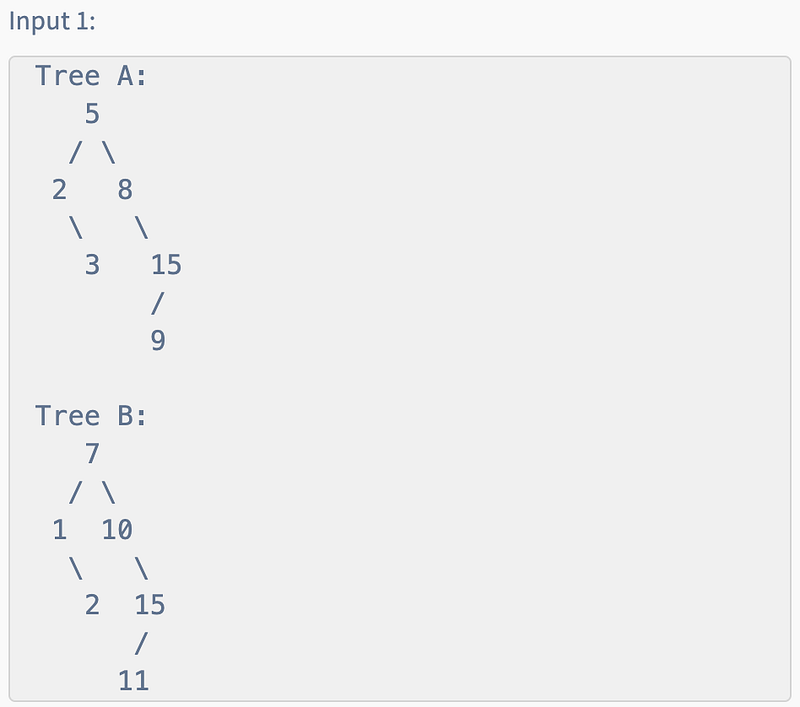
Output — 17
Explanation:
Common Nodes are: 2, 15
So answer is 2 + 15 = 17
Understanding the Problem
We have two BSTs A and B. We want to:
- Traverse both trees in sorted order (that’s what inorder traversal does for BSTs).
- Compare their values with the help of 2 pointers.
- Add common values to a running sum, modulo
1e9 + 7.
If no common nodes exist, return 0.
Approach 1: Common Solution (Using Arrays)
The straightforward method is:
- Do inorder traversal of
AandB. - Store results in two arrays.
- Use two pointers to find common values.
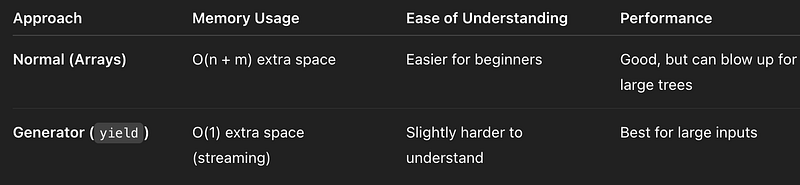
Issue with this approach — If the trees are too big, it can take lots of space in memory.
Approach 2: Using Generators (yield)
Instead of storing the entire inorder traversal, we can generate values one by one using yield and compare them to return the result.
What is yield?
yieldis used inside a generator function (function*).- Unlike
return(which exists immediately),yieldpauses the function and resumes on the next call to.next(). - This makes it perfect for streaming values lazily.
- So, no extra space while doing inorder traversal
Example
function* numbers() {
 yield 1;
 yield 2;
 yield 3;
}

const gen = numbers();
console.log(gen.next()); // { value: 1, done: false }
console.log(gen.next()); // { value: 2, done: false }
console.log(gen.next()); // { value: 3, done: false }
console.log(gen.next()); // { value: undefined, done: true }
Solution Via Yield
Using yield for Inorder Traversal
function* inOrder(root) {
 if (!root) return;
 yield* inOrder(root.left);
 yield root.data;
 yield* inOrder(root.right);
}
function findCommonSum(A, B) {
const MOD = 1e9 + 7;
let genA = inOrder(A);
let genB = inOrder(B);
// generate first in-order value of both
let { value: valueA, done: doneA } = genA.next();
let { value: valueB, done: doneB } = genB.next();
let sum = 0;
// run loop until one of the tree traversal is complete
while (!doneA && !doneB) {
if (valueA === valueB) {
// compare both values if equal then find next inorder values of both trees
sum = (sum + valueA) % MOD;
({ value: valueA, done: doneA } = genA.next());
({ value: valueB, done: doneB } = genB.next());
} else if (valueA < valueB) {
// If valueA is less then, increment A and get next value to compare
({ value: valueA, done: doneA } = genA.next());
} else {
// If valueB is less then, increment Band get next value to compare
({ value: valueB, done: doneB } = genB.next());
}
}
return sum;
}Comparing the Two Approaches
Key Takeaways
- Inorder traversal of BSTs gives sorted arrays.
- With arrays → simple but memory-heavy.
- With
yield→ more advanced, but memory-efficient. yieldis great when you don’t need the whole result at once.
Quick Quiz 📝
- What does
yieldreturn when called inside a generator?
a) The full array
b) A single value wrapped in{ value, done }
c) Nothing - Why is the generator approach better for large trees?
a) Faster execution
b) Less memory usage
c) Easier syntax
Comment your answers below 👇
At Dev Simplified, We Value Your Feedback 📊
👉 Connect with us to write on Dev Simplified.
👉 Have any suggestions? Let us know in the comments!