Why DNS Still Confuses Developers (Even in 2025)
It’s not you. DNS is complex, weirdly named, and full of traps.
You’re not alone if DNS still feels like a black box.
You know that moment when your site randomly breaks, and someone says, “Did you check the DNS settings?”
…And suddenly you’re sweating like you’re back in your first coding interview?
Yep.
DNS has been around since the 1980s, yet it still manages to trip up even experienced developers. Why? Because it’s invisible until it’s broken, poorly named, and rarely taught properly.
Let’s fix that today, with zero jargon and real-world clarity. Let’s understand it so that next time it will become really simple to answer.

First, What Even Is DNS?
Let’s kill the mystery.
DNS = Domain Name System.
Think of it as the internet’s address book.
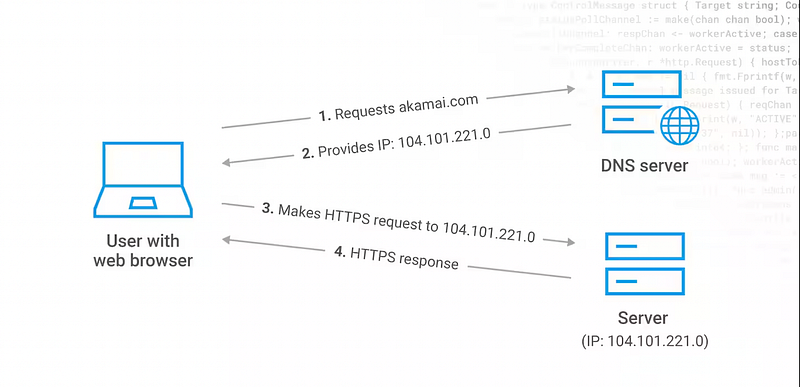
You typemycoolapp.com, and DNS tells the browser, Cool. That domain lives at IP address 104.26.3.2—go talk to that server.
More like a table mapping of the domain name you put in and then its corresponding address to actually locate it on the server. As it’s easier to remember mycoolapp.com then 104.26.3.2
Without DNS, we’d be memorising IP addresses like it’s 1995.
Okay, So Why Is It Still Confusing?
Because the flow looks like this (and nobody explains it like this):
- Your browser asks a DNS Resolver: “Where’s
mycoolapp.com?” - The resolver asks Root Servers: “Hey, who knows
.com?” - Then it goes to TLD Servers (
.com,.net, etc.) - Finally, it hits the Authoritative DNS Server for your domain (like Cloudflare or Route53)
- That server replies with: “Here’s the IP: 123.123.123.123”
Too many layers. And when it fails? Good luck figuring out which step broke.
Common DNS Traps That Drive Devs Nuts
Let’s make this painfully real:
- You deploy your app, but it doesn’t load.
DNS hasn’t propagated. (It can take 24–48 hours, depending on TTL.) - Your staging URL breaks randomly.
You forgot to update theArecord after changing hosting. - You set up a CDN, but assets are missing.
You skipped a CNAME record or messed up DNSSEC. - You use a custom domain on Vercel or Netlify, but it shows “not found.”
Missing root/apex domain forwarding.
DNS Terms That Sound Complicated But Aren’t
- A Record → Points the domain to an IP address
- CNAME → Alias that points to another domain (great for subdomains)
- MX Record → Mail server setup (for emails to work)
- TTL → “Time to Live” — how long DNS info is cached
- NS Records → Tell the internet which nameservers control your domain
You don’t need to memorise these. You do need to understand when each comes into play.
My DNS Disaster Story
We switched domains during a product launch. Everything worked locally. But when we went live, emails failed. Website failed. Devs panicked.
Why?
We updatedArecords, but forgot the MX records.
Our signup flow was broken for 3 days.
Lesson learned: DNS is not “set it and forget it.” It’s part of the deployment. Every. Single. Time.
How to Get Better at DNS (Without Becoming a SysAdmin)
Here’s your modern DNS learning plan:
- Use online tools to debug
- whatsmydns.net → Global propagation
dig,nslookup, or dnschecker.org
2. Visualize your setup
- Draw your domain → CDN → server flow
- Identify every place where DNS is involved
3. Add DNS checks to your deployment checklist
- Especially when switching domains, hosting, or mail providers
Final Thought
DNS feels like plumbing — out of sight, out of mind — until it leaks all over your product.
So don’t wait for the next bug report to learn how DNS works.
Understanding it won’t just save you time… it’ll save your launches.
Over to You
What’s the worst DNS bug you’ve faced? Or the best “aha” moment that made it click?
Let’s finally de-mystify DNS — together.
At Dev Simplified, We Value Your Feedback 📊
👉 Follow us to not miss any updates.
👉 Have any suggestions? Let us know in the comments!