useMemo in React: When It Boosts Performance (and When It Doesn’t)
A beginner-friendly guide to mastering memoisation, avoiding common pitfalls, and understanding how React 19 changes the game

If you’ve worked with React for a while, you’ve probably heard about useMemo. It’s often mentioned in performance discussions—but many developers either overuse it or avoid it entirely due to confusion.
Let’s break it down in a simple, practical way so you can use it confidently (and correctly).
What is useMemo in React?
At its core useMemo is a performance optimisation hook.
It stores (or caches) the result of a computation and only recalculates it when its dependencies change. This helps avoid repeating expensive work on every render.
Basic syntax:
const memoizedValue = useMemo(() => {
 return computeSomething();
}, [dependencies]);
How it works:
- On the first render → function runs, and the result is stored
- On re-render → React checks dependencies
- If dependencies haven’t changed → cached value is reused
- If they changed → function runs again
React uses Object.is internally to compare dependency values.
When should you use useMemo?
useMemo is most useful when your app performs heavy computations or handles large data sets.
Common use cases:
1. Filtering or sorting large lists
const completedTodos = useMemo(() => {
 return todos.filter(todo => todo.completed);
}, [todos]);
2. Complex calculations
For example, pricing logic, analytics calculations, or aggregations.
3. Derived state
When you compute values from props or context instead of storing them directly.
Understanding Dependencies (The Real Key)
The effectiveness of useMemo depends heavily on correct dependency management.
Important concept: Referential Equality
In JavaScript:
- Primitives (
number,string) compare by value ✅ - Objects & arrays compare by reference ❌
This means:
useMemo(() => calculate(), [{}]); // ❌ BadWhy? Because {} creates a new object on every render → memoization breaks.
Correct approach:
- Use stable references
- Memoise objects/functions if needed
const obj = useMemo(() => ({ a: 1 }), []);useMemo vs React.memo: Don’t Confuse Them
This is one of the most common mistakes.
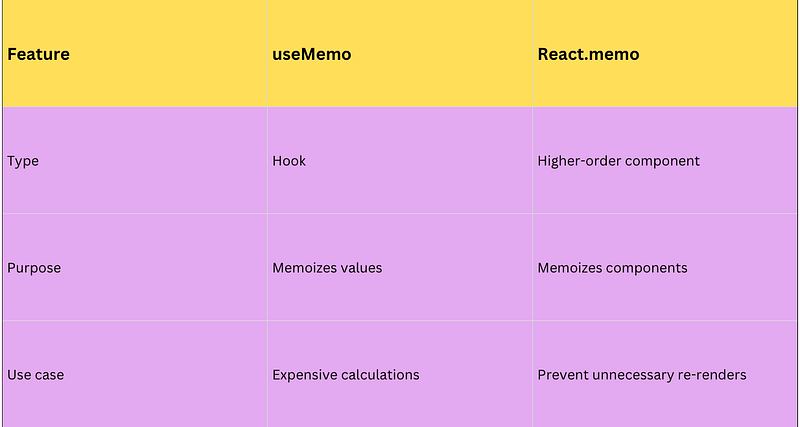
❌ Incorrect usage:
const element = useMemo(() => <Child />, []);This returns a React element (object), not a component — leading to potential issues.
✅ Correct usage:
const MemoizedChild = React.memo(Child);👉 Simple rule:
useMemo → data optimisation
React.memo → component optimisation
Optimising React Context with useMemo
If you’ve used Context API, you might have noticed unnecessary re-renders.
Problem:
const value = { user, setUser }; // new object every renderEven if user hasn’t changed, all consumers re-render.
Solution:
const value = useMemo(() => ({ user, setUser }), [user]);Now:
- The object reference stays stable
- Consumers only re-render when
userchanges
Advanced Pattern: useMemo + useCallback
For better stability:
const signOut = useCallback(() => setUser(null), []);
const contextValue = useMemo(() => ({
 user,
 signOut
}), [user, signOut]);
Why this works:
useCallbackstabilizes functionsuseMemostabilizes objects
Does useMemo Really Improve Performance?
It depends.
Benchmark insights:
- Heavy computations → up to ~60–70% improvement
- Simple operations → negligible difference
Important observation:
useMemoalone → small gains- Combined with component memoization → significant improvement
However…
⚠️ Overusing it can:
- Increase memory usage
- Add complexity
- Cause bugs (if dependencies are wrong)
React 19: Do You Still Need useMemo?
With the upcoming React Compiler, things are changing.
What it does:
- Automatically optimises re-renders
- Memoises values and functions
- Stabilizes references
What this means:
- You’ll write less manual
useMemo - Optimisation becomes mostly automatic
But it’s still useful for:
- Third-party libraries (charts, drag-and-drop)
- Heavy external data processing
- Older codebases without compiler support
So, it’s not going away — just becoming less common.
Common Mistakes to Avoid
❌ Using hooks inside useMemo
useMemo(() => {
 useState(0); // invalid
});
❌ Memoizing JSX
useMemo(() => <Component />, []); // wrong❌ Conditional usage
if (condition) useMemo(() => ...); // breaks rules❌ Using for side effects
useMemo(() => {
 localStorage.setItem('key', value);
}, [value]); // wrong
👉 Use useEffect for side effects.
Best Practices (What Actually Works)
✅ Use it when:
- Computation is expensive
- Data size is large
- You need stable references
✅ Combine with:
useCallback→ for functionsReact.memo→ for components
✅ Always:
- Profile first (React DevTools)
- Keep dependencies accurate
Key Takeaways
useMemocaches computed values to avoid unnecessary recalculations- It’s most useful for expensive operations, not small ones
- Dependency management is critical — wrong dependencies = bugs
- Don’t confuse it with
React.memo(data vs components) - It plays a big role in optimising Context API performance
- Overusing it can hurt more than help
- With React 19, manual optimisation will reduce — but not disappear
If you like this article, please do support me by clapping on this article, For you it might take some seconds for me it provides me huge motivation to keep writing more.
At Dev Simplified, We Value Your Feedback 📊
👉 To read more such articles on React, visit here
👉 Follow us not to miss any updates.
👉 Have any suggestions? Let us know in the comments!