Top 10 most commonly asked JavaScript Interview questions that you should know
Drawing on my experience as a Full Stack Developer for the past four years, I’ve compiled a set of essential JavaScript interview questions that frequently appear in interviews. These core concepts are often revisited, forming a strong foundation for success. We’ll explore these questions in order of increasing difficulty, ensuring you’re well-prepared to showcase your JavaScript expertise.
Table Of Content
- Difference between var, let & const ?
- How can we print the keys of an object in JavaScript without using for loop?
- Being single threaded, can JavaScript handles async operations? Explain in depth?
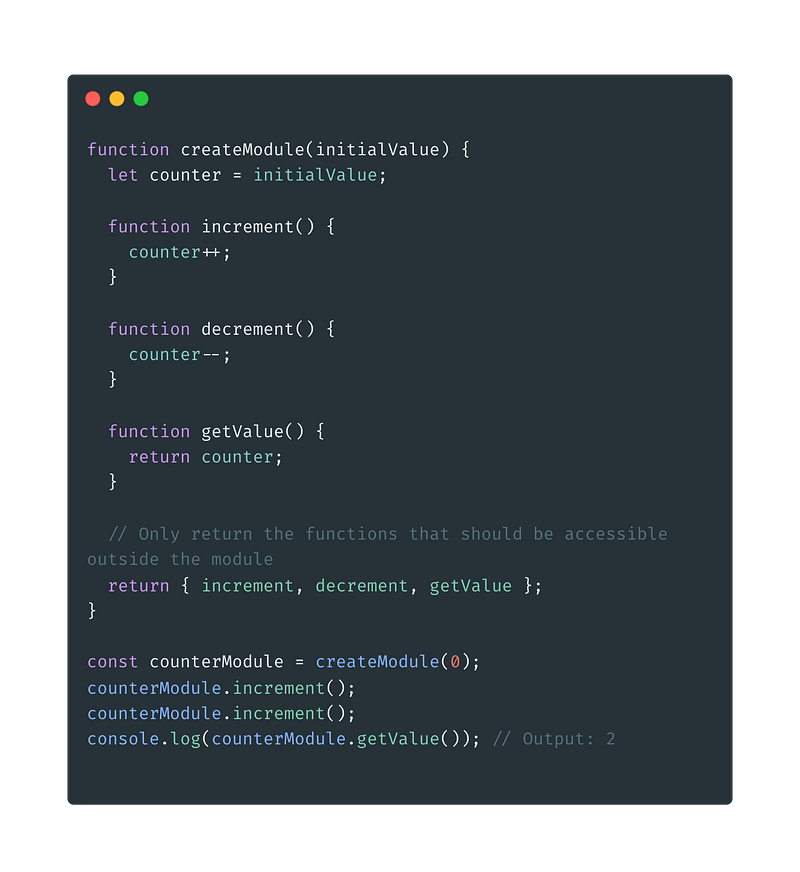
- What are closures in JavaScript?(Application of closures)
- Output of given code snippet?(Application of closures)
- What is an event loop, call stack, execution context?
- What is a deep copy and shallow copy of an object and How it is formed?
- What are arrow functions? How scope of this keyword changes with arrow functions?
- Difference between a map, forEach and for loop in JavaScript?
- How can we print the elements of a JavaScript array containing nested arrays (unknown depth) in a single-level format?
- Queries
Difference between var, let & const ?
Using all var, let & const we can declare variables inside JavaScript, but it differs in different ways like the scope of the variables declared, hoisting, reassigning the value etc.
var
- Scope: Function level and global level scope.
- Declaration: var can be both re-declared (creating a new variable with the same name) and updated (changing the value).
- Hoisting: var declarations are hoisted to the top of their scope (function or global). This means we can access a
varvariable even before its declaration in the code, but its value will beundefineduntil it's actually assigned.
let
- Scope: Block level scope. Scope within curly brackets `{}`.
- Declaration: let can be updated but cannot be re-declared within the same scope.
- Hoisting: let declarations are not hoisted. We cannot access them before their declaration in the code.
const
- Scope: Block level scope. Scope within curly brackets `{}`.
- Declaration: const cannot be updated or re-declared after its initial assignment. It must be assigned a value at the time of declaration.
- Hoisting: const declarations are not hoisted. We cannot access them before their declaration in the code.
Good Practice: It’s generally recommended to useconstwhen the variable not needs to be reassigned, while useletin other cases. Usage ofvarshould be avoided due to its scoping issues
How can we print the keys of an object in JavaScript without using for loop?
Object.keys method can be used for accessing object keys while
Object.entries can be used to access both its values and keys.
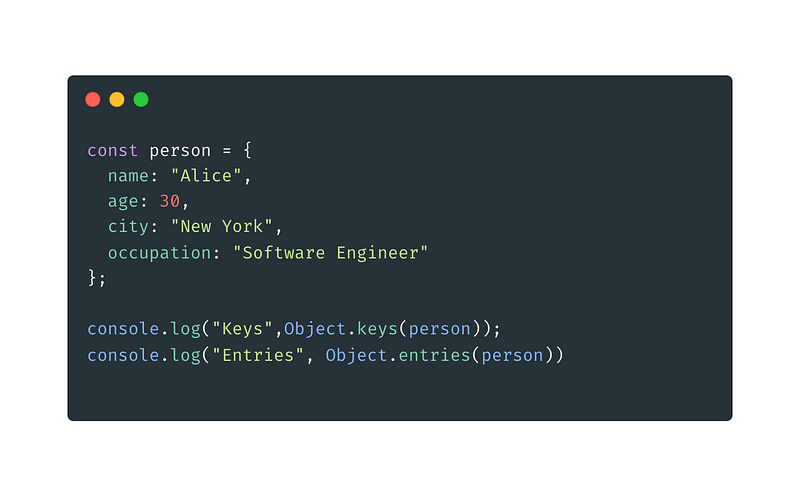
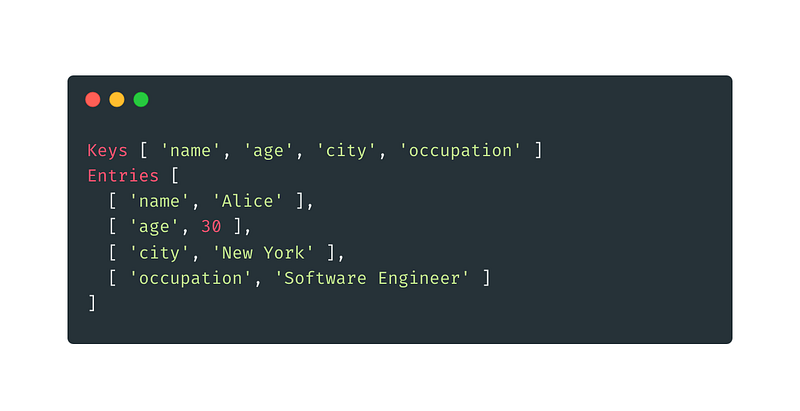
Note: There are some of the properties that are widely used, and a JS Developer should be familiar to it. Some of them are Object.keys, Object.values, hasOwnProperty, freeze, sealBeing single threaded, can JavaScript handles async operations? Explain in depth?
Yes, JavaScript is single threaded, but it can handle async operations by using callback functions, async/await or promises.
Async Operations are those operations which take some time to execute.
Ex- making a network request, I/O operations etc.
JavaScript handles async operations using call stack and event loop.
- Single thread executes functions one at a time.
- Async operations (network calls, timers) take time and can’t block the main thread.
- Enter the Event Loop: It monitors a queue of waiting async tasks.
- When the main thread is free (empty stack), the Event Loop:
- Checks the queue for ready async tasks.
- Moves suitable tasks to the stack for execution.
- Callbacks: Async functions tell the Event Loop what to do when they finish (like a to-do list).
What are closures in JavaScript?
In JavaScript, closures are a powerful concept that combines a function with its surrounding environment (lexical scope) at the time of creation. This allows the inner function to access variables from the outer function’s scope, even after the outer function has finished executing.
Ex — Data Privacy, State Management, Module patterns
Output of given code snippet? (Application of closures)
function test() {
 let i=0;
 for ( i = 0; i < 5; i++) {
 setTimeout(() => console.log(i), i);
 }
 }
test();- What will be the output of above code snippet and why?
Output of the code 5,5,5,5,5Final i Value: By the time the timeout callbacks are triggered (after the delay), the loop has already completed, and i has reached its final value (5). This means all the closures capture the value 5.
2. Update the code snippet so that it prints 0,1,2,3,4?
function outer(){
 let j=0;
 return function test() {
 for ( i = 0; i < 5; i++) {
 setTimeout(() => {console.log(j); j++;}, i);

 }
 }
}
outer()();
Key Point: The crucial aspect in this code is that the variable j is declared within the outer function (outer). This means the inner function (test) inherits a closure over this j.
Closure and Execution:
- Each iteration of the loop creates a closure around the current value of
j. - However, since
jis incremented after thesetTimeoutcall (inside the arrow function), each closure captures the value ofjat the time of creation. - This ensures that when the timeout callbacks are finally executed (after the delay), they each log the correct value of
jthat was captured during their creation.
What is an event loop, call stack, execution context?
Event loop, call stack and execution context these concepts works together to handle async operations in JavaScript.
Execution Context:
- When a function is invoked, an execution context is created for it. This context holds information about the function’s execution, including:
- Variable environment (local variables defined within the function)
- A reference to the function’s arguments
- A reference to the outer function’s context (in case of nested functions)
Call Stack:
- The functions are pushed into the Stack in LIFO order, and they’re removed from the stack once they finish executing.
- Only the function at the top of the stack is executed at a time.
Event Loop:
- Event loop is a loop that continuously monitor call stack and queues.
It continuously monitors the scenario:
- Call Stack Check: The event loop constantly checks if the call stack is empty (no function executing).
- Task Selection: If the call stack is empty, the event loop examines an event queue (explained later) for tasks that are ready to be executed (usually tasks that don’t require waiting for anything else).
- Task Execution: The event loop then moves suitable tasks from the queue to the top of the call stack for execution.
- Waiting for Queue/Stack: If no tasks in the queue are ready or the call stack isn’t empty, the event loop waits for an asynchronous operation to finish or the current function to complete.
In summary:
- The call stack keeps track of the currently executing functions.
- The event loop manages asynchronous operations and ensures the program remains responsive.
- The execution context provides the environment for each function execution.
What is a deep copy and shallow copy of an object and How it is formed?
Shallow Copy
- It creates a new object which references to the existing object and values which means that nested object will still be referenced not created.
- Updating the new object will also update the exisiting object.
- Shallow copy can be created using
spread operatoror by usingObject.assign
let obj = {
 name:"Neha",
 profile:{
 linkedin:"https://www.linkedin.com/in/nehagupta1504/",
 topmate:"https://topmate.io/nehagupta1504"
 }
}

let shallowCopy = {...obj};

// updating shallowcopy
shallowCopy.profile["github"] = "https://github.com/nehagupta1504";

//original object is updated
console.log("shallow copy=>",shallowCopy)
console.log("original object=>", obj);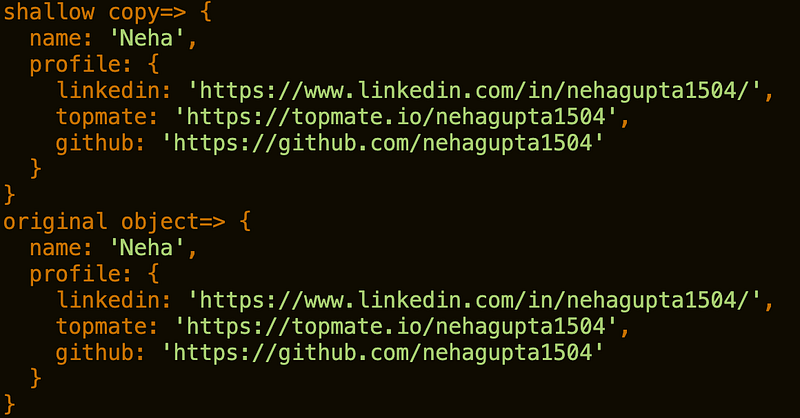
Deep Copy
- An object is created which has its own properties and values which are the exact copy of the original object from which it is created.
- Updating the new object will not update the existing object.
- Deep copy can be created using
json.stringify()json.parse()or by looping through original array and copying its value to the new array.
let obj = {
 name:"Neha",
 profile:{
 linkedin:"https://www.linkedin.com/in/nehagupta1504/",
 topmate:"https://topmate.io/nehagupta1504"
 }
}

let shallowCopy = JSON.parse(JSON.stringify(obj));

// updating shallowcopy
shallowCopy.profile["github"] = "https://github.com/nehagupta1504";

//original object is updated
console.log("shallow copy=>",shallowCopy)
console.log("original object=>", obj);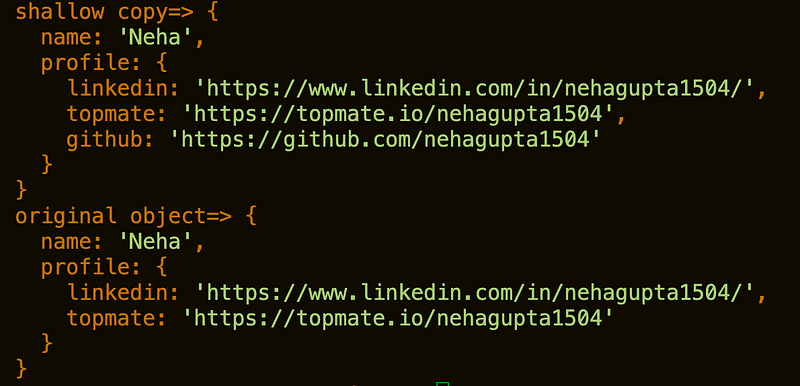
What are arrow functions? How scope of this keyword changes with arrow functions?
Arrow function in ES6 are defined to provide a concise way to define traditional functions. Using arrow function, we can improve conciseness, readability of the code.
// Traditional function
function sum(a,b){
 return a+b;
}
// Arrow function
const sum = (a,b)=>a+b
Scope of this keyword
Arrow function also impact scope of this keyword as unlike normal this keyword, in arrow function this keyword scopes binds with its parent/outer surrounding where the arrow function is defined.
const person = {
 name: "Neha",
 greet: function() {
 console.log(this.name); // this refers to person object (where greet is defined)
 },
 greetArrow: () => {
 console.log(this.name); // this might refer to something else depending on call context
 },
};

person.greet(); // Output: "Alice"
person.greetArrow(); // Output: undefined
Difference between a map, forEach and for loop in JavaScript?
Map:
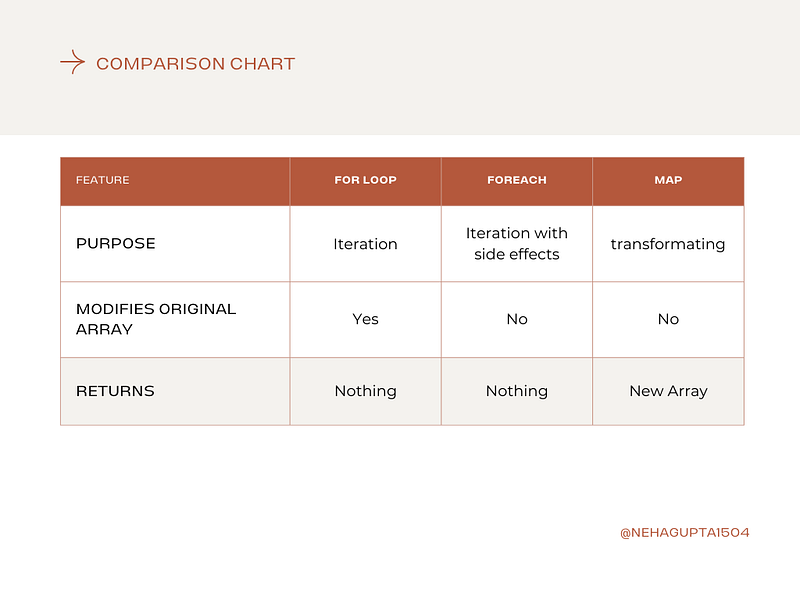
- Map is an array method which creates a new array with the operations defined on the original array.
- Used for transforming array elements or creating a new array based on the original.
let arr = [1,2,3,4,5];
let square = arr.map(el=>el*el);
console.log(square); // [1, 4, 9, 16, 25]
For Each
- Simpler syntax for iterating for loop.
- Executes a provided function once for each element in the array.
- Cannot modify the original array within the loop (useful for side effects).
- Doesn’t return a new value by default.
For Loop
- Provides the most control and flexibility for iterating through an array.
- You define a starting index, condition for continuing the loop, and increment/decrement step.
- Allows you to access and modify elements within the loop.
How can we print the elements of a JavaScript array containing nested arrays (unknown depth) in a single-level format?
Input: [1, [2, 3, [4, 5, 6, [7, 8, 9, [10, 11, 12]]]], 13, 14, [15, 16, [17]]];
Output: [1, 2, 3, 4, 5, 6, 7, 8, 9, 10, 11, 12, 13, 14, 15, 16, 17]

Input: [1, [2,3, [4]]]
Output: [ 1, 2, 3, 4 ]
let nestedArray = [1, [2,3, [4]]]
const flattenArray = (arr) => {
return arr.reduce((acc, item) => {
if (Array.isArray(item)) {
return acc.concat(flattenArray(item));
} else {
return acc.concat(item);
}
}, []);
};
console.log(flattenArray(nestedArray)); // Output: [ 1, 2, 3, 4 ]Queries
Hope you have enjoyed leading it and learnt something new or advantageous from this blog today.
Now If you have any doubts or queries feel free to drop a comment or connect with me on my Topmate .
You can also reach out to me on my LinkedIn and follow me for updates on latest blogs.
Please do like this post if you enjoyed reading it.
Thanks for the read :)
Also you can support me and my writings by treating me to a nice virtual cup of coffee ☕️
In Plain English 🚀
Thank you for being a part of the In Plain English community! Before you go:
- Be sure to clap and follow the writer ️👏️️
- Follow us: X | LinkedIn | YouTube | Discord | Newsletter
- Visit our other platforms: Stackademic | CoFeed | Venture | Cubed
- More content at PlainEnglish.io