The Biggest Mistake Developers Make With AI (And Why It’s Making Them Worse Engineers)
A junior developer recently told me:
“I finish tickets 3x faster with AI… but if something breaks, I have no idea what’s happening.”
That sentence perfectly explains the biggest mistake developers are making with AI today.
AI is making us faster.
But in many cases, it’s also making us less capable.
And no, the problem is not using AI.
The problem is how developers are using it.
If you’re blindly copying AI-generated code, skipping reasoning, and treating AI like an autopilot instead of a co-pilot, you may be quietly damaging the exact skills that make great engineers valuable.
Let’s talk about the mistake almost nobody discusses.
The Real Mistake: Treating AI Like a Developer Instead of a Reviewer
Most developers think:
“AI wrote it, so it must be fine.”
That mindset is dangerous.
AI is excellent at:
✅ Boilerplate
✅ Refactoring suggestions
✅ Documentation
✅ Debugging hints
✅ Generating starting points
But it struggles with:
❌ Context awareness
❌ Business logic nuances
❌ System architecture decisions
❌ Hidden edge cases
❌ Production reliability
The biggest mistake developers make is this:
Using AI for thinking instead of thinking with AI
That tiny difference changes everything.
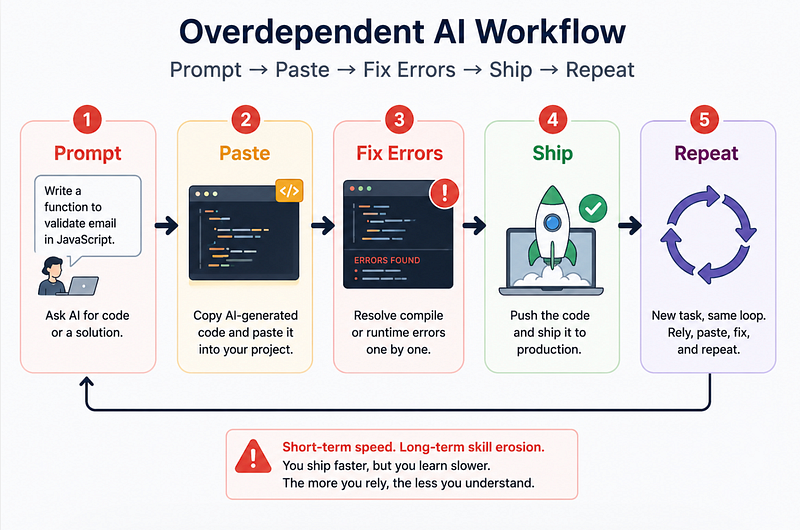
A Common Workflow That Quietly Hurts Developers
Here’s what many developers do:
Step 1: Copy ticket requirements
Prompt:
Build a React pagination component with API integration.Step 2: Copy the generated code
Step 3: Fix compilation errors
Step 4: Ship
Done.
Fast?
Yes.
Good engineering?
Not always.
Because the real learning never happened.
You skipped:
- architecture thinking
- tradeoff analysis
- debugging reasoning
- edge case consideration
Eventually, something scary happens:
You become dependent.
And dependency becomes obvious the moment AI gives bad output.
The “Looks Correct” Trap
- architecture thinking
- tradeoff analysis
- debugging reasoning
- edge case consideration
Eventually, something scary happens:
You become dependent.
And dependency becomes obvious the moment AI gives bad output.
AI-generated code
async function getUserData(userId) {
 const response = await fetch(`/api/user/${userId}`);
 return response.json();
}
Looks fine, right?
But what happens if:
- Request fails?
- API returns 500?
- JSON parsing fails?
- timeout occurs?
Missing production handling.
Better implementation
async function getUserData(userId) {
 try {
 const response = await fetch(`/api/user/${userId}`);
 if (!response.ok) {
 throw new Error("Failed to fetch user");
 }
 return await response.json();
 } catch (error) {
 console.error(error);
 return null;
 }
}
Why this matters
AI often optimises for:
“Looks correct”
But engineering requires:
“Works reliably under failure”
That’s a massive difference.
The Skill Developers Are Accidentally Losing
The biggest hidden loss is not coding speed.
It’s problem-solving ability.
Great developers aren’t valuable because they type fast.
They’re valuable because they can answer:
“Why is this system breaking?”
AI can generate code.
But when production crashes at 2 AM?
You still need to think.
Strong engineers ask:
- Why did this fail?
- What assumptions broke?
- What’s the bottleneck?
- What edge case did we miss?
Weak AI usage creates:
Prompt → Copy → Paste → Hope
And hope is not an engineering strategy.
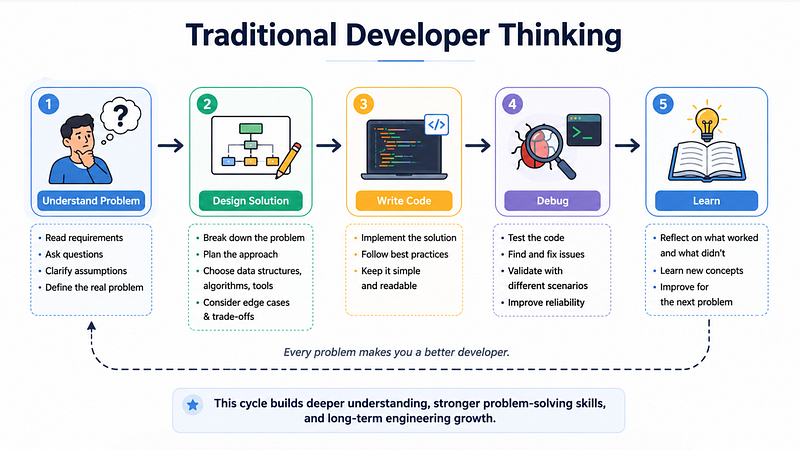
Traditional Developer Thinking
A Better Way to Use AI (That Actually Improves Your Skills)
Here’s a workflow I recommend to developers.
1. Solve first, prompt second
Before opening AI:
Ask yourself:
“How would I solve this manually?”
Even rough thinking matters.
Example:
Instead of:
Build JWT authentication.Try:
I plan to use JWT authentication with refresh tokens.
My architecture is:
Frontend → API → Auth middleware → DB
Review my approach.
Suggest improvements and security issues.
Notice the difference?
You’re leading.
AI is assisting.
That changes learning completely.
2. Ask AI to critique, not just generate
Bad prompt:
Write Redis caching implementation.Better prompt:
Review my Redis caching strategy.
What scalability issues or cache invalidation problems might happen?
This develops:
- architecture thinking
- systems thinking
- scalability awareness
Basically:
Senior engineer thinking.
3. Use AI for debugging explanations
Instead of asking:
Fix this bug.Ask:
Explain WHY this bug happens.
Walk me through root cause analysis.
This one habit alone can massively improve debugging skills.
The Counterintuitive Truth About AI
Here’s the surprising payoff most developers don’t expect:
The developers benefiting most from AI are often the strongest engineers already.
Why?
Because experienced developers know:
- What questions to ask
- What bad code looks like
- Where edge cases hide
- When AI is hallucinating
Ironically:
The better your fundamentals, the more valuable AI becomes.
Not the other way around.
That’s why two developers using the same AI tool can get wildly different outcomes.
One becomes faster.
The other becomes dependent.
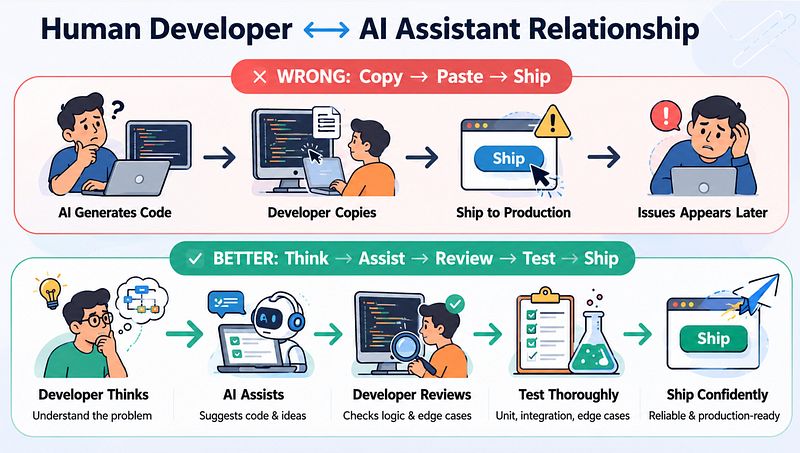
A Practical AI Workflow for Developers
Here’s a healthier approach:
Step 1: Understand the problem
Write assumptions first.
Step 2: Attempt your own solution
Even if imperfect.
Step 3: Ask AI for review
Use it like a senior peer review.
Step 4: Challenge AI output
Question everything.
Step 5: Test edge cases
Never trust the first output.
Step 6: Learn from mistakes
Save patterns you repeatedly miss.
Final Thought
AI is not replacing developers.
But it can replace your thinking if you let it.
The real goal isn’t:
“How can AI write more code for me?”
It’s:
“How can AI make me a better engineer?”
That mindset shift changes everything.
Because the developers who thrive in the AI era won’t be the ones who prompt the fastest.
They’ll be the ones who still know how to think.