The Best No-Code Tools I’ve Used (And What to Avoid)
A personal take on the pros, cons, and surprising lessons from building with no-code.
I used to roll my eyes at no-code tools.
“If I can build it in React, why would I need this?”
Then I tried building a quick internal dashboard without touching a single line of code — and it just worked.
- That dashboard turned into a client demo.
- That client demo turned into a paying project.
- That paying project saved me weeks of work.
So if you’re still ignoring no-code in 2025 — especially as a developer — I’m here to tell you: it’s time to rethink.
Why I Started Using No-Code Tools (And You Might Too)
Let’s be honest: not every project needs 15 libraries, a backend API, and CI/CD pipelines. Sometimes, you just need to get an idea out.
And no-code gives you three superpowers:
- Speed — Build in hours, not weeks
- Clarity — Focus on workflows and logic, not boilerplate
- Collaboration — Share editable prototypes with clients or teams instantly
But the real shift?
No-code lets you validate faster and fail smarter.
My Favourite No-Code Tools (With Real Use Cases)
Here are the tools I’ve personally used — and where they shine:
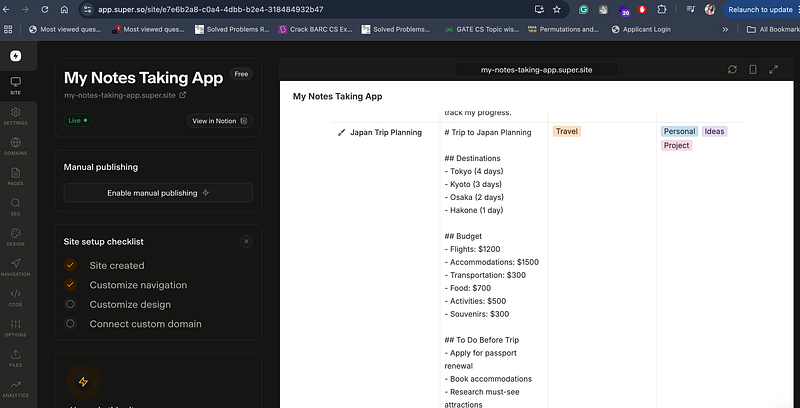
1. Notion + Super.so
Use Case: Simple websites, documentation, content hubs
You can turn a Notion page into a clean, fast site with zero config.
✅ Perfect for: Portfolios, resource pages, personal sites
❌ Not great for: Anything dynamic or multi-user
Example — I have built a notes taking app template and integrated it with super.so
2. Webflow
Use Case: Marketing sites, landing pages
Design-first and pixel-perfect. You’ll ship beautiful, responsive sites without touching CSS.
✅ Great for designers and visual builders
❌ Has a learning curve; pricing can escalate for teams
3. Airtable
Use Case: Database-lite for internal tools
Looks like a spreadsheet, works like a database. Super flexible.
✅ Easy to integrate with APIs via Zapier or Make
❌ Gets messy for large datasets or complex logic
4. Tally Forms
Use Case: Forms, surveys, waitlists
Cleaner than Google Forms, easier than Typeform.
✅ Unlimited forms for free
❌ Basic analytics — not ideal for advanced user journeys
5. Softr.io
Use Case: Dashboards, portals, member areas
Turn Airtable or Google Sheets into fully functional apps.
✅ Fastest way to build MVPs
❌ Limited if you need custom UI or business logic
No-Code Isn’t “One-Click Magic” — Here’s What to Avoid
- Assuming It’s Always Faster: For complex apps, code is still king.
- Skipping UX: Drag-and-drop doesn’t mean it looks good — design still matters.
- Ignoring Vendor Lock-in: Some tools make it hard to export your data or migrate later.
No-code accelerates — it doesn’t replace common sense.
Real Talk: Developers Should Embrace This
The smartest devs I know?
They’re using no-code for:
- Internal tools
- MVPs
- Landing pages
- Automation workflows
Not because they “can’t” code.
But because their time is too valuable to waste on coding the same thing from scratch.
Final Thought
No-code isn’t about replacing developers. It’s about empowering builders.
So, whether you’re launching a side project, testing a product, or just trying to save time at work, give these tools a shot.
Your Turn
What’s the best no-code tool you’ve used?
Or one that totally flopped?
Drop it in the comments 👇
Let’s make this the ultimate no-code toolkit for 2025.
At Dev Simplified, We Value Your Feedback 📊
👉 If you like the article, then please support the writer by clapping for this article.
👉 Have any suggestions? Let us know in the comments!