The AI Workflow That Made Me 3x Faster as a Developer (Without Replacing My Skills)
A practical developer workflow for using AI to debug faster, write cleaner code, learn quicker, and still think like an engineer.

I thought AI would magically make me faster.
Instead, it made me slower.
I was copying code from ChatGPT, pasting it into my project, fixing weird bugs, rewriting broken logic, and spending more time debugging than actually building.
At one point, I realised something uncomfortable:
AI wasn’t making me productive. My workflow was broken.
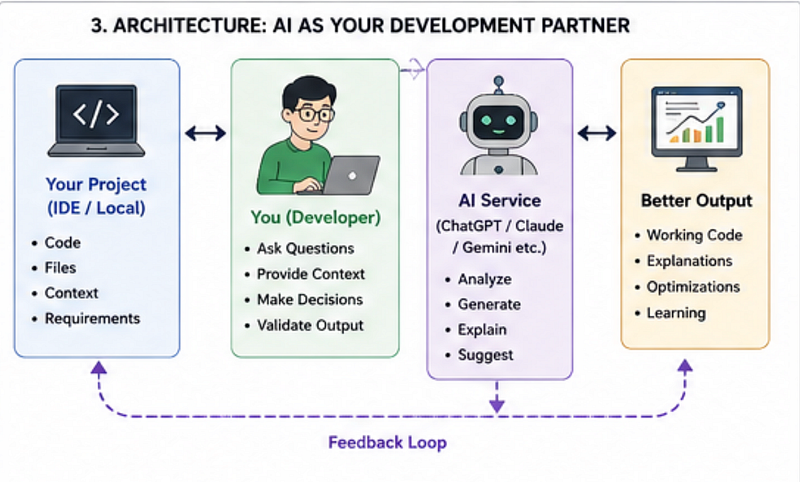
The real breakthrough came when I stopped treating AI like a Google replacement and started using it like a developer teammate.
That single shift changed everything.
Today, I use AI every day — and I genuinely ship faster.
Not because AI replaced my skills.
But because it amplified them.
Here’s the exact workflow that made me 3x faster as a developer without making me dependent on AI.
The Biggest Mistake Developers Make With AI
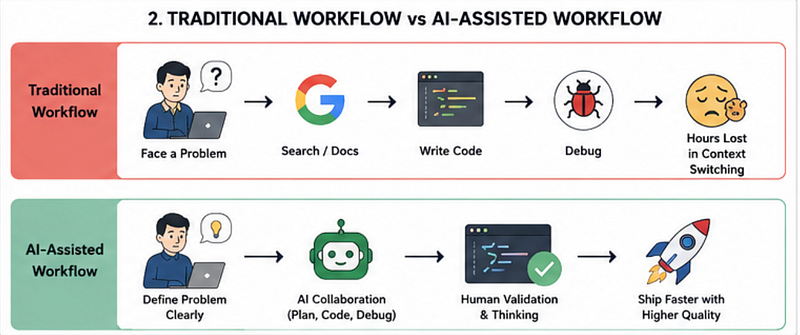
Most developers use AI like this:
Problem → Ask AI → Copy Code → Paste → Hope It WorksSounds familiar?
The problem is:
- AI lacks project context
- Generated code can be technically correct but architecturally wrong
- You stop thinking deeply about problems
- Debugging becomes harder
The result?
You become faster at starting, but slower at finishing.
What Actually Works
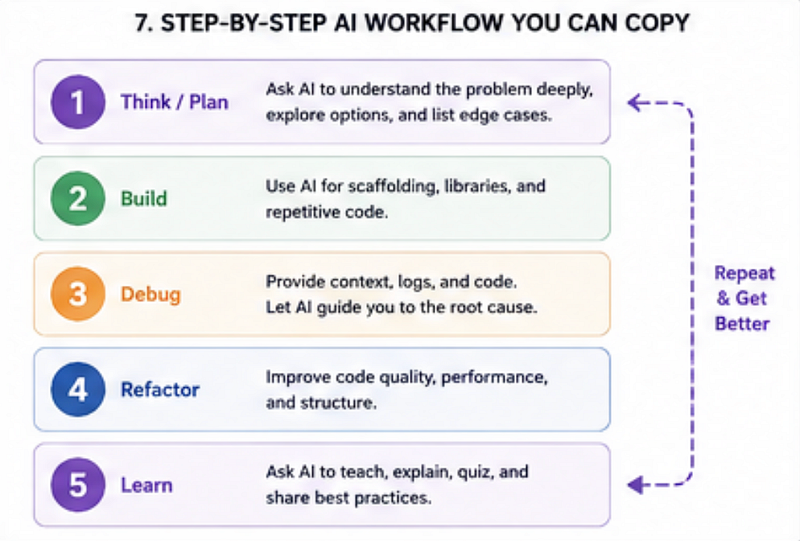
Instead of asking AI to solve everything, I split development into 5 different stages.
And I use AI differently in each one.
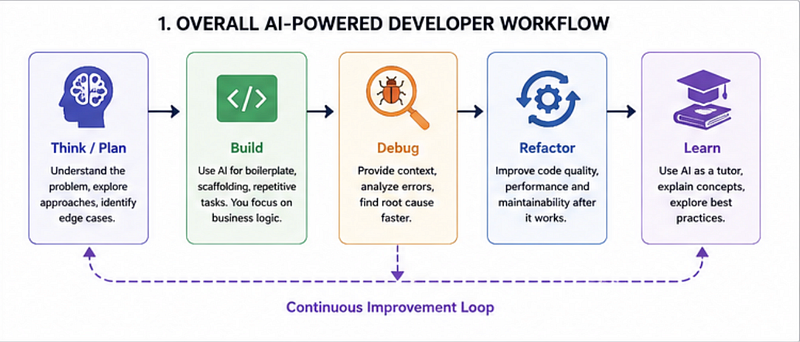
1. I Use AI for Planning — Not Coding First
This alone changed how I work.
Before touching code, I ask AI to help me think through the problem.
Bad Prompt
Build authentication in Next.jsThis usually gives a generic boilerplate.
Better Prompt
I'm building authentication in Next.js 15.
Requirements:
- Google login
- JWT session
- Role-based access
- Middleware protection
- MongoDB
Help me think through architecture and edge cases.
Do not write code yet.
Notice the difference?
I’m asking for thinking, not code.
This helps me:
- Identify edge cases early
- avoid architecture mistakes
- reduce future refactoring
Why This Matters
Most bugs happen because of poor planning, not bad coding.
AI becomes incredibly powerful when used as a thinking partner.
2. I Let AI Write Boilerplate — Not Business Logic
Here’s a controversial opinion:
You shouldn’t manually write repetitive code anymore.
AI is excellent at:
✅ API scaffolding
✅ Type definitions
✅ Form validation setup
✅ CRUD operations
✅ Test case templates
✅ Documentation
Example:
Instead of manually creating repetitive validation:
Before
if (!email) {
 return "Email required";
}
if (!email.includes("@")) {
 return "Invalid email";
}
if (password.length < 8) {
 return "Password too short";
}
Better Approach Using AI + Validation Libraries
import { z } from "zod";
const schema = z.object({
 email: z.email(),
 password: z.string().min(8),
});
What AI Did
AI helped me:
- Choose the right library
- scaffold validation
- explain implementation
What I Still Did
I still made engineering decisions.
That distinction matters.
Because copying code is not engineering. Decision-making is.
3. I Use AI Like a Debugging Partner
This is where AI saves me the most time.
Instead of saying:
Fix this bugI provide context.
My Debugging Template
Here's the bug:
Expected:
User stays logged in
Actual:
Session resets after refresh
Tech stack:
Next.js 15
JWT auth
Middleware
Here is the relevant code:
[paste code]
Help me debug step by step.
Do not rewrite everything.
This produces dramatically better answers.
Why?
Because debugging is about context.
Common Mistakes Developers Make
They dump 500 lines of code and ask:
“Why broken?”
Even senior developers can’t debug like that.
Neither can AI.
4. I Use AI for Refactoring After Things Work
This might surprise you.
I don’t optimise while building.
I optimise later.
Once the feature works:
I ask AI:
Refactor this for:
- readability
- performance
- maintainability
- clean architecture

Explain tradeoffs.
Example:
Before Refactoring
const users = data.filter((x) => x.active === true);After
const activeUsers = data.filter(user => user.active);Small improvement?
Sure.
But over hundreds of files?
Huge readability gains.
Why This Works
Premature optimisation slows developers down.
AI helps me improve code after momentum is built.
5. I Use AI to Learn Faster
This is probably the most underrated use case.
Instead of watching 4-hour tutorials, I learn interactively.
Example:
Teach me Redis caching like I'm a React developer.
Start beginner-friendly.
Then give production examples.
Then quiz me.
This makes learning feel like pair programming.
You’re not passively consuming.
You’re actively exploring.
Mini Quiz
Quick question:
You’re implementing authentication.
What should AI ideally help with?
A. Entire application logic
B. Repetitive setup and edge-case brainstorming
C. Making architectural decisions for you
Answer: B
Because engineering judgment still matters.
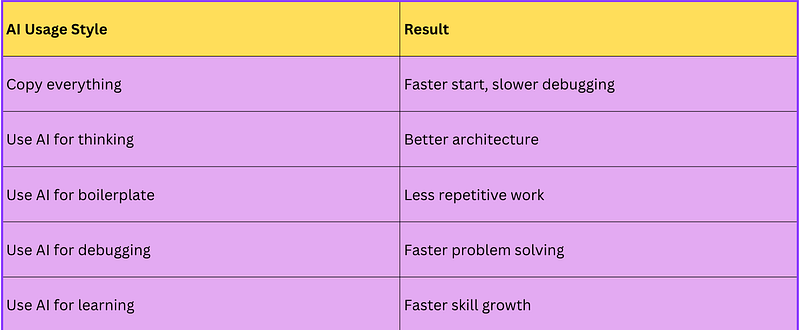
The Surprising Payoff: Using AI Less Actually Made Me Faster
This sounds backward.
But hear me out.
When I stopped asking AI to write entire features and started using it strategically:
- My debugging time dropped
- My understanding improved
- My code quality got better
- I trusted my own skills more
The irony?
The less dependent I became on AI, the more valuable AI became.
That was the real productivity unlock.
AI works best when it enhances thinking — not replaces it.
A Simple AI Workflow You Can Copy Today
Here’s the exact framework I follow:
Step 1: Think
Ask AI for architecture and edge cases.
Step 2: Build
Use AI for repetitive setup.
Step 3: Debug
Provide context, not chaos.
Step 4: Refactor
Improve after the features work.
Step 5: Learn
Turn AI into a tutor.