Stop Using AI Like a Beginner: Smart Developers Are Quietly Using This One Trick
Most developers are asking AI the wrong way. Here’s how top engineers use context, iteration, and system-level thinking to get dramatically better results.

AI tools have become part of almost every developer’s workflow. But there’s a huge difference between developers who occasionally copy AI-generated code… and developers who use AI as a true engineering partner.
The biggest mistake?
Most people still treat AI like a search engine.
They ask isolated questions like:
"How do I parse JSON in Java?"…and expect perfect production-ready answers.
That approach usually leads to generic code, missing edge cases, poor architecture decisions, and hallucinated solutions.
Smart developers use AI differently.
They treat it like a junior apprentice that needs context, guidance, feedback, and iteration.
And that small mindset shift changes everything.
The Problem With Using AI Like Google
Search engines retrieve information.
AI generates responses based on patterns.
That means AI does not “look up” answers the same way Google does.
When you ask vague or isolated questions, the AI fills gaps using probability rather than real understanding.
Typical Developer Prompt
Write a function to parse JSON in JavaWhat Usually Happens
- Generic boilerplate
- No error handling
- No business context
- No scalability considerations
- No integration awareness
The output may technically work…
…but it probably won’t fit your actual system.
Smart Developers Use “Briefings,” Not Queries
Experienced engineers provide AI with context before asking for solutions.
Instead of asking a tiny question, they describe:
- System architecture
- Constraints
- Business rules
- Performance requirements
- Framework choices
- Expected scale
- Existing patterns
This transforms the quality of AI responses.
Query vs Briefing
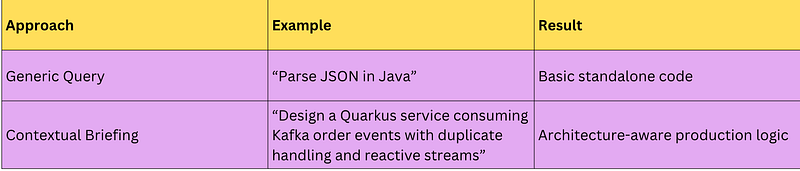
Some developer case studies report 60–70% better output quality when proper context is provided.
While these numbers are anecdotal rather than scientifically verified, the improvement pattern appears consistently across engineering teams.
Visual: Traditional AI Usage vs Smart AI Collaboration
┌──────────────────────┐
│ Ask Random Question │
└──────────┬───────────┘
 ↓
┌──────────────────────┐
│ Generic AI Response │
└──────────┬───────────┘
 ↓
┌──────────────────────┐
│ Manual Rework │
└──────────────────────┘
vs
┌────────────────────────────┐
│ Provide Full Context │
│ Architecture + Constraints │
└─────────────┬──────────────┘
 ↓
┌────────────────────────────┐
│ AI Generates Structured │
│ Context-Aware Suggestions │
└─────────────┬──────────────┘
 ↓
┌────────────────────────────┐
│ Iterative Refinement │
└─────────────┬──────────────┘
 ↓
┌────────────────────────────┐
│ Production-Ready Solution │
└────────────────────────────┘
AI Works Best in Conversations, Not One-Time Prompts
One of the biggest workflow improvements comes from iterative dialogue.
Instead of expecting one perfect response, skilled developers continuously refine the interaction.
This looks a lot like pair programming.
Example Workflow
Step 1 — Initial Briefing
Build a payment retry service using Node.js and Kafka.
Requirements:
- Retry failed payments
- Avoid duplicate transactions
- Support exponential backoff
- Handle 10k events/minute
Step 2 — Refine the Design
Now optimize this for memory usage and fault tolerance.Step 3 — Improve Architecture
Refactor this into smaller domain modules using clean architecture.Step 4 — Review Risks
Identify bottlenecks and possible failure points.
This iterative style helps developers:
- Clarify assumptions
- Improve scalability
- Catch architectural flaws
- Reduce technical debt
- Validate alignment with business logic
The Real Power of AI Isn’t Writing Code
Most people focus on AI-generated code snippets.
But that’s actually the lowest-value use case.
The biggest gains happen at the system level.
Smart developers use AI for:
- Architecture planning
- Refactoring strategies
- Design reviews
- Dependency analysis
- Database modeling
- Identifying anti-patterns
- Improving modularity
- Technical debt reduction
Example: AI-Assisted Refactoring
Before
async function processOrder(order) {
 validate(order);
 const payment = await chargeCard(order);
 if(payment.success) {
 await updateInventory(order);
 await sendEmail(order);
 await saveOrder(order);
 }
}
This works…
…but responsibilities are tightly coupled.
AI-Suggested Refactor
class OrderService {
 async process(order) {
 await this.validator.validate(order);
 const paymentResult =
 await this.paymentService.charge(order);
 await this.workflow.handle(paymentResult, order);
 }
}
Benefits
- Better separation of concerns
- Easier testing
- Cleaner architecture
- More scalable design
AI becomes valuable when it helps improve structure rather than just generating syntax.
Structured Data Beats AI Web Searches
Another major shift is how smart developers retrieve factual information.
Instead of asking AI to search the internet for everything, advanced workflows use structured lookup systems.
Traditional AI Search
"What is the weather in Tokyo?"Problems:
- Slow
- Hallucination risk
- Inconsistent formatting
- Dependency on web scraping
Structured Lookup Approach
cities.tokyo.weatherOr:
stocks.apple.priceOr:
timezones.paris.currentWhy Structured Data Is Better

These systems often include intelligent correction, too.
Example:
citys.tokyo.weatehrCan automatically become:
cities.tokyo.weatherThis improves developer productivity while reducing errors.
A Smarter AI Development Workflow
Here’s what modern AI collaboration increasingly looks like:
┌────────────────────┐
│ Define Context │
└─────────┬──────────┘
 ↓
┌────────────────────┐
│ Brief the AI │
└─────────┬──────────┘
 ↓
┌────────────────────┐
│ Iterate Responses │
└─────────┬──────────┘
 ↓
┌────────────────────┐
│ Refine Architecture│
└─────────┬──────────┘
 ↓
┌────────────────────┐
│ Validate & Review │
└────────────────────┘
What Developers Should Start Doing
If you want significantly better AI-assisted development results:
1. Stop Asking Tiny Questions
Give architecture-level context.
2. Treat AI Like a Junior Engineer
Guide it. Correct it. Refine outputs.
3. Use Multi-Turn Conversations
Iteration produces far better results than one-shot prompts.
4. Use AI for System Thinking
Focus on:
- architecture
- refactoring
- scalability
- optimization
- technical debt reduction
5. Prefer Structured Data Access
Use deterministic lookup systems whenever factual reliability matters.
Important Limitations
There are still important caveats:
- Structured lookup systems are not yet widely adopted
- Reported accuracy gains are largely anecdotal
- Prompt engineering standards are still evolving
- AI can still hallucinate even with strong context
So human review remains essential.
AI is powerful…
…but it is not an oracle.
If you like this article, please do support me by clapping on this article, For you it might take some seconds for me it provides me huge motivation to keep writing more.
At Dev Simplified, We Value Your Feedback 📊
👉 To read more such articles on React, visit here
👉 Follow us not to miss any updates.
👉 Have any suggestions? Let us know in the comments!