Redux for Beginners: A Simple Guide to Store, Actions, and Reducers in React
Understand how Redux manages state in your JavaScript apps — with clear examples and zero confusion.

If you’ve worked with React for a while, you already know that managing state can get tricky as your application grows. Passing data between components, keeping everything in sync, and updating the UI correctly can quickly become overwhelming.
That’s where Redux comes in.
In this beginner-friendly guide, we’ll break down what Redux is, why it’s useful, and how its three core pieces — Store, Actions, and Reducers — work together to manage application state in a predictable way.
Let’s start from the basics.
What Is Redux?
Redux is a state management library for JavaScript applications. It works with libraries and frameworks like React, Angular, and Vue.js.
At its core, Redux helps you manage and organize your application’s data (also called state) in a structured and predictable way.
Instead of storing state separately inside many components, Redux keeps everything in one central place and provides clear rules for updating it.
Why Do We Need Redux?
Let’s imagine you’re building an e-commerce website.
You might have:
- A cart component
- A user profile component
- A product listing page
- A previously viewed items section
Now think about the cart. It needs to:
- Track how many items are inside
- Store details of each item
- Update instantly when users add or remove products
In small applications, managing this state inside components works fine. But as your app grows:
- Multiple components may need access to the same data
- Different parts of the app may need to update that data
- The flow of information becomes harder to control
This is where Redux helps. It stores all application state in one central location and gives you a structured way to update it.
What Makes Redux Predictable?
Redux follows one important rule:
You cannot directly change the state.
Instead, you must describe what happened — and let Redux handle the update.
This predictability comes from three core principles:
- The entire state lives inside a single store.
- State can only be changed by dispatching actions.
- Changes are handled by pure functions called reducers.
Because updates happen in a controlled and consistent way, the same sequence of actions will always produce the same result. That makes debugging much easier.
The Three Core Concepts of Redux
Let’s understand the building blocks one by one.
1. The Store: The Single Source of Truth
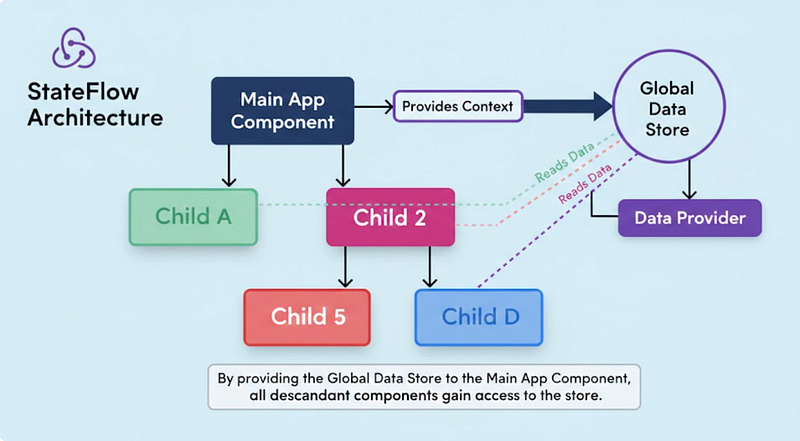
The store is the central container where your entire application state lives.
Think of it as a big JavaScript object that holds everything your app needs to remember.
Example structure of a store for a shopping cart:
{
 noOfItemInCart: 2,
 cart: [
 { bookName: "Book A", noOfItem: 1 },
 { bookName: "Book B", noOfItem: 1 }
 ]
}
In a React application, we connect the store to the app using a Provider. Once connected, any component can access the global state.
This eliminates the need to pass data through multiple layers of components (also known as prop drilling).
// src/index.js

import React from 'react'
import ReactDOM from 'react-dom'
import { Provider } from 'react-redux'

import { App } from './App'
import createStore from './createReduxStore'

const store = createStore()

// As of React 18
const root = ReactDOM.createRoot(document.getElementById('root'))
root.render(
 <Provider store={store}>
 <App />
 </Provider>
)
2. Actions: Describing What Happened
An action is simply a JavaScript object.
Its job is to describe what change should happen.
Example:
{
 type: "ADD_ITEM_TO_CART", // Must-Pass type
 payload: {
 bookName: "Book C",
 noOfItem: 1
 }
}
Every action must have a type.
The payload contains additional data needed for the update.
When a user clicks an “Add to Cart” button, you dispatch an action. That action does not change the state directly. Instead, it tells Redux:
“Hey, this is what just happened.”
3. Reducers: Updating the State the Right Way
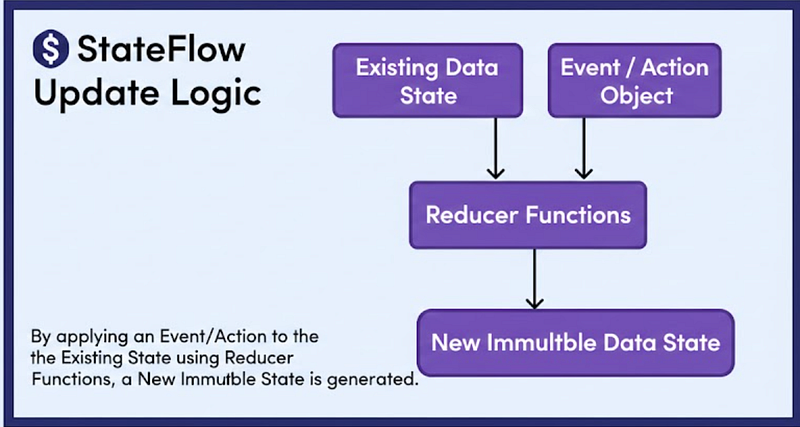
Reducers are pure JavaScript functions.
They take:
- The current state
- An action
And return:
- A brand-new updated state
Important: Reducers never modify the existing state directly. They always return a new copy.
Example reducer:
const initialCartState = {
 noOfItemInCart: 0,
 cart: []
}
const cartReducer = (state = initialCartState, action) => {
switch (action.type) {
case "ADD_ITEM_TO_CART":
return {
...state,
noOfItemInCart: state.noOfItemInCart + 1,
cart: [...state.cart, action.payload]
}
// More Cases... default:
return state
}
}
Here’s what’s happening:
- We copy the existing state using the spread operator.
- We increment the item count.
- We add the new item to the cart array.
- We return a brand-new updated object.
This approach keeps Redux state immutable, which ensures predictable behavior.
How Everything Works Together
Let’s connect the dots:
- A user clicks “Add to Cart.”
- An action is dispatched.
- Redux sends that action to all reducers.
- The matching reducer updates the state.
- The store saves the new state.
- React re-renders components that depend on that state.
Because this flow is always the same, debugging becomes easier. If something breaks, you just check:
- What action was dispatched?
- Which reducer handled it?
- What state was returned?
Real-World Example: Adding an Item to Cart
Initial state:
{
 noOfItemInCart: 2,
 cart: [Book A, Book B]
}
User clicks “Add to Cart” for Book C.
Redux processes the action and the updated state becomes:
{
 noOfItemInCart: 3,
 cart: [Book A, Book B, Book C]
}
Simple. Predictable. Controlled.
Why Developers Like Redux
Redux becomes especially useful when:
- Your app has complex state logic
- Many components need shared data
- You want predictable debugging
- You want a single source of truth
However, for very small applications, Redux might feel like extra setup. It shines most in medium to large-scale applications.
Key Takeaways
- Redux is a state management library for JavaScript apps.
- It keeps all application state inside a single store.
- You cannot modify state directly — you must dispatch actions.
- Reducers handle actions and return a new updated state.
- The flow of data is predictable and structured.
If you understand Store → Actions → Reducers, you understand the foundation of Redux.
Once these basics are clear, learning advanced concepts like middleware and async actions becomes much easier.
Did you enjoy reading it?
I truly appreciate you taking the time to read this guide. I hope it helped you understand Redux and its core concepts with more clarity and confidence.
If you found it helpful, feel free to share it with others who are learning React and state management. Your support means a lot.
More practical and beginner-friendly content is on the way — stay connected. 🚀
At Dev Simplified, We Value Your Feedback 📊
👉 Follow us not to miss any updates.
👉 Have any suggestions? Let us know in the comments!