Part 6: The Async Mistake Most JavaScript Devs Still Make — Microtasks vs Macrotasks
The underrated interview question that silently decides your event loop understanding
Why did the setTimeout run last?
That’s the question I asked a candidate during a recent mock interview.
The candidate had written numerous asynchronous programs before. He even used Promise.all, async/await and understood callbacks.
I have shared this code snippet with him and asked, What will be the print sequence?
Wait, don’t see the answer yet. Let me know what your answer is.
// what will be printed and in what order?
console.log('Start');
setTimeout(() => {
 console.log('Timeout');
}, 0);
Promise.resolve().then(() => {
 console.log('Promise');
});
console.log('End');
He answered
“Start → Timeout → Promise → End.”
Actual Output
Start → End → Promise → TimeoutLet me know in the comments, whether you were able to answer this correctly or not.
And that’s when the silence hit. This isn’t just a trick question — it’s your understanding of how things behind the scenes work. And most JavaScript devs (even experienced ones) still get it wrong.
Let’s break it down.
Why This Matters (Yes, Even in 2025)
Whether you’re building a frontend app, writing Node.js backends, or debugging a production issue at 2 AM, your ability to reason about async behaviour makes or breaks your code reliability.
If you don’t understand how it works, You’re just throwing your arrows randomly assuming that it’ll hit the target
- A missed
setTimeout? - A race condition in your
awaitlogic? - A flaky UI update?
Chances are, it comes down to misunderstanding microtasks and macrotasks.
Microtasks vs Macrotasks — The Real Difference
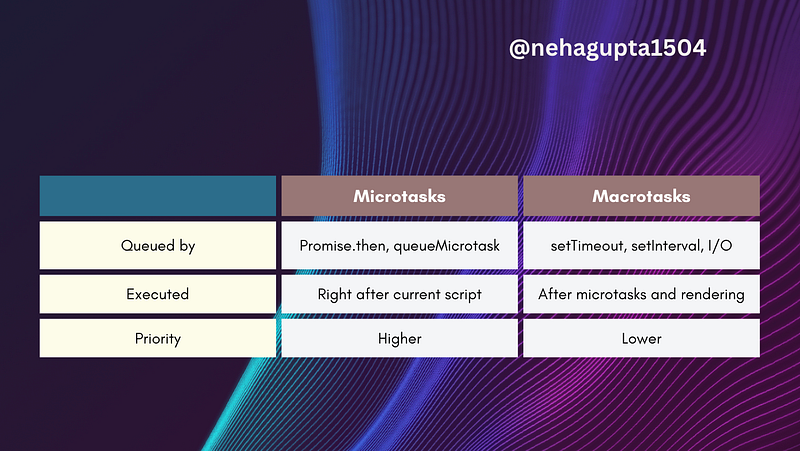
Let’s understand this in detail:
Think of it like this:
- Microtasks are urgent tasks with higher priority — like replying to a boss’s email before lunch.
- Macrotasks are scheduled with lower priority as Microtasks — like funfriday in offices, we there is some other meeting that will take priority instead of funfridays.
The Canonical Example (You will see this in interviews)
console.log('1');
setTimeout(() => {
 console.log('2');
}, 0);
Promise.resolve().then(() => {
 console.log('3');
});
console.log('4');
Output?
1 → 4 → 3 → 2
Why?
console.log('1')runssetTimeout(..., 0)schedules a macrotaskPromise.then(...)schedules a microtaskconsole.log('4')runs- Then microtasks (
3) are executed - Then macrotasks (
2) are executed
In short: Microtasks always jump the queue.
Real-World Bug This Could Cause
Imagine you’re working on a UI that:
- Saves user data to localStorage
- Shows a toast saying “Saved”
- Navigates away after a small delay
You might write:
saveToStorage(userData);
setTimeout(() => {
 showToast('Saved!');
}, 0);
navigateTo('/dashboard'); //Syncronous
But the toast never shows.
Why? Because the navigateTo() runs before thesetTimeout, killing the render cycle for your toast.
The fix?
Move your logic into a Promise.resolve().then() microtask to make it run before navigation, or use await:
await saveToStorage(userData);
showToast('Saved!');
await new Promise(res => setTimeout(res, 500)); // Let toast show for a moment
navigateTo('/dashboard');
How To Never Get This Wrong Again
- Burn this order into your brain
Script → Microtasks → Render → Macrotasks - Rewrite this example 5 different ways
ChangesetTimeout,setImmediate,Promise.then,async/await, etc. - Use Chrome DevTools Task Profiler
Open Performance tab → record → inspect how tasks queue and resolve. A must-do for those who are not familiar with this concept. - Ask yourself: “Who’s queuing this?”
Is it the browser? Node.js? You?
Then ask: “When will this run, and what could block it?”
Bonus Interview Insight
“Explain the difference between microtasks and macrotasks.”
Coming Up Next in Series
Part 7: The JavaScript Trap Most Devs Ignore — setTimeout Inside Loops
Part 5: Next Read: Deadliest JavaScript Event Loop Interview Question

Your Turn
Drop the weirdest bug below — and let’s decode it together.
And if you’re prepping for interviews, bookmark this. Because understanding async flow = confidence in interviews.
At Dev Simplified, We Value Your Feedback 📊
👉 Follow us to not miss any updates.
👉 Have any suggestions? Let us know in the comments!