Part 4: Elastic Load Balancing on AWS
How Load Balancers Keep Your App Running Smoothly Even With Huge Traffic

Ever walked into a coffee shop with 3 cashiers but still ended up in the longest line?
It will not happen to you, as you are smart, but the incoming requests to our servers are not.
Even though we have three servers up and running, the incoming requests don’t know where to go and are being loaded on only one server.
Meanwhile, two other servers are free, sitting idle.
That’s your backend without a load balancer.
You scale EC2 instances beautifully using Auto Scaling, but if your incoming requests all keep hitting one EC2 instance? You’ve just built a high-availability nightmare that, even though you’re servers are available but they aren’t doing anything.

The Coffee Shop Chaos: Why Load Balancing Exists
Let’s say:
- You’ve got 3 EC2 instances.
- All can serve the same app.
- Requests start flooding in.
Without a load balancer, all incoming traffic would default to one instance (thanks to default DNS routing or sticky clients), while others chill around doing nothing.
Now, imagine a host standing at the door.
That host:
- Sees which cashier is free.
- Route new customers to them.
- Ensures that no line gets too long.
That’s Elastic Load Balancing (ELB) in a nutshell.
What Is ELB?
Elastic Load Balancing is an AWS-managed service that automatically:
- Distributes incoming traffic across multiple EC2 instances.
- Keeps your application available, scalable, and fault-tolerant.
- Scales with traffic — no manual intervention needed.
- Works as a single entry point to your application (super helpful for DNS and routing simplicity).
- Whenever a new server spins up, it only tells ELB, and then traffic is distributed to all the servers, including the new one.
How ELB Works (Visually Explained)
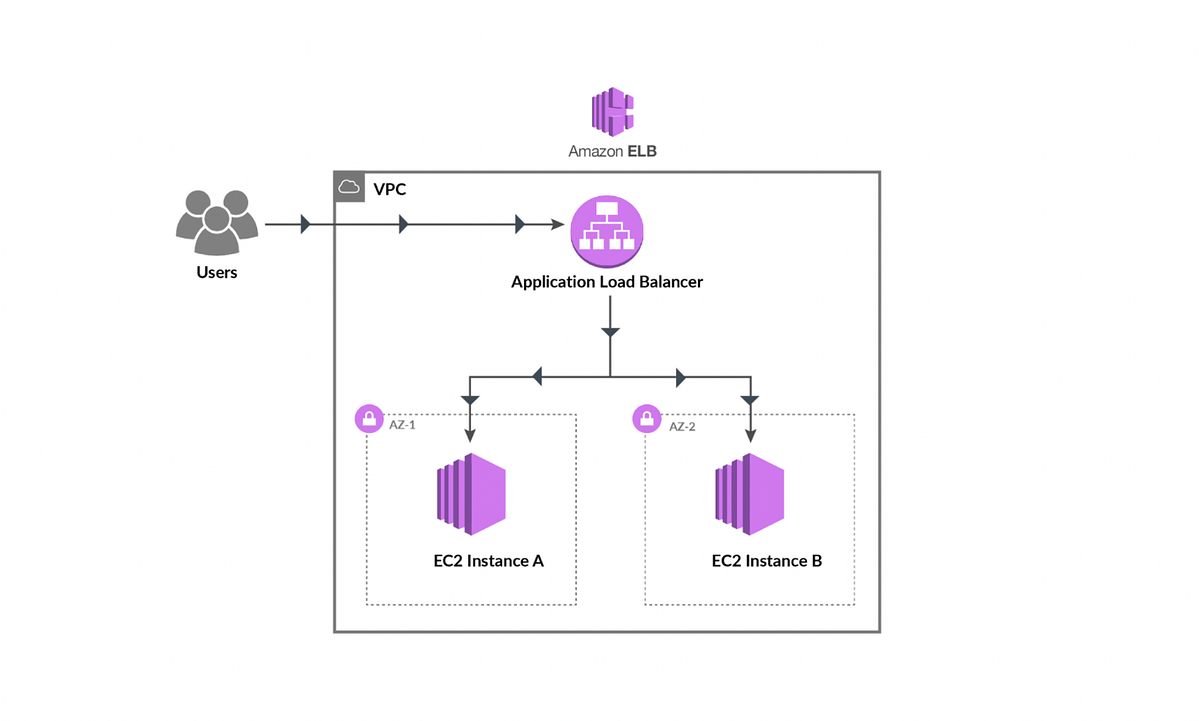
- Users → ELB → EC2 instances
- ELB checks which instance has the lowest load or is most available and sends the request to that server.
- Even distribution = faster responses and fewer crashes.
- It’s like a moderator between all servers.
Real-World Example: Scaling a To-Do App
You’ve got a basic To-Do App running on EC2.
Auto Scaling is enabled → new instances get added during traffic spikes.
BUT…
Without a load balancer:
- Users get routed to the old DNS cache
- Or a default instance that becomes overloaded causing, load on one server and the other servers as idle
With ELB:
- Users hit one common endpoint
- ELB distributes requests to whatever EC2 is ready
- As instances are added or removed, ELB updates itself
✅ You now have true scalability and resilience.
🔧 How ELB Plays with Auto Scaling (They’re BFFs)
- You configure Auto Scaling with min, desired, and max EC2 instances.
- When demand rises, → Auto Scaling adds EC2s.
- ELB is notified and starts routing traffic to the new instance.
- When traffic drops → ELB drains connections(taking care of inflight services while terminating an instance) before terminating instances.
All of this happens without you touching a thing.
Types of Load Balancers in AWS
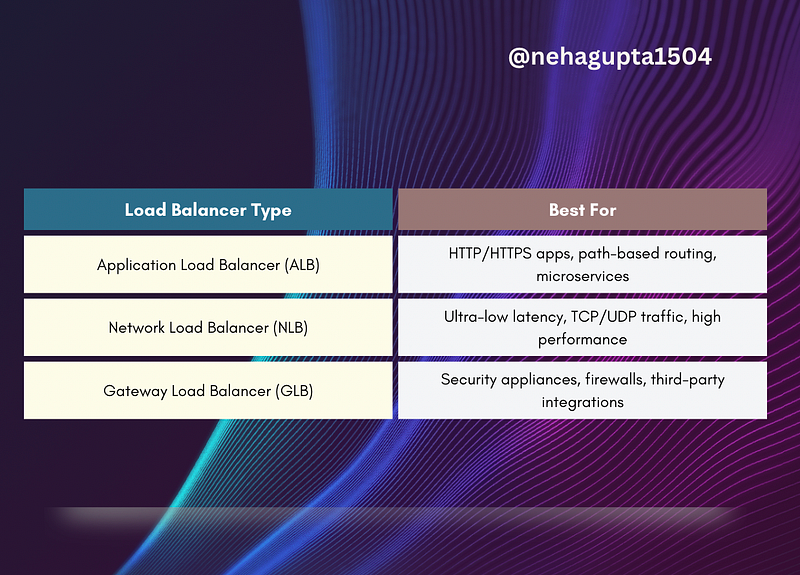
Frontend Meets Backend: The Internal ELB Use Case
Your frontend needs to talk to the backend. But what if the backend is:
- Scaling in and out constantly
- Made up of multiple EC2s
- Distributed across Availability Zones?
Rather than each frontend knowing about every backend instance (and constantly updating them, ughhhhh), you put an internal ELB in between and be smart.
Now:
- Frontend → ELB → backend
- ELB handles routing, scaling, and failover
- Internal ELB will take care of which server is going down, terminating, spinning up etc.
- Your architecture becomes decoupled and clean
Setting Up ELB (Starter Steps)
You can do this via AWS Console or CLI.
- Go to EC2 → Load Balancers → Create Load Balancer
- Choose Application Load Balancer
- Add listeners (HTTP on port 80, HTTPS on port 443)
- Assign EC2s to the Target Group
- Add health checks
- Route DNS or frontend to ELB’s DNS name
Boom. Load-balanced, scalable app — in minutes.
Routing Methods
To optimise traffic distribution, ELB uses several routing methods for efficient traffic management and higher availability ,ensuring efficient application performance
- Round Robin: To distribute traffic evenly on all the servers in a cyclic manner
- Least Connections: Routes traffic to the server with the fewest active connections, maintaining a balanced load.
- IP Hash: Uses the client’s IP address to consistently route traffic to the same server.
- Least Response Time: Directs traffic to the server with the fastest response time, minimising latency.
Cost & Performance Insights
- ELB pricing is based on usage, not flat instance cost.
- No extra setup needed as Auto Scaling happens — ELB scales automatically.
- Works across multi-AZ deployments for higher fault tolerance.
You only pay for what you use. That’s smart scaling.

Final Thought
Building scalable apps isn’t just about adding more servers.
It’s about routing traffic smartly, keeping users happy, and keeping your system balanced under chaos and not leaving them idle.
Comment below:
- What’s your experience with load balancers?
- Have you used ELB in production?
- Or still confused between ALB and NLB?
Want to share anything, we are all ears here 👂
At Dev Simplified, We Value Your Feedback 📊
👉 Follow us to not miss any updates.
👉 Have any suggestions? Let us know in the comments!