NPM, PNPM, YARN Package Managers
Package managers are tools that help manage the extra bits and pieces (dependencies) needed for coding projects.
You might be familiar with NPM and Yarn, which are popular choices. But there’s another option called PNPM.
Choosing the right package manager depends on your project needs. Each has its strengths, so it’s good to be familiar with all of them. They’re here to make your coding life easier.
Table Of Content
- Introduction to JavaScript Package Managers
- In what terms, a package manager is useful?
- NPM
- YARN
- PNPM
Introduction to JavaScript Package Managers
When a Node application is developed, it’ll use some dependencies might be some additional libraries, helpers or some other tools, for an instance let’s say you’re working on a React project, and you want to add routing in that project you’ll be going to install react-router-dom package and like this there can be a lot of packages which an application can use and for managing these packages we need a package manager inside node.
By default, we have NPM node package manager which comes bundled up with Node.js installation but using it always, may be won’t suit your needs.
Which is why today we’re going to look at different node package managers, their benefits and shortcomings.
In what terms, a package manager is useful?
- Dependency Management — Package Managers handles the installation and management of the dependencies, ensuring version correctness and availability of these dependencies to a project.
- Installation — From providing commands to download till the management, vulnerability & security assesment at local machine is done by a package manager.
- Scripts and Commands — Additional commands can be defined in package.json file to simplify the common development process like running a server, running tests and building assets etc. can be executed via the package manager CLI (command line tool).
- Security — Package managers often provide tools to scan the packages for known security vulnerabilities. Ex-
npm auditand it also focuses on other aspects to ensure security and safety like dependency locking, package signing & verification.
NPM (NODE PACKAGE MANAGER)
NPM is a default package manager for JavaScript applications, comes bundled up when you install node. NPM is the most widely used package manager due to its extensive support.
- In its earlier versions, NPM lacked support for a lock file. This meant that it didn’t maintain an exact record of the dependencies’ versions used in an application. Consequently, this absence of version control often led to compatibility issues, as different environments could end up with different versions of dependencies.
- Additionally, prior to updates, NPM permitted the use of different package versions across various machines. This flexibility inadvertently resulted in breaking changes, as developers might inadvertently rely on features or behaviours present in one version but absent in another.
Later on Yarn fixed these problems and after that NPM also came up with updates to fix the issues.
How NPM works
- NPM have a centralized registry which hosts thousands of packages. These packages can be library, frameworks, helpers, utilities or tools. When you run
npm installNPM downloads the listed packages in package.json file from NPM registry. - When these dependencies are downloaded, NPM also generates a lock file (package-lock.json). This file specifies the exact versions of all dependencies (direct and transitive) that were downloaded for your project. It acts as a deterministic record, ensuring that future installations, even on different machines, will attempt to download the same versions.
- When a lock file is not present or deleted, then, NPM will attempt to download the latest compatible version that satisfies the version ranges specified in your
package.jsonfile.
- These ranges use semantic versioning (semver) conventions like
^(compatible minor versions),~(compatible patch versions), or exact version numbers (1.2.3).
4. NPM uses a nested dependency tree, ensuring that each package gets the exact version of its dependencies.
Below is the snapshot of a package-lock.json file for react-dom package. When you install the react-dom package, it has a dependency called scheduler that will be downloaded automatically along with react-dom. However, react-dom also has peer dependencies, which are essential for its functionality but won't be downloaded automatically by NPM it expects those peer dependencies to be present for the package to work.
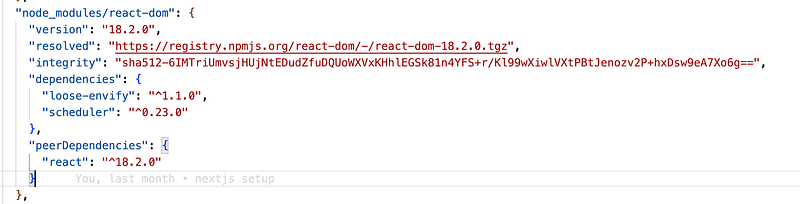
NOTE: It’s generally recommended to keep the lock file (package-lock.jsonoryarn.lock) as it ensures deterministic installations and reproducible environments.
Now Let’s look into the pros and cons of NPM
Pros
- Extensive Support — NPM hosts the world’s largest registry of JavaScript packages.
- Simplified Dependency Management — NPM automates the process of finding, installing and managing dependencies in most simplified way.
- Ease of use — NPM is easy to set up and use, making it accessible to developers of all skill levels.
Cons
- Disk Space — Since NPM uses nested dependency tree approach to save the packages, it requires more disk space to save multiple copies of the same package if different dependency requires them.
- Dependency Bloating — If the dependencies/packages are not properly managed in a long run, it can lead to accumulation of large number of packages unnecessarily, which can increase the size of a project and potentially introduce compatibility issues.
- Performance — NPM installations can be slower compared to other package managers, especially for larger projects with many dependencies, as it sequentially downloads the packages.
YARN (YET ANOTHER RESOURCE NEGOTIATOR)
Are you also thinking why Yarn stands for ‘YET ANOTHER RESOURCE NEGOTIATOR’ honestly, I am also not sure, I tried to find out but didn’t get any answers but If you know feel free to share in the comment box.
- So As you know till now, Yarn is also a node package manager developed by Facebook to overcome issues of NPM at that time, one of the issue was NPM didn’t state exact version of dependencies and there was no concept of lock file.
Yarn is very similar to how NPM works but in some aspects it provides more advantages.
Let’s see some basic commands of YARN.
How Yarn works
- First, we use
yarn initthe command to initialise a project with Yarn, which will generate a package.json file in your project. - You can add any package using command
yarn add <package_name>. - If you have preconfigured project, and you want to install dependencies, you can run a command
yarn installwhich will download all the dependencies from NPM registry and generate a lock file.
Pros
- Faster Installation — Yarn can install packages faster as compared to NPM since it install packages parallelly.
- Offline Support — Yarn is faster as it uses local caching. It stores the caching of packages at a global location, which can then shared among different projects, making it faster and also enabling offline support which is not there in NPM. You can use the command
yarn cache dirto find out in which directory YARN is keeping its package caches. - Less Disk Usage — Yarn uses a flat dependency structure that avoids duplication and nesting of packages, which results in minimal disk usage.
- Monorepo Support — Yarn was also developed to provide support for monorepo through a feature called WORKSPACE. Monorepo is the single repository where multiple packages are present, each having their package.json. Yarn Workspaces simplifies dependency management by allowing us to install dependencies for all packages from a central location.
Cons
- Less established ecosystem — Although Yarn is gaining traction, NPM has a longer history and wider community.
- Limited native module support — It may not be compatible with some features or packages that rely on NPM specific features.
- Dependent on NPM Registry — Even though Yarn managed dependencies efficiently, but it is dependent on NPM registry for packages download if NPM faces any issue YARN will indirectly be affected.
PNPM (The Highly Disk Efficient Package Manager)
PNPM stands for performant NPM. It is developed to solve issues occurring with YARN and NPM.
Once installed, you can use PNPM commands similar to NPM and YARN:
pnpm init: Initialises a new project, similar tonpm init or yarn init.pnpm install <package_name>: Installs a package and its dependencies.pnpm list: Lists installed packages in your project.pnpm remove <package_name>: Removes a package.pnpm run <script_name>: Runs a script defined in yourpackage.jsonfile.
Pros
- Disk Efficiency — It uses global store approach where all packages are stored globally at a single place, unlike NPM or Yarn. When a package is installed, PNPM links the files from global store to project
node_modulesso for each application we don’t store the packages repeatedly, which makes it disk efficient. - Lock file — Even though pnpm uses a non-flat internal structure, it provides a “flattened view” of the dependencies through a file called the lock file (often named
pnpm-lock.yaml). - Faster & Lighter — PNPM is faster and lighter than both NPM or YARN as it uses caching and not install packages each time If the package is found globally it will attach the symlinks/hardlinks in the node_module of that project/application.
Cons
- Newer Player — Although PNPM is faster, but it is new in market and not much people are aware about it, while on the other hand NPM and YARN were present from much longer time.
- Limited Native Module Support: There might be some compatibility concerns with certain native modules that rely on functionalities specific to NPM.
- Global Store Reliance: pnpm’s global store for packages offers efficiency benefits, but it can also introduce potential management overhead. For instance, you might need to consider how to handle situations like clearing the global store or managing conflicts if multiple projects require different versions of the same package.
Choosing the Right Tool:
Here’s a quick comparison to help you decide which package manager to go for:
- For speed and efficiency: If installation speed and minimizing disk usage are top priorities, pnpm is an excellent choice, especially for larger projects.
- For established ecosystems: If you need access to a wider community and a vast array of resources, npm might be a better fit due to its longer history and larger user base.
- For complex native modules: If your project relies heavily on native modules, npm or Yarn might offer better compatibility due to their longer track record in this area.
Ultimately, the best package manager depends on your specific needs and preferences. Consider the strengths and weaknesses of each option before making any decision.
Queries
Hope you have enjoyed leading it and learnt something new or advantageous from this blog today.
Now If you have any doubts or queries feel free to drop a comment or connect with me on my Topmate .
You can also reach out to me on my LinkedIn and follow me for updates on latest blogs.
Please do like this post if you enjoyed reading it.
Thanks for the read :)
Also you can support me and my writings by treating me to a nice virtual cup of coffee ☕️
In Plain English 🚀
Thank you for being a part of the In Plain English community! Before you go:
- Be sure to clap and follow the writer ️👏️️
- Follow us: X | LinkedIn | YouTube | Discord | Newsletter
- Visit our other platforms: Stackademic | CoFeed | Venture | Cubed
- More content at PlainEnglish.io