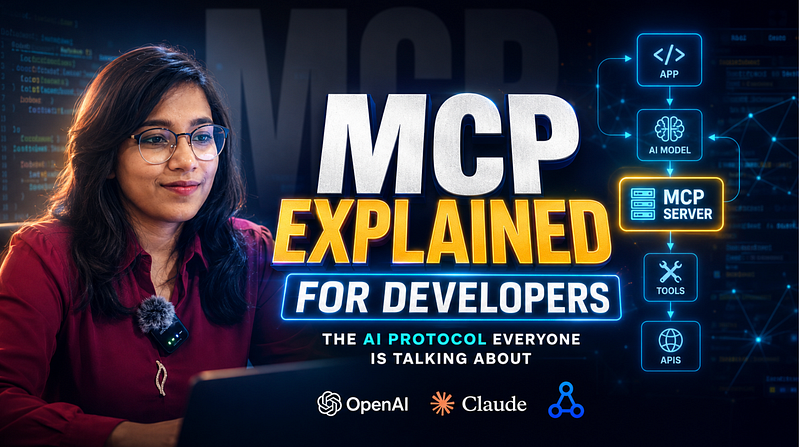
MCP Explained for Developers: The AI Protocol Everyone Is Suddenly Talking About
What MCP actually is, why developers are excited about it, and how to build your first MCP server in Node.js with Express, tools, and Claude/OpenAI integration.
Most developers are using AI wrong.
Not because they’re bad at prompting.
But because they’re treating AI like a chatbot instead of an application layer.
You ask AI a question → it replies → conversation ends.
But what if your AI could:
- query your database,
- call APIs,
- search internal docs,
- trigger workflows,
- or interact with your developer tools?
That’s exactly why developers are suddenly talking about MCP (Model Context Protocol).
And honestly?
It might become one of the most important concepts in AI engineering.
What Exactly Is MCP?
Think of MCP (Model Context Protocol) as a standard way for AI models to communicate with tools and external systems.
Instead of manually wiring every integration separately, MCP creates a shared protocol between:
AI Models ↔ Tools ↔ Your Application
In simple words:
MCP helps AI interact with your systems in a structured, reusable way.
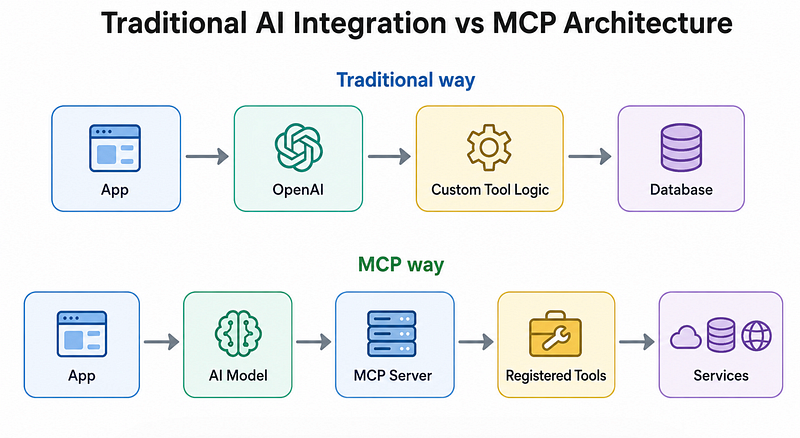
Without MCP, every AI integration becomes custom glue code.
With MCP, tools become standardised.
Why This Matters
Before MCP, if you wanted AI to:
- read a file,
- fetch GitHub issues,
- query a database,
- search company docs,
You had to build custom integrations for every model.
Claude implementation? Different.
OpenAI implementation? Different.
Another provider? More work.
MCP changes that.
Build the tool once.
Expose it through MCP.
Multiple AI models can potentially use it.
Why Developers Suddenly Care About MCP
Here’s the big shift:
AI is moving from “answering questions” to “taking actions.”
That changes everything.
Instead of:
“How do I deploy my app?”
AI can actually:
- inspect logs,
- check deployment status,
- read configs,
- Suggest fixes.
That requires structured tool access.
MCP solves this.
Real-World Example
Imagine you’re building an internal engineering assistant.
Instead of giving generic answers, your assistant can:
1. Read Jira tickets
2. Query PostgreSQL
3. Fetch deployment logs
4. Search internal documentation
5. Trigger workflows
That’s where MCP shines.
MCP vs Traditional APIs
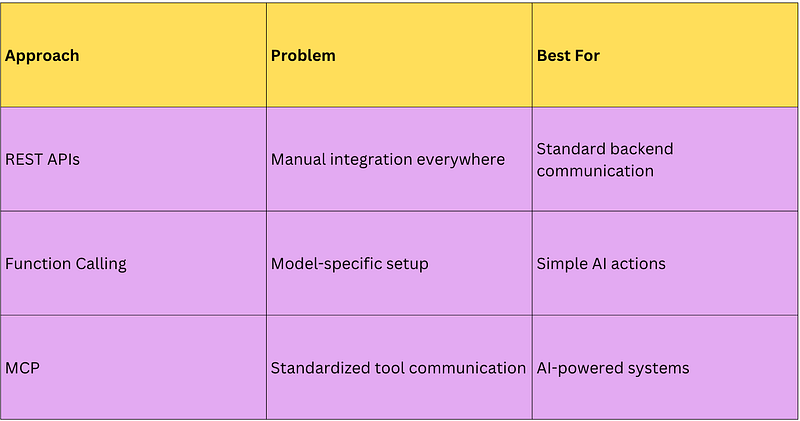
Key insight: MCP doesn’t replace APIs.
It sits on top of them.
Your APIs still exist.
MCP simply makes them AI-friendly.
Build Your First MCP Server in Node.js
Let’s build something practical.
We’ll create an MCP server that exposes a simple tool:
Weather lookup
An AI model can call this tool whenever needed.
Step 1: Project Setup
Install dependencies:
mkdir mcp-server-demo
cd mcp-server-demo

npm init -y

npm install express dotenv axios
Project structure:
mcp-server-demo
│── server.js
│── .env
│── package.json
Step 2: Create an Express Server
Create server.js
import express from "express";
import dotenv from "dotenv";

dotenv.config();

const app = express();
app.use(express.json());

const PORT = process.env.PORT || 3000;

app.listen(PORT, () => {
 console.log(`MCP Server running on ${PORT}`);
});
Nothing fancy yet.
But keep this principle in mind:
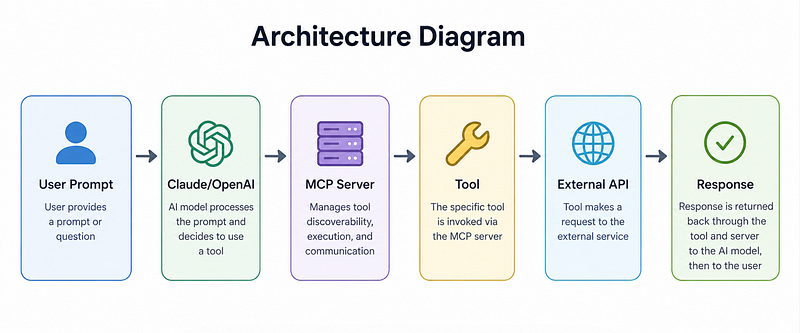
MCP servers expose capabilities (tools).
Step 3: Register Your First Tool
Now let’s expose a tool.
We’ll create a weather function.
import axios from "axios";

const tools = {
 getWeather: async (city) => {
 try {
 const response = await axios.get(
 `https://wttr.in/${city}?format=j1`
 );

 return {
 city,
 temperature:
 response.data.current_condition[0].temp_C,
 condition:
 response.data.current_condition[0]
 .weatherDesc[0].value,
 };
 } catch (error) {
 throw new Error(
 "Failed to fetch weather"
 );
 }
 },
};
Now expose it via Express:
app.post("/tool/:toolName", async (req, res) => {
 try {
 const { toolName } = req.params;
 const args = req.body;

 if (!tools[toolName]) {
 return res.status(404).json({
 error: "Tool not found",
 });
 }

 const result =
 await tools[toolName](args.city);

 return res.json(result);
 } catch (error) {
 return res.status(500).json({
 error: error.message,
 });
 }
});
Why this matters
Instead of hardcoding logic into prompts, we’re exposing structured capabilities.
Your model can now use tools instead of guessing answers.
Step 4: Claude/OpenAI Integration
Now let’s connect an LLM.
OpenAI Example
const tools = [
 {
 type: "function",
 function: {
 name: "getWeather",
 description:
 "Get weather by city",
 parameters: {
 type: "object",
 properties: {
 city: {
 type: "string",
 },
 },
 required: ["city"],
 },
 },
 },
];
Now when a user asks:
“What’s the weather in Bangalore?”
The model can call:
{
 "name": "getWeather",
 "arguments": {
 "city": "Bangalore"
 }
}
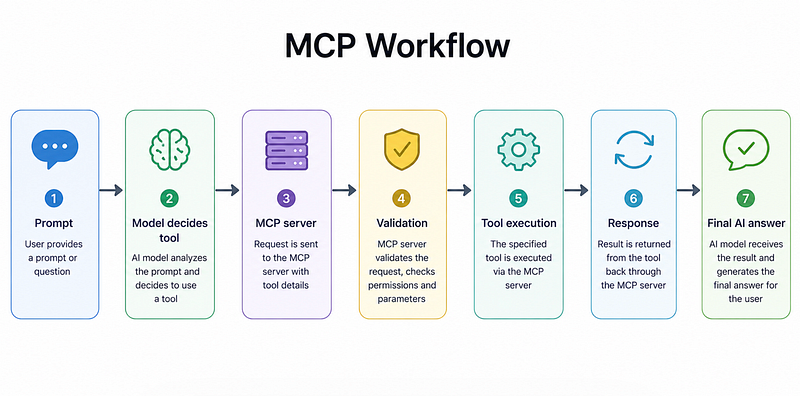
Then your MCP server executes it.
Claude Example
Claude uses the tool calling in a similar way.
Instead of manually prompting:
“Pretend you have access to weather data…”
Claude can directly invoke your registered MCP tool.
This makes outputs more reliable.
Less hallucination.
More action.
Common Mistakes Developers Make
1. Treating MCP like a replacement for APIs
It isn’t.
Your APIs remain the source of truth.
MCP simply exposes them to AI systems.
2. Giving tools too much power
Bad:
executeAnything()Better:
getUserProfile()
createInvoice()
fetchLogs()
Keep tools narrow and predictable.
3. Skipping validation
Always validate tool inputs.
Never trust model-generated arguments blindly.
Example:
if (!args.city) {
 throw new Error(
 "City is required"
 );
}
Production systems need guardrails.
The Surprising Payoff of Learning MCP
Here’s the part most developers miss:
MCP is not really about AI.
It’s about standardising application intelligence.
The winners in AI won’t just build chatbots.
They’ll build systems where AI can safely interact with software.
That’s a completely different engineering problem.
And full-stack developers already have most of the skills needed.
You know APIs.
You know backend systems.
You know authentication.
MCP is simply the missing bridge.
Final Takeaways
If you’re a full-stack developer, learning MCP right now is worth your time because:
✅ AI apps are moving toward tool usage
✅ MCP reduces custom integration complexity
✅ You can reuse tools across models
✅ It fits naturally into Node.js + Express workflows
Start small.
Build one tool.
Expose it through an MCP server.
Then slowly evolve toward more useful workflows.
Because the future of AI isn’t:
“Ask better prompts.”
It’s:
“Build smarter systems.”