JavaScript’s Most Confusing Concepts — Finally Made Simple
Closures, Event Loop, this, Async/Await, and Object Copying Explained in Beginner-Friendly Language

JavaScript is one of the most popular programming languages in the world. It powers websites, web apps, mobile apps, and even servers. But despite its popularity, some JavaScript concepts continue to confuse beginners — and even experienced developers.
If you’ve ever struggled with closures, the event loop, the this keyword, Promises, or object copying, you're not alone.
In this guide, we’ll break down these tricky topics in a simple and practical way.
1. Closures Explained Simply
A closure happens when a function remembers variables from its outer scope, even after the outer function has finished running.
That sounds technical, so let’s see it in action:
function createCounter() {
 let count = 0;
 return function () {
 count++;
 return count;
 };
}
const counter = createCounter();
console.log(counter()); // 1
console.log(counter()); // 2
Why does this happen?
The inner function keeps access to the count variable. It “remembers” it.
Real-World Uses of Closures
- Private variables
- Counters
- Caching results (memoisation)
- Event handlers that remember state
- Function factories
Closures are powerful because they help manage data without exposing everything globally.
2. Event Loop: How JavaScript Handles Async Code
JavaScript is single-threaded, meaning it runs one task at a time.
So how does it handle things like:
- API requests
- Timers
- User clicks
It uses something called the event loop.
Main Parts of the Event Loop
- Call Stack → Runs functions currently being executed
- Web APIs → Handles timers, fetch requests, etc.
- Microtask Queue → Promise callbacks
- Macrotask Queue →
setTimeout, DOM events
Important Rule:
Microtasks run before macrotasks.
Example:
console.log("1");
setTimeout(() => console.log("4"), 0);
Promise.resolve().then(() => console.log("3"));
console.log("2");
Output:
1
2
3
4Why?
1runs first2runs next- Promise callback goes to microtask queue → runs before timeout
4runs last
This is why async JavaScript feels magical.
3. Understanding this in JavaScript
One of the most misunderstood parts of JavaScript is the this keyword.
Key Rule:
this depends on how a function is called, not where it was written.
Example:
const user = {
 name: "Alice",
 greet: function () {
 console.log(this.name);
 }
};
user.greet();
Output:
AliceBecause user called the method.
Arrow Functions Behave Differently
const user = {
 name: "Alice",
 greetArrow: () => {
 console.log(this.name);
 }
};
user.greetArrow();
Output:
undefined
Arrow functions do not create their own this. They inherit it from the surrounding scope.
Other Ways this Gets Set
new Person()→thisbecomes the new objectcall(),apply(),bind()→ manually setthis
Understanding this is essential for interviews and real-world coding.
4. Promises vs Async/Await
Asynchronous programming is everywhere in JavaScript.
For example:
- Fetching API data
- Reading files
- Database calls
Two common ways to handle async code:
- Promises
- Async/Await
Promise Example
fetch("/api/data")
 .then(res => res.json())
 .then(data => console.log(data))
 .catch(err => console.error(err));
Async/Await Example
async function getData() {
 try {
 const res = await fetch("/api/data");
 const data = await res.json();
 console.log(data);
 } catch (err) {
 console.error(err);
 }
}
Difference
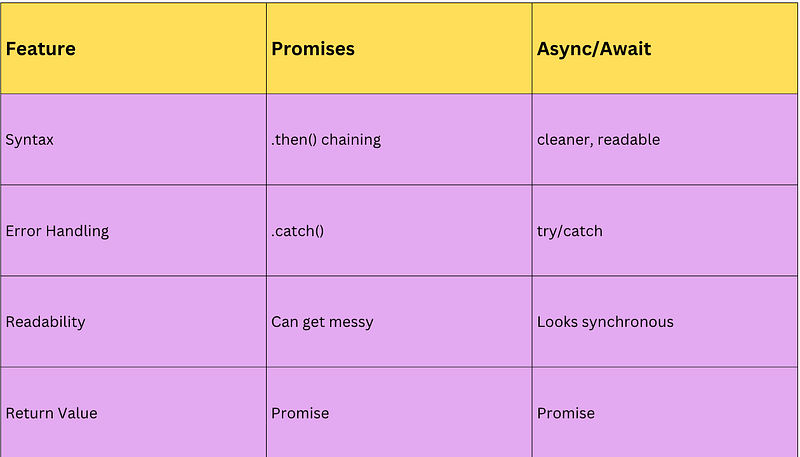
Best Use Cases
Use Promises when handling multiple parallel tasks, like:
Promise.all([...])Use async/await for cleaner sequential logic.
5. Deep Copy vs Shallow Copy
Copying objects in JavaScript can be dangerous if you don’t understand references.
Shallow Copy Example
const original = {
 name: "Neha",
 address: {
 city: "Delhi"
 }
};
const copy = { ...original };
copy.address.city = "Mumbai";
console.log(original.address.city);
Output:
MumbaiWhy? Because nested objects are still shared.
Deep Copy Example
const original = {
 name: "Neha",
 address: {
 city: "Delhi"
 }
};
const deepCopy = structuredClone(original);
deepCopy.address.city = "Mumbai";
console.log(original.address.city);
Output:
DelhiPopular Copy Methods
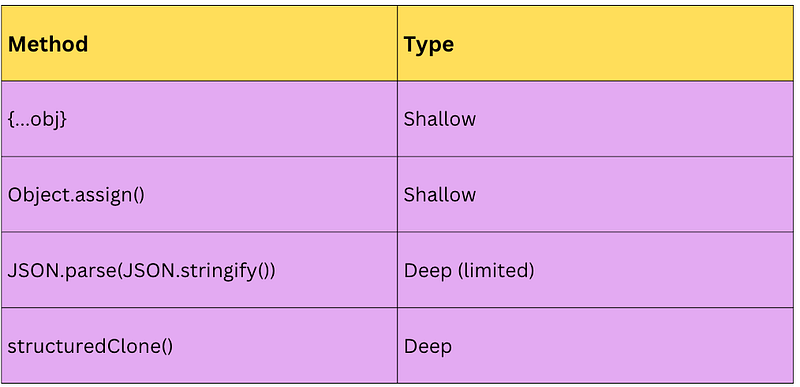
Final Thoughts
JavaScript becomes much easier once these confusing concepts click.
You don’t need to memorise everything instantly. Learn the behaviour, practice examples, and use them in small projects.
These topics appear often in:
- Job interviews
- React development
- Backend Node.js work
- Real-world debugging
Mastering them gives you a serious advantage.