I Stopped Watching AI Tutorials — This LangChain Project Taught Me More Than 100 Videos
Most developers stay stuck consuming AI content. Here’s the one practical LangChain project that teaches real AI development — from API keys to working chatbots.
“I’ve watched 40+ AI tutorials… but I still don’t know how to build anything.”
I hear this from developers all the time.
They’ve watched videos on prompt engineering, LangChain, vector databases, agents, RAG, embeddings, and the latest AI framework every week.
Yet when asked:
“Can you build a working AI app?”
Silence.
Here’s the uncomfortable truth:
Watching AI tutorials will not make you an AI developer.
Building one messy, real, end-to-end AI project will.
And no — it doesn’t have to be complicated.
You do not need to build the next ChatGPT.
You need to build something small that teaches the real workflow.
In this article, I’ll show you the exact project I recommend:
A simple AI chatbot using LangChain + OpenAI + Streamlit.
And surprisingly?
This tiny project teaches more practical AI engineering than hours of passive learning.
The Biggest Mistake Developers Make While Learning AI
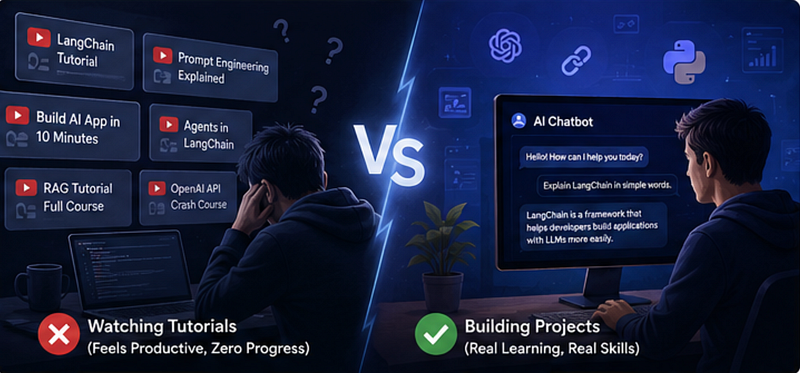
Most developers learn AI like this:
Watch tutorial
 ↓
Feel productive
 ↓
Watch another tutorial
 ↓
Get overwhelmed
 ↓
Still can't build anything
It feels productive.
But it’s mostly consumption, not learning.
The problem?
AI development is highly practical.
You only start understanding concepts when things break.
Like:
- API keys failing
- Bad model responses
- Prompt issues
- Environment variable bugs
- Dependency conflicts
- Weird AI outputs
That struggle is where the real learning starts.
The mindset shift
Instead of asking:
“What AI tutorial should I watch next?”
Ask:
“What small AI app can I finish this weekend?”
That single question changes everything.
The One Project That Actually Teaches AI Development
Instead of watching another 2-hour tutorial, build this:
AI Chatbot Using LangChain + OpenAI + Streamlit
This project is intentionally simple.
And that’s exactly why it’s powerful.
You’ll build:
✅ A working AI chatbot
✅ A real UI using Streamlit
✅ OpenAI API integration
✅ LangChain implementation
✅ Prompt-to-response workflow
✅ Environment variable handling
Most importantly:
You’ll finally understand how AI applications actually work.
What You’ll Build
The chatbot flow looks like this:
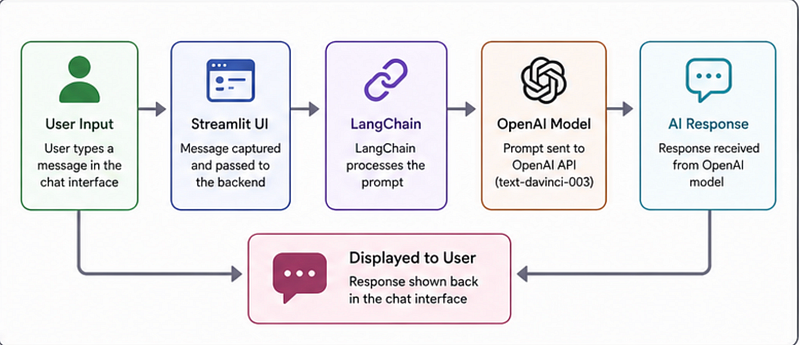
This is one of the biggest mindset shifts in AI engineering:
AI apps are mostly orchestration.
You are connecting systems together.
Not training massive models.
That realisation alone removes a lot of fear beginners have.
Setting Up the Project
The project setup is surprisingly beginner-friendly.
Step 1: Clone the Repository
git clone https://github.com/KalyanMurapaka45/Chatbot-Using-Langchain.gitStep 2: Create Virtual Environment
conda create -p chatbot-env python==3.10 -yActivate it:
conda activate chatbot-env/Why this matters:
A virtual environment isolates dependencies.
Without it, projects often break due to package conflicts.
Step 3: Install Dependencies
pip install -r requirements.txtThis installs:
- LangChain
- OpenAI SDK
- Streamlit
- python-dotenv
- Supporting libraries
Step 4: Add OpenAI API Key
Create a .env file:
OPENAI_API_KEY=your-api-keyThis is an important real-world habit.
Bad Practice
api_key = "sk-secret-key"Better Practice
api_key = os.getenv("OPENAI_API_KEY")Never hardcode secrets inside projects.
Even small habits like this separate tutorial-watchers from actual developers.
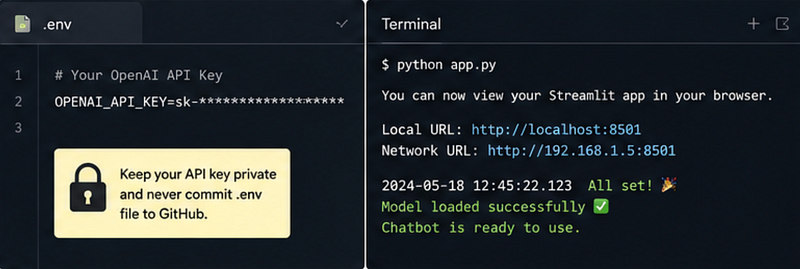
.env setup and terminal running Streamlit appThe Core AI Logic
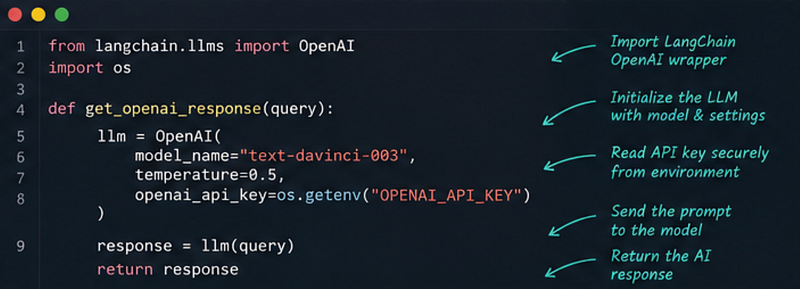
This is the actual chatbot logic from the project:
from langchain.llms import OpenAI
import os

def get_openai_response(query):

 llm = OpenAI(
 model_name="text-davinci-003",
 temperature=0.5,
 openai_api_key=os.getenv("OPENAI_API_KEY")
 )

 response = llm(query)

 return response
And honestly?
This tiny block teaches more practical AI engineering than hours of videos.
What This Code Actually Teaches You
Most beginners just copy-paste AI code.
Don’t do that.
Understand what’s happening.
temperature=0.5
This controls AI creativity.
Lower Temperature
temperature=0.1- More predictable
- More factual
- Less creative
Higher Temperature
temperature=0.9- More creative
- More varied
- Sometimes less accurate
This teaches a major AI concept:
Model behavior is configurable.
That’s real AI engineering.
Where Real Learning Starts
The most important part of this project is not when it works.
It’s when it breaks.
You’ll likely see errors like:
ModuleNotFoundErrorOr:
Invalid API KeyOr:
Rate Limit ExceededAnd suddenly:
- You start debugging
- You read documentation
- You understand dependencies
- You learn environment variables
- You understand request flow
That’s the exact moment you stop becoming a tutorial consumer.
And start becoming a developer.
One Honest Reality Check
This project uses:
text-davinci-003That model is older now.
Modern AI apps usually use newer chat-based models.
But the important part is:
The learning workflow is still completely valid.
Because AI engineering fundamentals remain the same:
Input
→ Prompt
→ Model
→ Response
→ Validation
→ UI
The tools evolve.
The workflow stays.
The Surprising Payoff Nobody Talks About
Here’s the weird thing.
After building one small AI project…
Suddenly, all those tutorials start making sense.
Before building:
“LangChain feels confusing.”
After building:
“Oh… it’s just connecting prompts, models, and workflows.”
That confidence shift is huge.
You stop memorising AI buzzwords.
And start understanding systems.
What You Should Do Next
Once this chatbot works:
Don’t stop there.
Improve it.
Add features like:
- Chat history
- Memory
- PDF upload
- Voice input
- Multiple models
- Streaming responses
- Deployment
That’s how AI developers grow.
Not by endlessly consuming content.
But by shipping progressively better projects.
Key Takeaways
- Watching tutorials does not build AI engineering skills
- One complete AI project teaches more than 50 videos
- AI development is mostly orchestration and debugging
- Small projects are enough to start
- Real learning begins when things break
And honestly?
Most developers are only one finished project away from finally understanding AI.
Project Repository
You can explore and build the project here:
Chatbot Using LangChain GitHub Repository
If you build it, don’t just stop at “it works.”
Break it.
Improve it.
Experiment with it.
That’s how real AI developers are made.
If you’re looking for a practical Langraph series where you can build real-world projects, you must look into this one