I Stopped Coding the Old Way After Trying These 10 AI Tools in 2026
Most AI coding tools promise “10x productivity.” Few actually change how developers build software. These 10 are different.
A few months ago, I noticed something strange in developer communities.
People weren’t asking:
“Which AI autocomplete is best?”
Instead, they started asking:
“Which AI agent can handle this feature for me?
That shift sounds subtle.
It isn’t.
2026 feels like the year developers stopped using AI as a smarter autocomplete and started treating it like a junior engineer, reviewer, architect, debugger, and sometimes even a product manager.
But here’s the problem:
Most articles lump every AI tool together.
That’s misleading.
Some tools are amazing for cloud debugging, some for UI generation, others for full SDLC automation, and a few are honestly just hype.
So I tested what developers are actually using — and more importantly, when each tool genuinely helps.
The Big Shift: We’re Moving From Coding to Orchestrating
The biggest trend in 2026 isn’t “better autocomplete.”
It’s agentic development.
Instead of writing every line yourself, developers are increasingly:
- defining requirements,
- describing behaviour,
- validating outputs,
- reviewing architecture,
- and letting AI execute repetitive work.
Think of it like this:
Old workflow:
Idea → Manual Coding → Debugging → Testing → Deployment2026 workflow:
Idea → Spec → AI Execution → Human Validation → Ship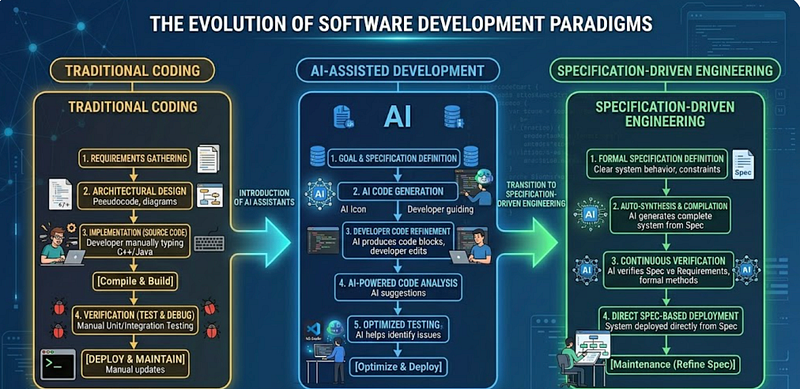
The surprising part?
The best developers aren’t the ones writing the most code anymore.
They’re the ones giving the clearest instructions.
1. Kiro — The “Requirements-First” IDE
If you’ve ever built something and realised halfway through:
“Wait… what exactly are we building?”
Kiro feels oddly refreshed.
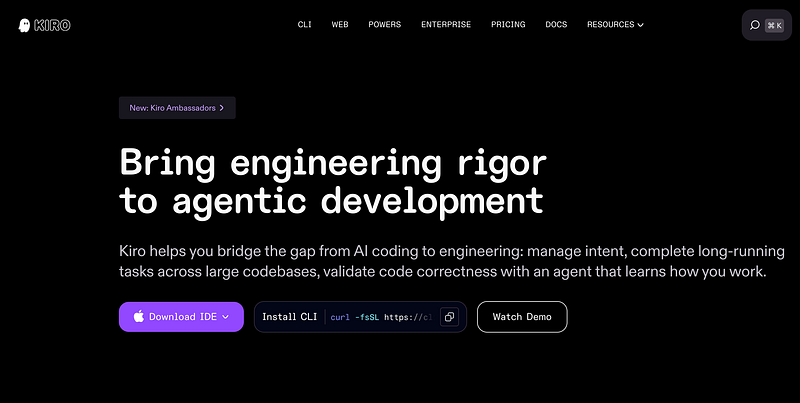
Instead of vague prompting, it uses structured requirements (EARS notation) to define software behaviour before implementation.
Example Workflow
Instead of:
Build authenticationYou write:
WHEN a user logs in
IF credentials are valid
THEN issue JWT token
Kiro converts structured requirements into implementation-ready code.
Why this matters
Less ambiguity = fewer bugs.
Especially useful for:
- enterprise apps
- large teams
- requirement-heavy systems
Common mistake developers make:
Treating Kiro like ChatGPT instead of a spec-driven IDE.
2. Claude Code + GSD — Better Prompting for Real Projects
Most AI failures happen because prompts are messy.
That’s where GSD (Spec-Driven Meta Prompting) becomes surprisingly useful.
Instead of:
❌ Bad prompt:
Build a dashboardTry:
✅ Better structured prompt:
Build an admin dashboard.
Requirements:
- JWT authentication
- Analytics widgets
- Mobile responsive
- Role-based access
Why it works:
AI performs dramatically better when context becomes structured.
This matters even more for large repositories.
3. BMAD-METHOD — Your AI Development Team
This one genuinely surprised me.
Instead of one assistant, BMAD deploys multiple specialised agents:
- Product Manager
- Architect
- Developer
- QA Engineer
- Tester
Imagine this workflow:
Feature Idea
↓
Product Agent writes requirements
↓
Developer Agent implements
↓
QA Agent validates
↓
Tester catches edge cases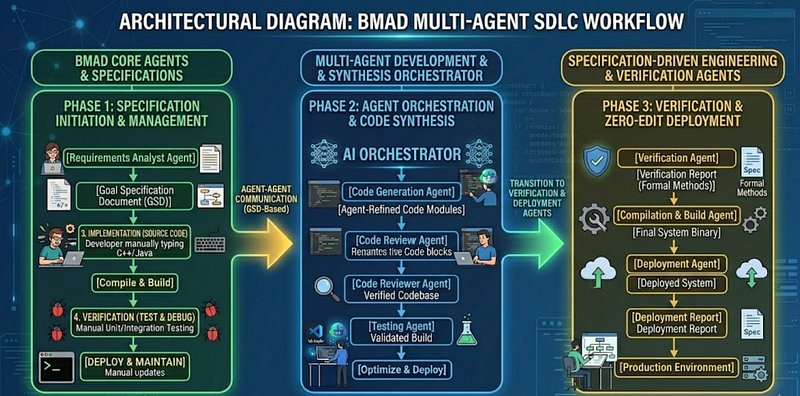
Is it perfect?
No.
But for solo developers or startups, it can dramatically reduce planning time.
4. Amazon Q Developer — The Cloud Debugging Beast
If you work with AWS, this feels unfair.
Instead of digging through logs for hours:
Why is my Lambda timing out?Amazon Q can inspect AWS context and suggest fixes.
Practical use case
Bad debugging workflow:
Read logs manually
Search Stack Overflow
Guess issue
Retry deployment
Better workflow:
Ask Amazon Q
Inspect deployment
Review suggestion
Validate fix
Especially useful for:
- Lambda
- ECS
- IAM permission issues
- CI/CD debugging
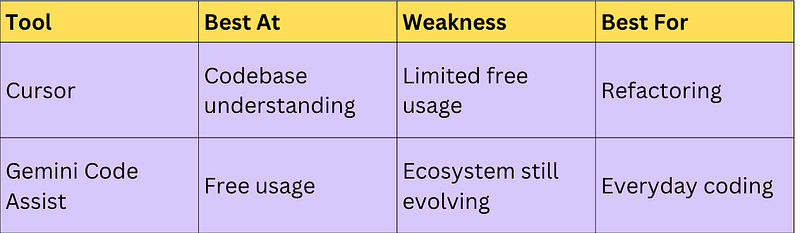
5 & 6. Cursor and Gemini Code Assist
These are becoming serious competitors.
Cursor shines at:
✅ Understanding entire codebases
Example:
Refactor authentication flow to support OAuthInstead of editing one file, it navigates dependencies automatically.
Gemini Code Assist shines at:
✅ Huge free tier
Up to 180,000 monthly code completions, making it surprisingly accessible for individual developers.
7. v0 — UI Development Feels Cheating Now
Frontend developers might love (or hate) this.
Prompt:
Create a SaaS pricing page using React + TailwindAnd suddenly:
You have production-ready UI.
Not perfect.
But surprisingly close.
Where developers go wrong
They blindly accept generated UI.
Better workflow:
- Generate layout
- Refactor components
- Improve accessibility
- Add business logic

8. Bolt.new — Full Apps From Plain English
Bolt.new feels like prototyping on steroids.
Example:
Build a MERN expense tracker with JWT authMinutes later:
You’re debugging instead of scaffolding.
That’s the real productivity gain.

9 & 10. Codeium + Phind
These deserve more attention.
Codeium
Great free alternative for daily coding assistance.
Phind
Feels like Google for developers — but answers first, links second.
Especially useful for debugging obscure issues.
The Surprising Thing I Learned
Here’s the unexpected takeaway:
The developers getting the biggest productivity gains aren’t using more AI tools.
They’re using fewer tools, more intentionally.
A practical stack might look like:
- Cursor → code understanding
- v0 → frontend scaffolding
- Amazon Q → cloud debugging
- Phind → research
That’s it.
Too many tools often create more friction than speed.
Final Takeaways
AI in 2026 isn’t replacing developers.
But it is replacing repetitive development work.
The biggest winners will likely be developers who learn:
- how to write better specs,
- how to validate AI output,
- how to orchestrate workflows,
- and when not to trust AI.
The strange part?
We may spend less time writing code…
…and more time designing how software should behave.
Which AI tool has actually changed your workflow lately — or is the hype getting out of control?
Some More Interesting Reads
2. Most Developers Use ChatGPT Wrong — The Workflow That Actually Saves Me Hours