How Git HEAD Works: A Simple Guide to a Complex Concept
Struggling with Git Head , Then read this article to understand it for forever

I have seen most people confused with Git And I have always thought that it’s pretty straightforward, but there’s some behind-the-scenes complexity that I wasn’t considering, and it turned out to be a little bit more complicated.
What people understand from Head:
“HEAD is where you currently are.”
Cool, got it.
But then Git starts saying:
(HEAD -> main)detached HEAD<<<<<<< HEADgit show HEAD

First: What Most Think HEAD Is
Think of HEAD as a bookmark — it tells Git where you currently are in your repository.
In plain terms: HEAD points to the commit you’re working on right now.It usually points to the latest commit on your current branch. So if you’re on main, HEAD is pointing to the most recent commit in main.
That’s how Git knows where to start when you:
- Make a new commit
- Checkout a different branch
- Revert changes
The 3 Faces of HEAD — And How They Actually Work Together
1. .git/HEAD (The Actual File Behind It All)
This is a plain text file inside every Git repo.
It either contains:
ref: refs/heads/main- Meaning: “HEAD is pointing to the tip of the
mainbranch.”
6a1f8b0d86eab44b9d61… ← actual commit hash- Meaning: “HEAD is directly pointing to this commit, not a branch.”
Think of this file as the “source of truth” for HEAD.
2. HEAD as a Git Revision Parameter (e.g., git show HEAD)
In Git commands like:
git log HEADgit diff HEAD~1git show HEAD
HEAD acts like a shorthand reference to the latest commit where you currently are.
It’s a flexible reference you can use in any Git command that takes a “revision,” like a commit hash, tag, or branch.
3. HEAD in Git Messages and States
This is where it gets confusing — because Git uses HEAD everywhere:
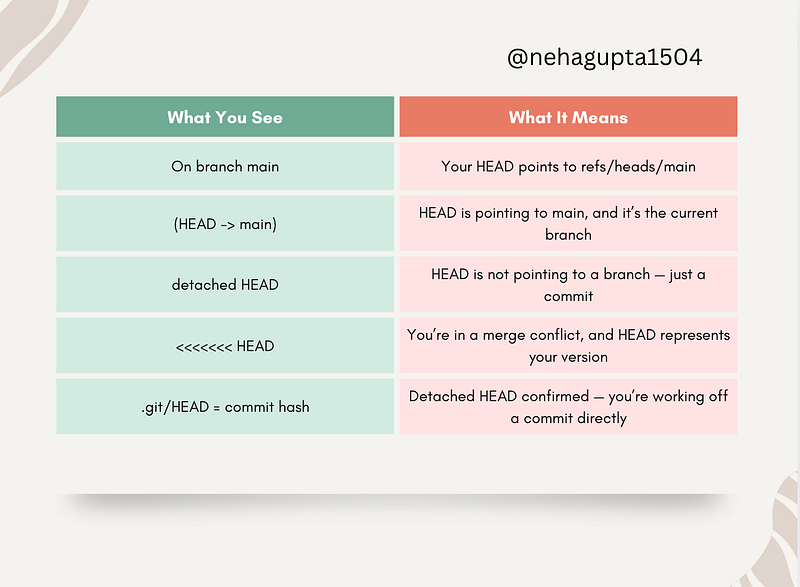
Each one means something slightly different, but all stem from that one underlying .git/HEAD pointer.
Why This Matters In Real Projects
Understanding HEAD deeply helps you:
✅ Avoid accidentally losing changes in detached HEAD
✅ Debug merge conflicts more confidently
✅ Use advanced Git commands like reset, reflog, and checkout without panic
✅ Work on hotfixes, rebases, and cherry-picks safely
Tips for Mastering HEAD Without Losing Your Mind
- Run
cat .git/HEADin real projects to see where you are - Use
git reflogif you ever get lost — it shows your HEAD history - Don’t fear “detached HEAD” — just know how to save your work with
git switch -c branch-name - Play in a dummy repo — seriously, break things to understand them
Let’s Talk
What’s been your biggest “WTF” moment with Git HEAD?
Share your confusion, your wins, or your thoughts in the comments.
If you like reading my articles, you can always support my writings by buying me a cup of coffee here ☕️ .
Let me take the hot sip and enjoy 😉
At Dev Simplified, We Value Your Feedback 📊
👉 If you like the article, please support us by sharing this article.
👉 Have any suggestions? Let us know in the comments!