Frontend Interview Question: Building Your Own HashMap in JavaScript
Understand how hash tables work internally and implement a fully functional custom HashMap from scratch

JavaScript developers often rely on the built-in Map object to store key–value pairs. It’s powerful, efficient, and supported directly by the JavaScript engine.
But if you want to truly understand how key-value storage works internally, implementing your own HashMap is one of the best exercises. It reveals how hashing works, how collisions are handled, and how data structures maintain performance as they grow.
In this guide, we’ll walk through the core building blocks of a custom HashMap implementation in JavaScript, including hashing, collision handling, resizing strategies, and handling complex keys.
Understanding the Core Architecture of a HashMap
At its core, a HashMap stores key–value pairs and uses a hash function to decide where each pair should be stored in memory.
Instead of searching the entire structure, the hash function converts a key into an index in an internal array, allowing quick access.
A typical custom implementation contains three main components:
- Buckets array — stores the data
- Hash function — converts keys into array indices
- Operations — methods like
set,get, andremove
Here is a simplified structure:
class HashMap {
 constructor(capacity = 16) {
 this._buckets = new Array(capacity);
 this._size = 0;
 }
 _hash(key, length = this._buckets.length) {
 let hash = 0;
 const keyStr = typeof key === 'object' ? JSON.stringify(key) : String(key);
 for (let i = 0; i < keyStr.length; i++) {
 hash = (hash * 33) ^ keyStr.charCodeAt(i);
 }
 return Math.abs(hash) % length;
 }
}
What’s happening here?
hashsignifies a private function that can be used inside HashMap functions likegetsetnot outside the HashMap class.- The
constructorcreates an array of buckets. _hash()converts the key into a numeric index.- The modulo operation (
%) ensures the index fits inside the array. - Multiplying by a constant spreads the hash values apart. The number 33 comes from the DJB2 hashing algorithm, which is widely used because it balances speed and distribution.
Once this structure exists, we can build the methods that insert and retrieve data.

I know you are having the same reaction, so continue reading and it’ll be clearer.
Designing an Effective Hash Function
A hash function plays a crucial role in HashMap performance. It should:
- Always produce the same result for the same key
- Be fast to compute
- Spread keys evenly across buckets
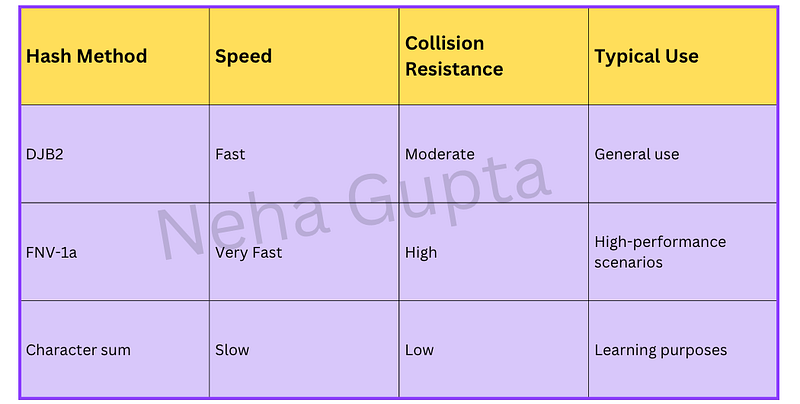
One commonly used algorithm is DJB2, which uses multiplication and XOR operations.
Example:
hash = (hash * 33) ^ charCodeWhy is this useful?
Because it distributes keys more evenly than simpler approaches like adding character codes together.
Common hashing approaches
For most in-memory hash tables, simple but consistent hashing is enough.
Handling Collisions in HashMaps
Even with a good hash function, different keys can sometimes produce the same index. This situation is called a collision.
There are two common ways to handle this.
1. Chaining (Most Common Approach)
In chaining, each bucket holds multiple entries, usually stored in an array or linked list.
When two keys map to the same index, they are stored in the same bucket.
Example implementation:
set(key, value) {
 const index = this._hash(key);
 if (!this._buckets[index]) {
 this._buckets[index] = [];
 }
 const bucket = this._buckets[index];
 for (let i = 0; i < bucket.length; i++) {
 if (bucket[i][0] === key) {
 bucket[i][1] = value;
 return;
 }
 }
 bucket.push([key, value]);
 this._size++;
}
Why developers like chaining
- Easy to implement
- Handles collisions gracefully
- Works well even with unpredictable data
2. Linear Probing (Open Addressing)
Another approach is open addressing, in which the algorithm searches for the next available slot when a collision occurs.
Example:
set(key, value) {
 let index = this._hash(key);
 while (
 this._buckets[index] !== undefined &&
 this._buckets[index][0] !== key
 ) {
 index = (index + 1) % this._buckets.length;
 }
 this._buckets[index] = [key, value];
}
This approach saves memory but can suffer from clustering, where many entries accumulate in nearby slots.
For most custom implementations, chaining is simpler and more reliable.
Resizing the HashMap with Load Factor
If too many entries fill the table, collisions increase and performance slows down.
To prevent this, HashMaps track a metric called the load factor:
load factor = number of entries / number of bucketsA common threshold is 0.75.
Once the table reaches that level, it doubles its capacity and rehashes all existing entries.
Example resize method:
_resize() {
 const oldBuckets = this._buckets;
 this._buckets = new Array(oldBuckets.length * 2);
 this._size = 0;
 for (const bucket of oldBuckets) {
 if (bucket) {
 for (const [key, value] of bucket) {
 this.set(key, value);
 }
 }
 }
}
Why resizing works
Expanding the table reduces collisions because entries are distributed across more buckets.
Some implementations also shrink the table when usage drops below 25%.
Supporting Complex Keys (Objects)
Primitive keys like strings or numbers are easy to hash. But objects require special handling.
One solution is serialisation, converting objects into strings.
Example:
function serializeKey(key) {
 if (typeof key !== 'object') return String(key);
 return JSON.stringify(key, Object.keys(key).sort());
}
Sorting the keys ensures that objects with the same structure produce the same serialized string, which keeps hashing consistent.
More advanced systems use hashing algorithms such as FNV-1a to reduce collision risk when handling large datasets.
Built-in Map vs Custom HashMap
JavaScript already provides a built-in Map, which handles hashing internally and supports any key type.
Example:
const map = new Map();
map.set({ id: 1 }, "value");
Here’s a quick comparison:
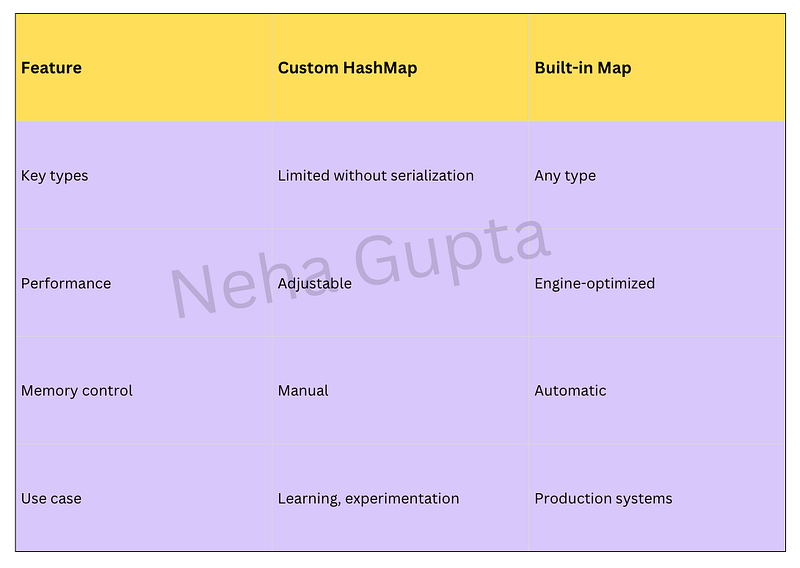
In real applications, the built-in Map is typically the better choice.
However, building a custom HashMap is valuable for understanding how modern data structures work internally.
Key Takeaways
Building your own HashMap helps reveal the mechanics behind one of the most important data structures in programming.
Key points to remember:
- A HashMap uses a hash function to convert keys into array indices.
- Collisions are unavoidable, so strategies like chaining or linear probing are required.
- Performance is maintained by resizing the table when the load factor grows too high.
- Object keys usually require serialization or custom hashing.
- JavaScript’s built-in
Mapis highly optimized, but implementing your own version is an excellent learning exercise.
Understanding these concepts doesn’t just help with data structures — it also improves how you reason about performance, memory usage, and system design in real applications.
At Dev Simplified, We Value Your Feedback 📊
👉 To read more such articles on JavaScript, visit here
👉 Follow us not to miss any updates.
👉 Have any suggestions? Let us know in the comments!