Create in-app sharing and referral using Branch.io -Expo React Native
Branch.io is a powerful deep linking and attribution platform designed to help developers create seamless user experiences and track engagement across different channels and platforms. It simplifies the process of linking to specific content within your app, measuring the effectiveness of marketing campaigns, and creating referral programs.
Key features of Branch.io include:
- Deep Linking: Create links that take users directly to specific content in your app.
- Attribution: Measure the success of your marketing campaigns by tracking user interactions.
- Referral Programs: Build and track user referral programs to drive growth
Table of content
- Why to use Branch.io
- How to configure it with your app
- How to create quick links or deep links
- How to share your app using quick links
- Queries
Why to use Branch.io
As we have already seen about branch.io let’s understand those concepts in detail as well
1. Enhanced User Experience
- Deep Linking: Direct users to specific content within your app, even if they haven’t installed it yet.
- Contextual Onboarding: Show personalized content based on the link users clicked.
2. Comprehensive Attribution
- Cross-Platform Tracking: Understand how users interact with your app across different platforms and channels.
- Campaign Measurement: Evaluate the performance of your marketing campaigns in real-time.
3. Growth and Engagement
- Referral Programs: Implement and track user referral programs to increase your app’s user base.
- Personalized Sharing: Allow users to share specific content from your app easily.
How to configure it with your app
- Sign up on branch.io
- Configure your branch dashboard using the following link
- Install react-native-branch using
npm react-native-branchfor more details check - Create a subscriber in your main route file.
import React, { useRef, useEffect } from 'react';
import branch from 'react-native-branch';
import { WebView } from 'react-native-webview';

const App = () => {
 const webViewRef = useRef<WebView | null>(null);
 const handleSubscribe = () => {
 branch.subscribe({
 onOpenStart: () => {
 // Handle any initialization logic here
 },
 onOpenComplete: ({ error, params, uri, ...rest }) => {
 if (error) {
 console.error('Error handling Branch link:', error);
 } else {
 // Handle the Branch link data here
 // For example, extract and use the referral code from params
 console.log('Branch link data:', params);
 }
 },
 });
 };

 return (
 <WebView
 onMessage={async(event)=>{
 const data = JSON.parse(event.nativeEvent.data);
 switch(data?.event){
 /*
 Here page load is an event I am generating from PWA, to make sure that my webview loads first.
 For just react native you can call this once the app loads
 */
 case "page-load": handleSubscribe();

 }

 }}
 />
 );
};

export default App;
Note: Make sure that your webview loads before you can the subscribe method to listen.
How to create quick links or deep links
- Go to your branch dashboard
- Click on the quick links section
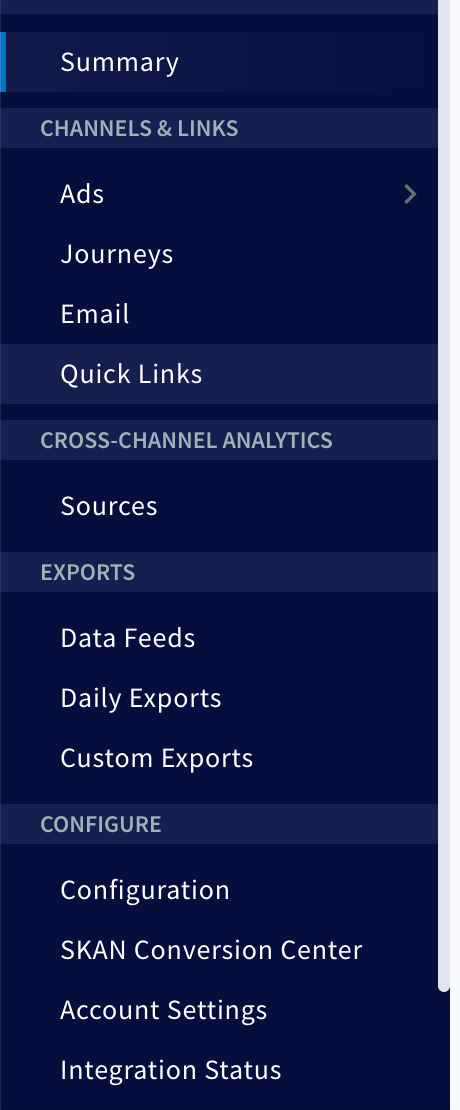
3. Click on “Create” in the top right corner
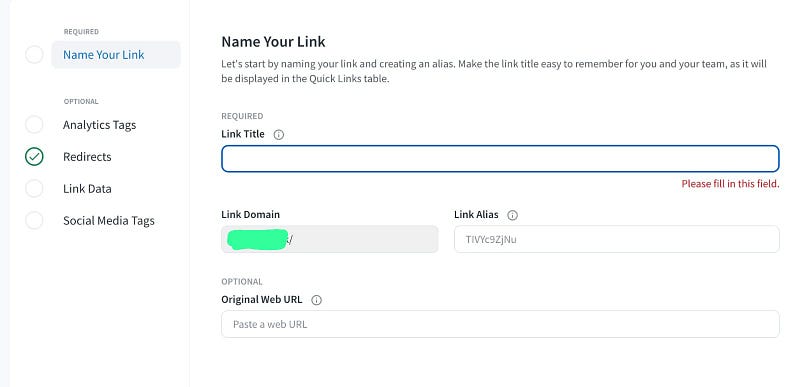
4. Provide the link title by which you can track it.
5. Add link alias like /referral. If your domain is example.com the generated link will be example.com/referral.
6. Add analytics data i.e, whatever data you want to track with your link like campaign, channel etc.
Share your app using quick links
We have successfully generated branch quick link i.e, https://example.com/referral
Now we can easily set it up in our code and add some additional query params and we’ll get this params in subscribe function once user clicks on the link.
APP_LINK = `https://example.com/referral?code=${XTV536}`

//XTV536 - is the referral code of user you should replace it with what is the code you want to share
// Use this App_link to share the referral code once anyone clicks on the link it'll automatically be fetched by branch's subscribe method.
Now configure your application however you like to.
Queries
Hope you have enjoyed reading it and learnt something new and valuable from this article today.
Now If you have any doubts or queries feel free to drop a comment or connect with me on my Topmate.
You can also reach out to me on my LinkedIn and follow me for updates on latest blogs.
Please do like this post if you enjoyed reading it.
Thanks for the read :)
Also, you can support me and my writings by treating me to a nice virtual cup of coffee ☕️