Complete LangGraph Roadmap: The 18 Concepts You Actually Need to Learn to Build AI Agents
Most developers jump into LangGraph the wrong way. Here’s a practical roadmap that takes you from simple workflows to production-ready AI agents — without getting overwhelmed.
But most developers make the same mistake:
They open a LangGraph tutorial, see nodes, edges, conditional routing, tools, memory, agents, loops… and suddenly feel like they’re staring at a PhD syllabus.
I’ve seen developers jump straight into multi-agent systems before understanding something as basic as state flow.
That usually ends the same way:
Confusing code. Broken workflows. Hours of debugging.
The truth?
LangGraph is actually easier to learn than it looks — if you learn things in the right order.
This roadmap breaks down the 18 essential LangGraph topics you should learn, step by step, so you can build real AI systems instead of endlessly watching tutorials.
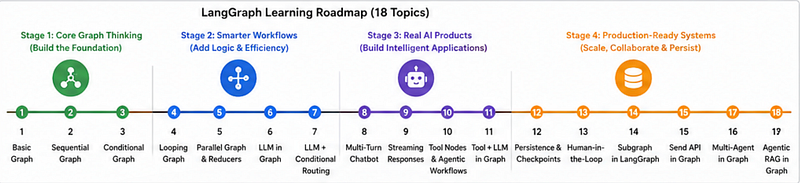
Why Most Developers Struggle With LangGraph
A common misconception is:
“LangGraph is just LangChain with graphs.”
Not exactly.
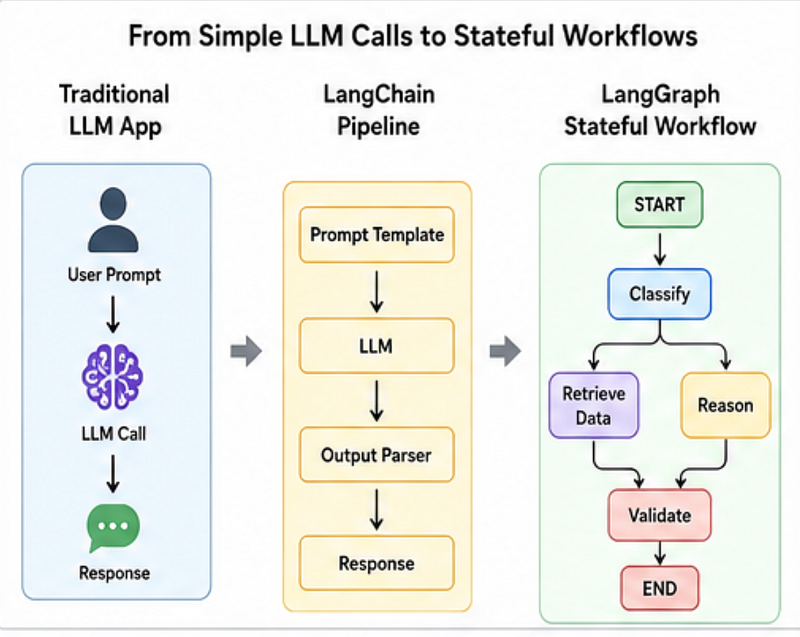
LangGraph changes how you think about AI systems.
Instead of writing linear code, you design stateful workflows where decisions, retries, memory, and tools become part of the execution flow.
Think of it like this:
Traditional AI app:
response = llm.invoke(prompt)
print(response)
LangGraph workflow:
START → classify → retrieve_data → reason → validate → ENDYou’re no longer building a single prompt.
You’re building an intelligent system.
Stage 1: Learn How Graphs Actually Work
Before touching AI agents, you need to understand the foundation.
1. Basic Graph
Everything starts here.
In LangGraph, your application is a graph of nodes connected through edges.
A node performs work.
An edge decides where execution moves next.
Learn these concepts first:
- Nodes
- Edges
- Graph execution
- State handling
STARTandEND
Simple example:
from langgraph.graph import StateGraph

workflow = StateGraph(dict)
def greet(state):
 return {"message": "Hello Developer"}
workflow.add_node("greet", greet)
Why this matters
Most debugging problems later happen because developers don’t understand how state moves between nodes.
Skipping fundamentals makes advanced workflows painful.
2. Sequential Graphs
Once basics are clear, move to linear workflows.
This is the easiest mental model.
Step A → Step B → Step C.
Example use cases:
- Content generation
- Data processing
- Text cleanup pipelines
Example:
workflow.add_edge("summarize", "review")
workflow.add_edge("review", "publish")
Common mistake
Many developers overcomplicate workflows too early.
If your use case is linear, don’t force agentic complexity.
Sometimes a sequential graph is enough.
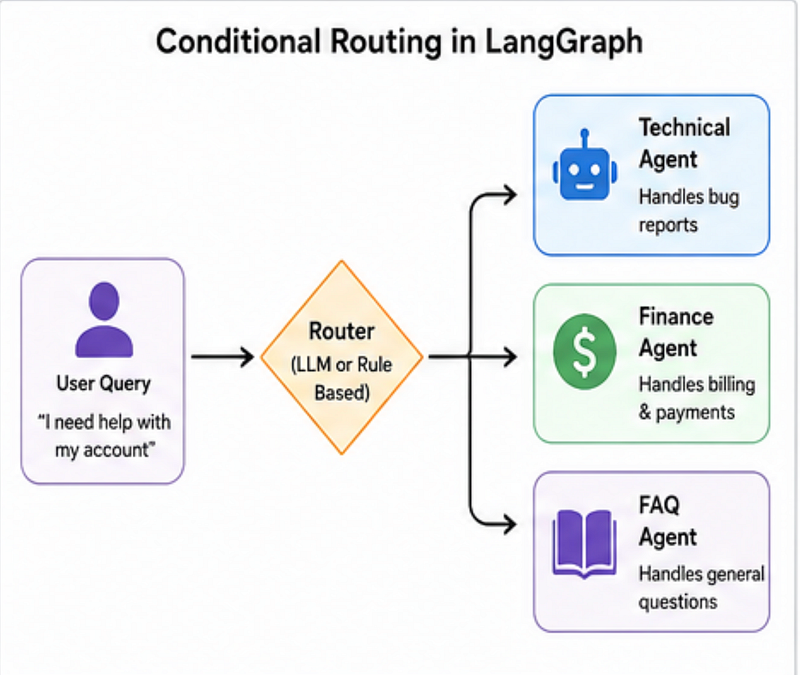
3. Conditional Graphs
This is where LangGraph starts feeling smart.
Instead of fixed execution, workflows become dynamic.
Example:
def router(state):
 if state["query_type"] == "technical":
 return "coding_agent"
 return "general_agent"
Now your AI can:
- Route queries intelligently
- Trigger fallback systems
- Decide when to call tools
Real-world example
A support chatbot can automatically decide:
- Billing question → finance workflow
- Bug report → engineering workflow
- FAQ → knowledge base
Stage 2: Make Your AI Workflow Smarter
Now things become interesting.
4. Looping Graphs
Real AI systems rarely solve problems in one shot.
Sometimes they need retries.
Sometimes reflection.
Sometimes self-correction.
Example logic:
while confidence < 80:
 improve_answer()
In LangGraph, loops help with:
- Reflection agents
- Retry systems
- Multi-step reasoning
- Planning workflows
Mistake to avoid
Bad exit conditions can create infinite loops.
Always define stopping rules.
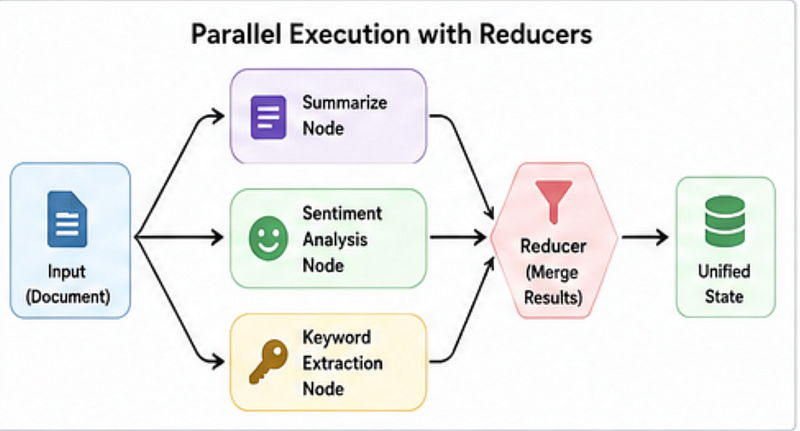
5. Parallel Graphs + Reducers
Want faster systems?
Run multiple tasks simultaneously.
Example:
Instead of one LLM call:
summary = summarize(doc)
sentiment = analyze(doc)
keywords = extract(doc)
You can run them together.
Benefits:
✅ Faster responses
✅ Better scalability
✅ Lower workflow latency
But there’s a catch.
When multiple nodes update state together, conflicts happen.
That’s where reducers come in.
Reducers safely merge outputs.
Think of them as traffic controllers for shared state.
Surprising insight
This is one of the most underrated LangGraph skills.
Many production bugs come from poor state merging — not bad prompts.
Stage 3: Add Intelligence to Your Workflow
6. LLM in Graph
Now you introduce intelligence.
Instead of hardcoded logic:
llm.invoke(prompt)You place LLMs inside graph nodes.
Example:
def generate_answer(state):
 response = llm.invoke(state["question"])
 return {"answer": response}
Learn:
- Prompt handling
- Structured outputs
- Response parsing
- Context management
Practical tip
Don’t blindly trust model outputs.
Always validate responses before moving to the next node.
7. LLM + Conditional Routing
This unlocks AI-driven decisions.
Example:
The LLM detects intent and routes execution.
if intent == "refund":
 return "finance_agent"
This enables:
- Smart classification
- Dynamic workflows
- Specialized agents
At this point, your app starts feeling agentic.
Stage 4: Build Real AI Products
Now you’re entering production territory.
8. Multi-Turn Chatbots
AI without memory feels broken.
Users expect context.
LangGraph helps manage:
- Chat history
- Session memory
- Conversation state
Perfect for:
- AI assistants
- Educational bots
- Customer support
9. Streaming Responses
Nobody likes waiting 10 seconds for text.
Streaming improves perceived speed dramatically.
Instead of:
Wait → entire answer
Users see:
Typing → live response
This small UX improvement massively increases engagement.
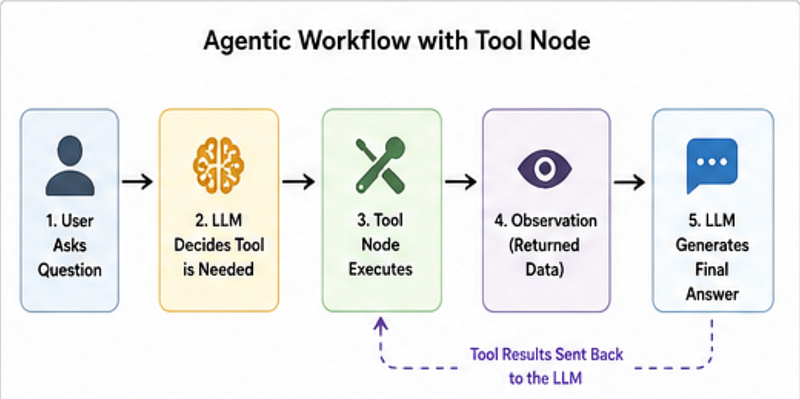
10. Tool Nodes + Agentic Workflows
This is where things become powerful.
Your AI stops being “just a chatbot.”
Now it can:
- Search APIs
- Query databases
- Use calculators
- Read files
Example flow:
- User asks a question
- LLM decides a tool is needed
- Tool executes
- AI returns smarter output
This is the foundation of real AI agents.
Advanced Topics That Make You Production Ready
Once comfortable, learn:
Persistence & Checkpoints
Recover interrupted workflows.
Human-in-the-Loop
Pause AI for approvals.
Subgraphs
Build reusable modular systems.
Send API
Control dynamic execution.
Multi-Agent Systems
Specialized agents collaborating together.
Agentic RAG
Combine retrieval with intelligent reasoning for enterprise-grade AI systems.
The Unexpected Truth About Learning LangGraph
Here’s the surprising part:
You do NOT need all 18 concepts to start building useful AI products.
Most real-world projects only need:
- Sequential workflows
- Conditional routing
- Tool calling
- Memory
- Basic persistence
That alone gets you surprisingly far.
The advanced concepts matter when complexity grows, not on day one.
And that’s where many developers go wrong.
They try to learn everything before building anything.
Instead:
Build → struggle → learn the missing concept → repeat.
That feedback loop is where real learning happens.
Final Thoughts
LangGraph is not just another AI framework.
It teaches you how to think in stateful, intelligent workflows.
If you learn these concepts in the right order, you’ll be able to build:
- AI agents
- Multi-agent systems
- Conversational assistants
- Autonomous workflows
- Enterprise AI applications
Your practical roadmap:
- Start with graphs
- Learn routing and loops
- Add LLMs and tools
- Build chat systems
- Move into production features
And one question before you go:
Which LangGraph topic feels the most confusing right now — routing, memory, tools, or multi-agent systems?