Build your Own AI Resume Analyser Chrome Extension — Part I
Build a Practical Resume Scanner Step-by-Step (Hands-on Guide + Code + Testing)

Most tutorials stop at explaining concepts. This one goes further — you’ll build, run, and test a working Chrome extension.
In this guide, we’re creating a Resume Analyser Chrome Extension that scans a webpage, extracts resume content, and evaluates it instantly.
👉 Important: In this part, we’re using rule-based logic (no AI yet)
👉 In Part II, we’ll integrate AI and make it smarter
What You’ll Build
By the end of this article, you’ll have:
- A working Chrome extension
- Resume extraction from any webpage
- Basic ATS-style analysis
- A scoring system with suggestions
- Ability to run and test it locally in Chrome
Step 1: Project Setup (manifest.json)
Every Chrome extension begins with a configuration file.
{
 "manifest_version": 3,
 "name": "Resume Analyzer Extension",
 "version": "0.1.0",
 "description": "Starter Chrome extension scaffold for resume analysis.",
 "action": {
 "default_popup": "popup.html"
 },
 "permissions": ["activeTab", "scripting"],
 "host_permissions": ["<all_urls>"],
 "content_scripts": [
 {
 "matches": ["<all_urls>"],
 "js": ["content.js"],
 "css": ["styles.css"],
 "run_at": "document_idle"
 }
 ],
 "icons": {
 "16": "assets/icon48.png",
 "48": "assets/icon48.png",
 "128": "assets/icon48.png"
 }
}
Key Concepts:
- Popup UI → Opens when user clicks extension
- Permissions → Allows access to the current tab
- Content Scripts → Extract webpage content
- Run timing → Executes after page loads
Step 2: Extract Resume Data (content.js)
This script runs inside webpages and extracts text.
chrome.runtime.onMessage.addListener((message, _sender, sendResponse) => {
 if (message?.type === "PING") {
 sendResponse({
 ok: true,
 title: document.title,
 url: location.href
 });
 return true;
 }

 if (message?.type === "EXTRACT_RESUME_TEXT") {
 const title = document.title;
 const url = location.href;

 const candidate = document.querySelector("main, article, [role='main']") || document.body;
 const text = (candidate?.innerText || "")
 .replace(/\r\n/g, "\n")
 .replace(/\n{3,}/g, "\n\n")
 .trim();

 const lines = text.split("\n").map((l) => l.trim()).filter(Boolean);
 const bulletLines = lines.filter((l) => /^(\*|-|•|\u2022)\s+/.test(l)).length;
 const wordCount = text ? text.split(/\s+/).filter(Boolean).length : 0;

 sendResponse({
 ok: true,
 title,
 url,
 text,
 stats: {
 wordCount,
 lineCount: lines.length,
 bulletLines
 }
 });
 return true;
 }
});
This is how we read resume content directly from a webpage.
Step 3: Build the UI (popup.html)
<!doctype html>
<html lang="en">
 <head>
 <meta charset="UTF-8" />
 <meta name="viewport" content="width=device-width, initial-scale=1.0" />
 <title>Resume Analyzer</title>
 <link rel="stylesheet" href="styles.css" />
 </head>
 <body class="popup">
 <main class="popup__container">
 <h1 class="popup__title">Resume Analyzer</h1>
 <p class="popup__subtitle">Scan this page for a resume (local-only).</p>

 <label class="label" for="jobDesc">Job description (optional)</label>
 <textarea
 id="jobDesc"
 class="textarea"
 rows="5"
 placeholder="Paste the job description to check keyword match…"
 ></textarea>

 <details class="details">
 <summary class="details__summary">Optional: paste resume text (overrides webpage scan)</summary>
 <textarea
 id="resumeText"
 class="textarea"
 rows="6"
 placeholder="Paste resume text here if the webpage scan isn’t accurate…"
 ></textarea>
 </details>

 <button id="analyzeBtn" class="button" type="button">Analyze current page</button>
 <pre id="output" class="output output--hidden" aria-live="polite"></pre>
 </main>

 <script src="popup.js"></script>
 </body>
</html>
Step 4: Resume Analysis Logic (popup.js)
We analyse resumes using simple but effective rules.
- Basic Setup
const analyzeBtn = document.getElementById("analyzeBtn");
const output = document.getElementById("output");
const jobDescEl = document.getElementById("jobDesc");
const resumeTextEl = document.getElementById("resumeText");

function setOutput(text) {
 if (!output) return;
 const normalized = (text ?? "").toString();
 const hasContent = normalized.trim().length > 0;
 output.classList.toggle("output--hidden", !hasContent);
 output.textContent = normalized;
}

function isRestrictedUrl(url) {
 if (!url) return true;
 return (
 url.startsWith("chrome://") ||
 url.startsWith("chrome-extension://") ||
 url.startsWith("edge://") ||
 url.startsWith("about:") ||
 url.startsWith("view-source:") ||
 url.startsWith("devtools://") ||
 url.startsWith("https://chrome.google.com/webstore")
 );
}

function normalizeText(s) {
 return (s ?? "")
 .replace(/\r\n/g, "\n")
 .replace(/[ \t]+\n/g, "\n")
 .replace(/\n{3,}/g, "\n\n")
 .trim();
}

function hasSection(text, sectionRegex) {
 return sectionRegex.test(text);
}

function extractKeywords(text) {
 const stop = new Set([
 "a",
 "an",
 "and",
 "are",
 "as",
 "at",
 "be",
 "by",
 "for",
 "from",
 "has",
 "have",
 "in",
 "is",
 "it",
 "of",
 "on",
 "or",
 "that",
 "the",
 "to",
 "with",
 "you",
 "your"
 ]);

 const tokens = (text || "")
 .toLowerCase()
 .replace(/[^a-z0-9+\-#.\s]/g, " ")
 .split(/\s+/)
 .map((t) => t.trim())
 .filter(Boolean)
 .filter((t) => t.length >= 3 && t.length <= 32)
 .filter((t) => !stop.has(t));

 // de-dupe while keeping some frequency signal
 const freq = new Map();
 for (const t of tokens) freq.set(t, (freq.get(t) ?? 0) + 1);

 return { tokens, freq };
}
2. Resume analysis function
function analyzeResume(resumeTextRaw, jobDescRaw) {
 const resumeText = normalizeText(resumeTextRaw);
 const jobDesc = normalizeText(jobDescRaw);

 const lower = resumeText.toLowerCase();
 const lines = resumeText.split("\n").map((l) => l.trim()).filter(Boolean);
 const wordCount = resumeText ? resumeText.split(/\s+/).filter(Boolean).length : 0;
 const bulletLines = lines.filter((l) => /^(\*|-|•|\u2022)\s+/.test(l)).length;

 const emailLike = /\b[A-Z0-9._%+-]+@[A-Z0-9.-]+\.[A-Z]{2,}\b/i.test(resumeText);
 const phoneLike =
 /(\+\d{1,3}[-.\s]?)?(\(?\d{3}\)?[-.\s]?)\d{3}[-.\s]?\d{4}\b/.test(resumeText) ||
 /\b\d{10}\b/.test(resumeText.replace(/\D/g, ""));

 const dateLike =
 /\b(19|20)\d{2}\b/.test(resumeText) ||
 /\b(jan|feb|mar|apr|may|jun|jul|aug|sep|sept|oct|nov|dec)\b/i.test(resumeText) ||
 /\b(present|current)\b/i.test(resumeText);

 const metricLike =
 /\b\d+(\.\d+)?\s?(%|k|m|b)\b/i.test(resumeText) ||
 /\$\s?\d+/.test(resumeText) ||
 /\b\d{2,}\b/.test(resumeText);

 const sections = {
 education: /(education|academic|university|college|degree|b\.?tech|m\.?tech|bachelor|master|phd)\b/i,
 experience: /(experience|employment|work history|professional experience|internship|intern)\b/i,
 skills: /(skills|technical skills|technologies|tooling|stack)\b/i,
 projects: /(projects|project experience|personal projects|selected projects)\b/i
 };

 const presentSections = Object.fromEntries(
 Object.entries(sections).map(([k, rx]) => [k, hasSection(resumeText, rx)])
 );
 const missingSections = Object.entries(presentSections)
 .filter(([, v]) => !v)
 .map(([k]) => k);

 const sectionHitCount = Object.values(presentSections).filter(Boolean).length;

 // Rough “is this a resume?” heuristic (not perfect, but practical).
 const resumeSignals =
 (emailLike ? 1 : 0) +
 (phoneLike ? 1 : 0) +
 (dateLike ? 1 : 0) +
 (bulletLines >= 3 ? 1 : 0) +
 (sectionHitCount >= 2 ? 1 : 0);

 const looksLikeResume = resumeSignals >= 3 && wordCount >= 120;

 // Keyword match vs JD
 let keywordMatchPct = null;
 let matchedTop = [];
 if (jobDesc) {
 const jd = extractKeywords(jobDesc);
 const resume = extractKeywords(resumeText);

 // take top 25 JD keywords by frequency
 const jdTop = [...jd.freq.entries()]
 .sort((a, b) => b[1] - a[1])
 .slice(0, 25)
 .map(([t]) => t);

 const resumeSet = new Set(resume.freq.keys());
 const matched = jdTop.filter((t) => resumeSet.has(t));
 keywordMatchPct = jdTop.length ? Math.round((matched.length / jdTop.length) * 100) : 0;
 matchedTop = matched.slice(0, 12);
 }

 // Formatting issues
 const issues = [];
 if (wordCount > 1100) issues.push("Too long (consider 1–2 pages / fewer words).");
 if (bulletLines < 3) issues.push("Few/no bullet points (harder for ATS + skimming).");
 if (!dateLike) issues.push("No clear dates found (roles/education timeline unclear).");
 if (!metricLike) issues.push("No quantified impact found (add numbers/percentages).");
 if (!emailLike) issues.push("No email detected.");
 if (!phoneLike) issues.push("No phone number detected.");

 // Rewrite suggestions (simple, rule-based)
 const suggestions = [];
 if (bulletLines < 6) suggestions.push("Convert responsibilities into 6–12 achievement bullets with action verbs.");
 if (!metricLike) suggestions.push("Add measurable outcomes: %, $, time saved, scale, latency, cost, users.");
 if (jobDesc && (keywordMatchPct ?? 0) < 45)
 suggestions.push("Mirror key job keywords naturally in Skills + Experience bullets (no keyword stuffing).");
 if (missingSections.length) suggestions.push(`Add/label missing sections: ${missingSections.join(", ")}.`);

 // ATS score (0–100) from weighted heuristics
 let score = 0;
 score += Math.min(25, sectionHitCount * 7);
 score += emailLike ? 8 : 0;
 score += phoneLike ? 7 : 0;
 score += dateLike ? 12 : 0;
 score += Math.min(16, bulletLines * 2);
 score += metricLike ? 12 : 0;
 if (jobDesc && keywordMatchPct != null) score += Math.min(20, Math.round(keywordMatchPct * 0.2));

 // penalties
 if (wordCount < 120) score -= 15;
 if (wordCount > 1400) score -= 10;
 if (sectionHitCount === 0) score -= 25;

 score = Math.max(0, Math.min(100, Math.round(score)));

 return {
 looksLikeResume,
 score,
 missingSections,
 keywordMatchPct,
 matchedTop,
 issues,
 suggestions,
 stats: { wordCount, bulletLines, sectionHitCount, resumeSignals }
 };
}
Step 5: Trigger Analysis (popup.js)
Runs when analysis button is clicked
analyzeBtn?.addEventListener("click", async () => {
 try {
 const [tab] = await chrome.tabs.query({ active: true, currentWindow: true });
 if (!tab?.id) {
 setOutput("No active tab found.");
 return;
 }

 if (isRestrictedUrl(tab.url)) {
 setOutput(
 "This page doesn't allow content scripts.\n\nOpen a normal http(s) webpage (not chrome://, extensions, or the Web Store) and try again."
 );
 return;
 }

 setOutput("Scanning page…");

 const jobDesc = jobDescEl?.value ?? "";
 const overrideResume = resumeTextEl?.value ?? "";

 const extracted = await chrome.tabs.sendMessage(tab.id, { type: "EXTRACT_RESUME_TEXT" });
 if (!extracted?.ok) {
 setOutput("Couldn't extract text from this page.");
 return;
 }

 const resumeText = normalizeText(overrideResume) || extracted.text || "";
 if (!resumeText) {
 setOutput("No text found to analyze.");
 return;
 }

 const result = analyzeResume(resumeText, jobDesc);

 if (!result.looksLikeResume && !normalizeText(overrideResume)) {
 setOutput(
 [
 "This page does not look like a resume.",
 "",
 `Page title: ${extracted.title}`,
 `URL: ${extracted.url}`,
 "",
 "Tip: If this IS a resume but the page is hard to parse, use the “paste resume text” option in the popup."
 ].join("\n")
 );
 return;
 }

 const lines = [];
 lines.push(`ATS Score: ${result.score}/100`);
 lines.push(`Missing sections: ${result.missingSections.length ? result.missingSections.join(", ") : "none"}`);
 lines.push(
 `Keyword match (vs JD): ${
 result.keywordMatchPct == null ? "n/a (no JD provided)" : `${result.keywordMatchPct}%`
 }`
 );
 if (result.matchedTop?.length) lines.push(`Top matched keywords: ${result.matchedTop.join(", ")}`);
 lines.push("");
 lines.push("Formatting issues:");
 lines.push(result.issues.length ? result.issues.map((i) => `- ${i}`).join("\n") : "- none detected");
 lines.push("");
 lines.push("Rewrite suggestions:");
 lines.push(result.suggestions.length ? result.suggestions.map((s) => `- ${s}`).join("\n") : "- none");
 lines.push("");
 lines.push(
 `Stats: ${result.stats.wordCount} words, ${result.stats.bulletLines} bullets, ${result.stats.sectionHitCount} sections`
 );

 setOutput(lines.join("\n"));
 } catch (err) {
 setOutput(
 `Error: ${err?.message ?? String(err)}\n\nIf you just edited files, go to chrome://extensions and click Reload on the extension.`
 );
 }
});
Step 6: How to Test Your Chrome Extension (Very Important)
Now that your code is ready, let’s actually run it inside Chrome.
Step 1: Prepare Your Project Folder
Make sure your folder structure looks like this:
resume-analyzer/
│
├── manifest.json
├── content.js
├── popup.html
├── popup.js
├── styles.css
└── assets/
 └── icon48.png (optional for now)
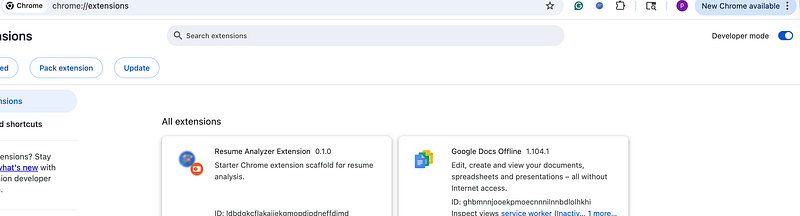
Step 2: Open Chrome Extensions Page
- Open Chrome
- Go to url:
chrome://extensions/
3. At the top of the page: Enable Developer Mode
👉 This allows you to load custom extensions.
Step 3: Load Your Extension
- Click “Load unpacked”
- Select your project folder (
resume-analyzer) - Click Open
👉 Your extension will now appear in Chrome!
Step 5: Pin the Extension
- Click the Extensions icon (top-right puzzle icon)
- Pin your Resume Analyser Extension
This makes it easy to access.
Step 6: Test on a Webpage
- Open any webpage that contains resume-like content
2. Click your extension icon
3. Click “Analyse current page”
Step 7: View Results
You’ll see output like:
ATS Score: 72
Missing Sections: projects
Word Count: 450
Bullet Points: 5
⚠️ Important Notes While Testing
- Some pages (like
chrome://or Chrome Web Store) won’t work - If extraction fails:
👉 Use the “Paste Resume” option in the popup - If you update code:
👉 Go back tochrome://extensions/and click Reload
Real-World Use Case
You’re applying for jobs:
- Open your resume online
- Paste job description
- Click Analyze
Within seconds, you get:
- ATS score
- Missing sections
- Improvement suggestions
👉 This mimics real ATS systems used by recruiters.
What We Built (Without AI)
So far, you have:
✅ Chrome extension setup
✅ Resume extraction from webpages
✅ Rule-based analysis engine
✅ ATS scoring system
✅ Local testing setup in Chrome
This is a fully working mini product already.
What’s Next (Part II)
Now we upgrade this into a real AI tool:
- Add backend server
- Integrate AI (resume insights + rewriting)
- Improve keyword matching
- Generate intelligent suggestions
- Prepare for Chrome Web Store publishing
Key Takeaways
- Chrome extensions can read and analyse live webpages
- Resume analysis doesn’t always need AI — rules can go far
- Testing locally using Developer Mode is essential
- A strong base makes AI integration easier
- You now have a working, testable extension