Part 9: AWS Lambda- A Fully Managed Service That Runs While You Sleep
How Lambda simplifies event-driven apps without you touching a single server
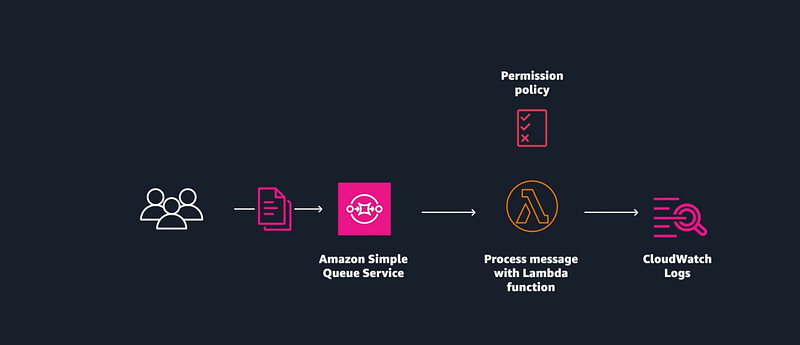
AWS Lambda is a fully managed service by AWS, which means…
- No more provisioning servers.
- No more scaling drama.
- No more worrying about availability at 2 A.M.
Just write your function, hook it to an event, and let AWS do the heavy lifting.
Yes, you do need to test it😂
Let’s break it down, the Neha way 👇
What Exactly Is AWS Lambda?
Imagine building an app where users upload flower photos (yes, flower 🌺), and your backend needs to classify those images and send them care tips.
You could do it the hard way:
- Set up and manage servers
- Monitor uptime
- Scale on traffic spikes
- Handle OS patches and updates
But will you? If you have Lambda functions
Just write your flower classification logic, drop it into a Lambda function, and connect it to a trigger — say, when someone uploads an image.
Lambda = Function as a Service (FaaS)
Your code executes only when needed, and you’re charged only for the time it runs. No idle servers, no guesswork. Just clean event-driven computing.
How It Works (In Simple Words)
Here’s the core workflow of AWS Lambda:
- Write your function (Python, Node.js, Java, etc.)
- Attach a trigger — for example:
- A photo upload to S3
- A new entry in a database
- A message in an SQS queue
3. Lambda runs your function and scales automatically
4. You pay per execution time, billed in milliseconds
Real-World Use Cases (with flowers!)
Let’s say you’re building a Plant Care App. Here’s how Lambda can power it:
🌼 Photo Classification
When a user uploads a flower image, Lambda triggers a classification model and stores the result in DynamoDB.
🪴 Care Tip Delivery
Lambda sends care tips via email or in-app notification based on the flower species detected.
🌻 Weekly Digest
Every Sunday, a Lambda function aggregates the user’s activity and sends a personalised plant-care summary.
All this happens without you provisioning a single server.
Amazing right??

Try This in Your Sandbox
💡 Want to test it hands-on?
Start by building a simple SQS + Lambda workflow:
- Create a queue in Amazon SQS
- Write a Lambda function that processes incoming messages
- Attach the trigger
- Send a test message and check the logs
🎯 Boom — you’ve just built an event-driven microservice without worrying about scale, servers, or scheduling.
Let’s compare things real quick:
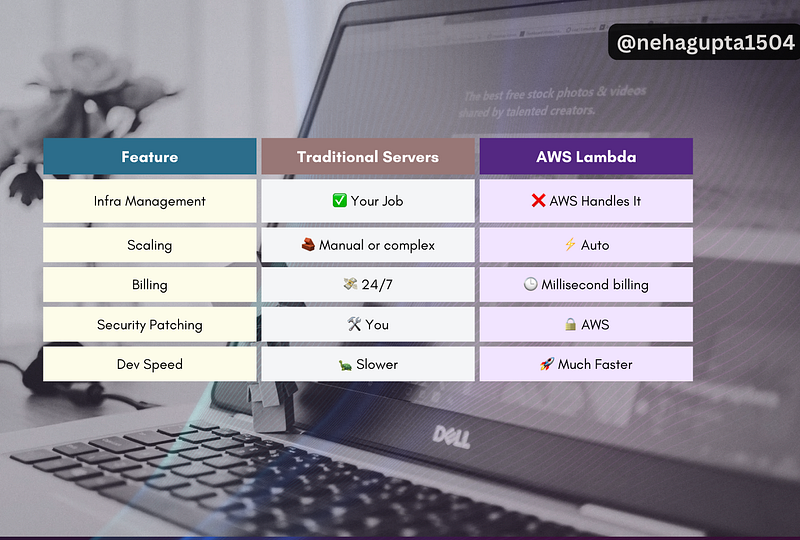
What’s Still On You?
Even though AWS handles the infrastructure, you’re still responsible for:
- Writing secure code
- Configuring IAM roles and permissions
- Validating inputs (because bugs don’t magically disappear)
- Monitoring logs and errors via CloudWatch
But honestly? That’s a tiny tradeoff for how much friction Lambda removes.
Let me know, Am I right, Or Am I right ?😂
Small Things to Know
- Max execution time is 15 minutes
- Cold starts (minor delay when a function is called after inactivity) — solvable with provisioned concurrency
- Not ideal for stateful, long-running workloads
Quiz Time — Just for Fun
Q. You’ve built a flower-processing app that resizes and classifies images as soon as they’re uploaded. Which of the following are core components needed to make this work with AWS Lambda? (Choose exactly 3)
A. Lambda Function
B. AWS Glue
C. Trigger (e.g., S3 upload)
D. Runtime (e.g., Python or Node.js)
E. VPC
F. Amazon EC2 instance
Don’t forget to comment your answer below 👇 Let’s test your knowledge.
At Dev Simplified, We Value Your Feedback 📊
👉 Follow us to not miss any updates.
👉 Have any suggestions? Let us know in the comments!