Part 8: Serverless Computing in AWS
Why Developers Are Ditching Servers — A Deep Dive Into Serverless Computing (EC2, ECS, EKS, AWS Lambda)
If we have to manage the servers, how much time and resources will it take only to do that?
You’re not alone. The modern developer’s dilemma isn’t
“how to deploy faster”
— it’s
“how to stop wasting time on infrastructure.”
Enter: Serverless Computing — where AWS takes care of all the “heavy lifting,” and you get to focus on what actually matters — your code and features.
But First… What Is Serverless (Really)?
No, it’s not that there are no servers. Servers still exist. I initally took it taht way 😂
You no longer have to manage them.
With serverless computing, you:
✅ Don’t provision servers
✅ Don’t patch OS or monitor uptime
✅ Don’t worry about scaling
You only write your business logic, and AWS handles the rest.
Sorted Infra, Sorted Life
Understanding the Levels of AWS Compute Control
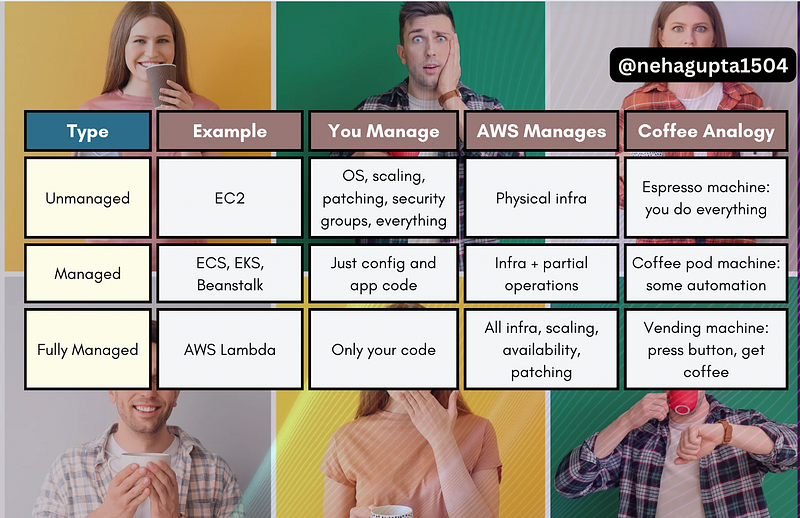
Let’s quickly decode the three types of AWS compute models, using everyone’s favourite metaphor — coffee ☕:
Why Serverless Is a Game-Changer
Let’s say you’re building a backend service for a food delivery app:
- (Unmanaged) With EC2, you’d manually configure scaling policies.
- (Managed) With ECS, AWS would help manage containers, but you still handle deployment.
- (Fully Managed) With Lambda, AWS spins up compute power only when the function is invoked, and auto-scales it as needed.
That’s power. That’s savings. That’s fewer headache.
Let’s Break Down the Key AWS Compute Services
1️⃣ AWS Lambda: Your Code, Only When Needed
- Upload your function.
- AWS runs it only when triggered (like an HTTP request, file upload, event).
- Zero infrastructure setup.
- Auto-scales on demand (no cold sweats at 3 a.m. when traffic spikes).
✅ Great for:
- Microservices
- Event-driven apps
- Real-time notifications
2️⃣ Amazon ECS (Elastic Container Service)
- Container orchestration without managing Kubernetes
- You define your containers; AWS manages running them
- Choose Fargate to make it serverless (no EC2 management at all)
✅ Great for:
- Teams already using Docker
- Lift-and-shift apps moving into containers
- Devs who want control over containers but not infrastructure
3️⃣ Amazon EKS (Elastic Kubernetes Service)
- Want Kubernetes? Let AWS manage the painful parts.
- You still define pods, deployments, services — but AWS handles infra.
- Built-in integrations with CloudWatch, IAM, etc.
✅ Great for:
- Teams already invested in K8s
- Complex apps needing advanced orchestration
- Hybrid/multi-cloud deployments
4️⃣ AWS Elastic Beanstalk
- Upload code → AWS handles deployment
- Auto-scaling, monitoring, load balancing included
- Works with Java, .NET, PHP, Node.js, Python, Go, Ruby
✅ Great for:
- Fast deployment of full-stack apps
- Teams that want zero infra ops
- Beginners migrating from Heroku-like platforms
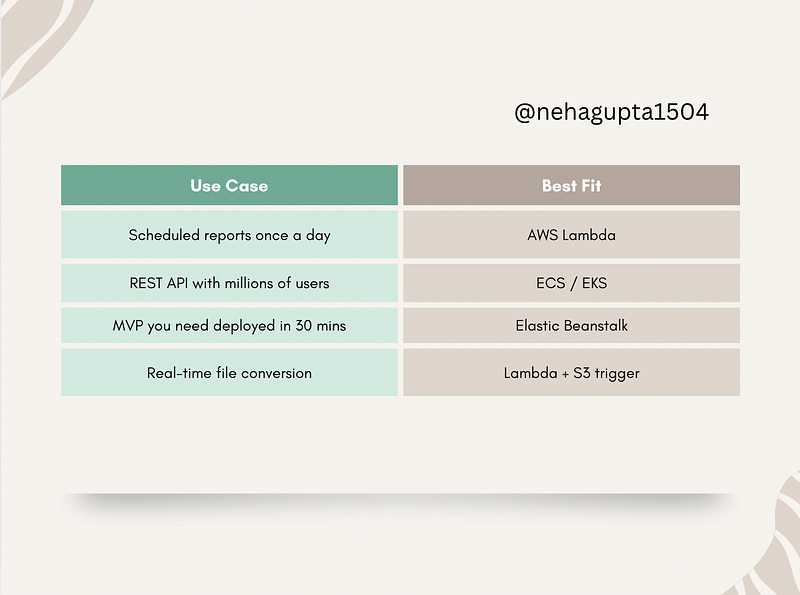
Choosing the Right Compute Option: Real Scenario
What About Security?
Let’s revisit the Shared Responsibility Model for Serverless:
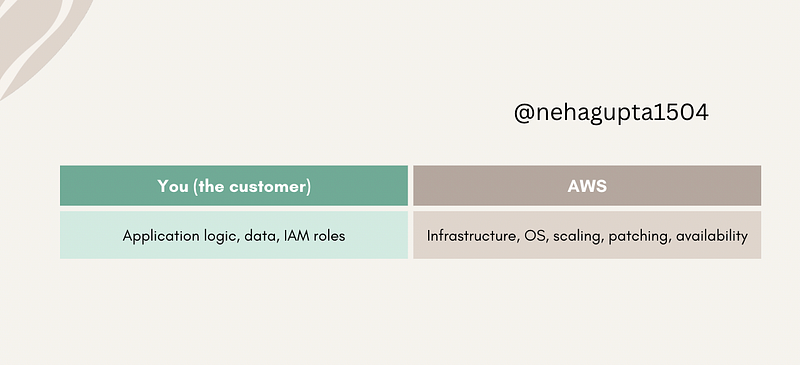
- You don’t worry about OS vulnerabilities or provisioning errors.
- You just write secure, well-tested functions.
TL;DR: Why Serverless = Freedom
✅ No more server provisioning
✅ Pay only for what you use
✅ Built-in high availability
✅ Focus on your product, not patching boxes
Serverless isn’t “just another buzzword.”
It’s the new standard for shipping faster, scaling smoother, and sleeping better and again it doesn’t mean without servers 😂
UpComing Next
Part 9: A detailed overview of AWS Lambda
What About You?
What’s the first thing you’d build using AWS Lambda?
- API?
- File handler?
- Notification system?
Drop it in the comments 👇 Let’s inspire each other.
At Dev Simplified, We Value Your Feedback 📊
👉 Follow us to not miss any updates.
👉 Have any suggestions? Let us know in the comments!