Part 15: Global Networking in AWS:Route 53, CloudFront, Global Accelerator
Day 15 of AWS Cloud Essentials from Beginners to Advanced Level
Introduction to Route 53, CloudFront, Global Accelerator
When you’re deploying your app to the cloud, you’re often focused on code, containers, or maybe a Lambda function or two.
But here’s a reality check: even the most elegant backend won’t matter if users around the globe can’t access it quickly and securely.
So, how exactly does a user in Tokyo access an app you deployed in Oregon? And how do you make that interaction blazing fast and resilient, even at scale?
Let’s break down AWS’s global networking tools — Amazon Route 53, Amazon CloudFront, and AWS Global Accelerator — into something you can use and actually understand.
First Stop: How Do Users Find Your App?
Imagine you just launched your application. A user types in megaapp.io and enter.
What happens next?
That’s where DNS — the Domain Name System — comes in. It’s the internet’s phone book, turning human-friendly names into machine-friendly IP addresses.
Meet Route 53: AWS’s DNS-as-a-Service
Amazon Route 53 is a scalable and highly available DNS web service. When a user hits your domain, Route 53 tells their browser where your app lives by mapping the domain to the right IP address.
But Route 53 does more than basic DNS. It supports smart traffic routing using:
- Latency-based routing: Route to the Region with the lowest latency for the user.
- Geolocation routing: Route based on the user’s physical location.
- Geoproximity routing: Weighted routing based on geography + custom bias.
- Weighted routing: Split traffic for testing or gradual rollouts.
💡 Use Case: Route 53 lets you direct European traffic to your Dublin region and North American traffic to Oregon — all automatically.
🔧 Bonus: Domain Registration
Don’t want to juggle registrars? Route 53 can register and manage all your domain names directly. One dashboard. No hassle.
Speed Matters: Introducing CloudFront
Your users won’t wait for that 5MB hero image to load from a distant server. That’s where Amazon CloudFront — AWS’s Content Delivery Network (CDN) — comes in.
What CloudFront Does
Think of CloudFront as AWS’s fleet of delivery trucks parked near every major city in the world. When a user in Mumbai wants your content, they don’t have to wait for it to load from the U.S. CloudFront caches it is cached locally at an edge location — reducing load times and boosting performance.
✅ Ideal for:
- Websites with static assets (HTML, JS, CSS, images)
- Video streaming platforms
- Global APIs or SPAs
How It Works with Route 53
Route 53 points the user to the nearest CloudFront edge location, and CloudFront serves the cached content. If it’s not cached, CloudFront fetches it from your origin (e.g., an S3 bucket or EC2 instance) and saves it for future requests.
Need Even More Speed? Use Global Accelerator
Let’s say your app isn’t just global — it’s business-critical, serving banks or gamers worldwide. Latency and downtime aren’t just annoying — they’re expensive.
Enter AWS Global Accelerator
This service routes traffic through AWS’s private backbone network rather than the congested public internet. Think of it as a VIP fast lane across continents.
- Improved performance: Especially useful for TCP-heavy applications like VoIP, gaming, or finance.
- Automatic failover: If a region or instance goes down, it reroutes traffic in real-time.
💡 Use Case: A real-time multiplayer gaming platform uses Global Accelerator to reduce ping times and ensure smooth gameplay across Regions.
Connecting Your Office to AWS Securely
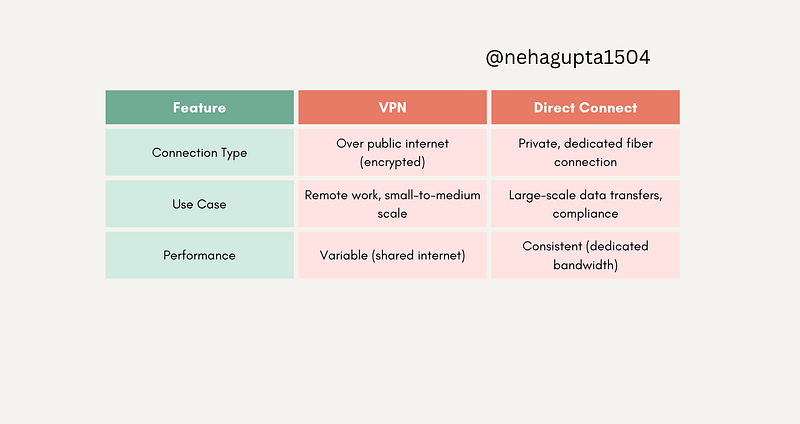
You may need a private link between your on-premises data centre and AWS — especially when moving sensitive or high-volume data.
Here’s how you do it:
VPN vs. Direct Connect
Real-World Example: Global SaaS Platform
Scenario: You’re launching an application with users in North America, Europe, and Asia.
Your Stack:
- Use Route 53 with latency-based routing to direct users to the closest region.
- CloudFront caches static content at edge locations near users.
- Global Accelerator routes API traffic on the fastest AWS-managed path.
- Direct Connect links your company HQ to AWS with high-speed private lines.
✅ Result: Fast, secure, reliable access no matter where your users live.
Q: An international sales team needs fast, cost-effective access to media-rich training videos. Which service should they use?
A. Amazon VPC
B. Amazon Route 53
C. Amazon CloudFront
D. AWS Global Accelerator
Comment your answer as A, B, C, D in the chat. Let’s see how much you have learned.
Final Thoughts
If you’re deploying globally, AWS gives you all the tools to make sure your application is found fast, served fast, and securely connected. Whether it’s DNS with Route 53, content delivery with CloudFront, or low-latency routing via Global Accelerator — you’re covered.
Now that you know what’s under the hood, the next time a user types your domain and your app loads instantly, you’ll know it wasn’t magic.
It might be AWS edge networking.
If this blog helped you, let me know in the comments…
Your words might seem small, but they’re the reason I keep writing more🤗
At Dev Simplified, We Value Your Feedback 📊
👉 Follow us to not miss any updates.
👉 Have any suggestions? Let us know in the comments!