Part 14: Mastering AWS VPC Security: The Real Difference Between Subnets, Security Groups, and Network ACLs
Day 14 of AWS Cloud Essentials from Beginners to Advanced Level
Ever deployed your backend, only to realise that traffic isn’t reaching your EC2 instance?
Or worse — people are accessing your private DB instance from the internet?
If you’ve been confused between Security Groups, Network ACLs, Subnets, and Internet Gateways, you’re not alone. These are foundational to building secure, scalable cloud apps on AWS — but they’re also easy to get wrong.
In this article, I’ll break it all down like we’re building the infra together — no jargon, just developer-friendly explanations, real-world analogies, code examples, and some pro insights & tips along the way.
The Problem: Traffic Rules Gone Wrong
When you launch an EC2 instance inside a VPC, it’s like placing a server inside a secure building. But unless you explicitly define who can enter, it might be:
- Too open (hello, security risks 😱 as anybody can come in), or
- Too closed (no incoming traffic… great… except you need your users to access the app).
That’s where Security Groups and Network ACLs (NACLs) come in.
But what’s the difference? And why do you need both?
What is a VPC, Subnet, and Why Should You Care?
VPC
A Virtual Private Cloud (VPC) is your own private section of AWS’s global network. Think of it as a virtual datacenter — your isolated zone where you place your infrastructure (EC2s, DBs, Load Balancers, etc.).
Subnets
You divide your VPC into subnets — smaller chunks of IP ranges.
- Public Subnet: Resources (like your app server) that need internet access.
- Private Subnet: Resources (like databases) that must stay internal.
Each subnet can be assigned to different Availability Zones for high availability.
Real World Example:
VPC CIDR: 10.0.0.0/16
Public Subnet 1: 10.0.1.0/24 (us-east-1a)
Private Subnet 1: 10.0.2.0/24 (us-east-1a)
Network Security in AWS: NACLs vs Security Groups
Now that we’ve created segments(subnets) inside our cloud (VPC), let’s control who can go in and out.
1. Network ACL (NACL): The Passport Control Officer
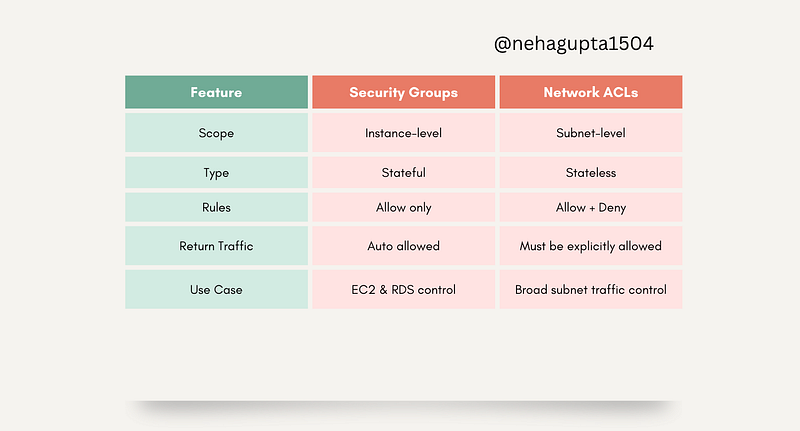
Scope: Subnet-level
Type: Stateless
Controls: Inbound + outbound traffic
Default Behaviour:
- Default NACL: Allow everything
- Custom NACL: Deny everything (until rules are added)
NACLs are like passport control. Every person (packet) entering or exiting the subnet is checked. And just because you were let in doesn’t mean you’ll be allowed out.
📌 Key Traits:
- Stateless: Doesn’t remember previous requests
- Has both Allow and Deny rules
- Applied to all traffic entering or leaving a subnet
✅ Example NACL Rule (Inbound):bash
Rule #100: Allow TCP from 0.0.0.0/0 on port 80
Rule #200: Deny all
2. Security Group (SG): The Doorman at Your Server
Scope: Instance-level
Type: Stateful
Controls: Inbound rules only (outbound is open by default)
Default Behaviour:
- Inbound: Deny all
- Outbound: Allow all
Think of SGs as the doormen at each EC2 instance. Only guests on the list get in. But once you’ve invited someone in, they’re always allowed to leave and come back.
📌 Key Traits:
- Stateful: Remembers request/response
- Only Allow rules (no deny)
- Automatically allows return traffic
✅ Example SG Rule:
Inbound:
Allow TCP from 0.0.0.0/0 on port 443 (HTTPS)
Quick Quiz #1:
Which AWS component performs stateless packet filtering? Remember, No Peaking🫣
- Security Group
- EC2 Instance
- Network ACL
- Internet Gateway
💬 Drop your answer in the comments!
How It Works: Packet Journey from EC2 to EC2
Let’s say Instance A (in Subnet A) sends a request to Instance B (in Subnet B):
Outbound Journey:
- Security Group A: Allows all outbound — ✅ Passed
- NACL A (Outbound Rule): Must allow — ✅ Passed
- NACL B (Inbound Rule): Must allow — ✅ Passed
- Security Group B: Must allow specific port/IP — ✅ Passed
Return Journey (Response from B → A):
- Security Group B: Remembers previous request — ✅ Passed
- NACL B (Outbound Rule): Must allow — ✅ Checked again
- NACL A (Inbound Rule): Must allow — ✅ Checked again
- Security Group A: Since it’s response traffic — ✅ Auto-allowed
🔄 Security groups don’t re-check return traffic. NACLs do.
💡 Real-World Scenario: Setting Up a Public Web App
You want to host a website on EC2 (frontend) and connect it to an RDS database (backend).
- EC2 in Public Subnet
- Security Group: Allow HTTP/HTTPS from Internet
- RDS in Private Subnet
- Security Group: Allow MySQL port only from EC2’s SG
- Network ACLs:
- Public Subnet: Allow HTTP/S inbound & ephemeral outbound
- Private Subnet: Allow DB port from EC2 subnet
✅ Secure
✅ Scalable
✅ Works across AZs
Quick Quiz #2:
A customer needs fine-grained traffic control over each EC2 in a public subnet. What should they use?
- Change subnets to private
- Use Security Groups
- Use Network ACLs
- Just set strong passwords
Comment your answer ⬇️
Pro Tips for Mid-Level Devs
- Order matters in NACLs: Rules are evaluated top-down, so always leave room for future changes.
- Use security groups like firewalls: Group similar EC2s together using tags, then apply common SGs.
- Logging: Consider enabling VPC Flow Logs to see which rules are blocking or allowing traffic.
- CIDR Planning: When building large apps, pre-plan your CIDR ranges to avoid collisions later.
Summary: What to Use and When
Remember the Shared Responsibility Model
AWS provides the infrastructure, and you configure it securely. Whether it’s routing, packet filtering, or port access — Security Groups and NACLs are your job.
What’s Next?
In upcoming articles, we’ll show you:
- How to build this setup using Terraform
- Simulating attacks and testing your firewall rules
- Monitoring with VPC Flow Logs
Until then — go clean up those wide-open 0.0.0.0/0 rules 👀
If this blog helped you, let me know in the comments…
Your words might seem small, but they’re the reason I keep writing more🤗
At Dev Simplified, We Value Your Feedback 📊
👉 Follow us not to miss any updates.
👉 Have any suggestions? Let us know in the comments!